Loading
Form preview
  • US Legal Forms
  • Other Templates
  • Tax Forms
  • Washington Tax Forms
  • Wa Dor Combined Excise Tax Return 2018

Get Wa Dor Combined Excise Tax Return 2018

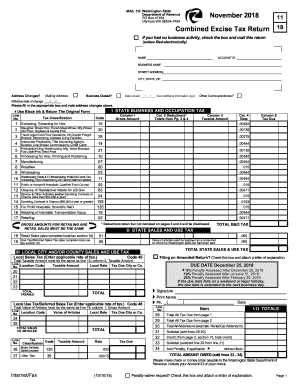
FOR RETAILING AND RETAIL SALES MUST BE THE SAME Line No. Column 3 Taxable Amount TOTAL Tax Code Classification Motor Vehicle 120 Sales/Leases 27 Litter Tax 36 Taxable Amount Rate .003 .00015 Tax Due Signature Print Name Ph. ( Line No. 28 29 30 31 32 33 34 ) Date Item VII TOTALS Total All Tax Due from page 1 Total All Tax Due from page 2 Total All Addendums (example: Rental Car Addendum) Subtotal (add lines 28-30) Credit (from page 2, section VI, total credit) Subtotal (s.

How it works

  1. Open form

    Open form follow the instructions

  2. Easily sign form

    Easily sign the form with your finger

  3. Share form

    Send filled & signed form or save

How to fill out the WA DoR Combined Excise Tax Return online

This guide provides clear instructions for users on how to accurately complete the Washington State Department of Revenue Combined Excise Tax Return online. Whether you are a new user or require a refresher, this comprehensive guide will support you through each step of the process.

Follow the steps to complete your excise tax return seamlessly.

  1. Press the ‘Get Form’ button to access the Combined Excise Tax Return form.
  2. Begin by filling in your name, account ID, and business name at the top of the form. Make sure these details are accurate to avoid processing delays.
  3. Provide your business address, including the street address, city, state, and ZIP code. If there have been any address changes, indicate these in the designated box.
  4. If your business was closed during the reporting period, check the corresponding box and enter the date it closed.
  5. Complete the first section regarding the State Business and Occupation Tax. This will require you to report your gross amounts and applicable deductions. Follow the provided tax classification codes to ensure accuracy.
  6. Move to the State Sales and Use Tax section. Report your retail sales, using the same rates as specified in the form for local taxes if applicable.
  7. In the local city and/or county sales and use tax section, ensure that the total taxable amount matches what you reported previously.
  8. If you have deductions, fill out pages 3 and 4, ensuring that all deductions align with the categories listed in the form.
  9. Review summary totals to confirm tax amounts owed, including any penalties that may apply if filing late.
  10. Once you have completed the form, save your changes. You may then download, print, or share the completed return as needed.

Complete your WA DoR Combined Excise Tax Return online today to ensure timely submission and compliance.

Get form

Experience a faster way to fill out and sign forms on the web. Access the most extensive library of templates available.

Related content

Excise tax returns and addendums
Combined Excise Tax. This return is used for reporting your business income, sales tax...
Learn more
Wash. Admin. Code § 458-20-22802 - Electronic...
My DOR is an internet-based application providing a secure and encrypted method for...
Learn more
Ooma, Inc.
In addition, on November 28, 2016, Ooma filed a complaint against the Oregon Department of...
Learn more

Related links form

UK AA1 (Formerly AA1A) 2017 AU IO1 – Personal Imports Option OR OLCC Ownership Interest Questionnaire 2019 NY Restaurant Revitalization Program: A Subsidized Wage Program For Restaurant 2020

Questions & Answers

Get answers to your most pressing questions about US Legal Forms API.

Contact support

Businesses that engage in activities subject to federal excise tax must file a federal excise tax return. This includes producers or importers of goods like gasoline, tobacco, and alcohol, as well as those who operate certain recreational facilities. If your business falls into these categories, ensuring timely and accurate filing is crucial for compliance. Consult resources like uslegalforms to simplify this process.

Excise tax differs from regular income tax mainly in its application. While regular taxes are based on income, excise taxes are assessed on specific products or activities, like alcohol or fuel. This results in different calculation methods and purposes for each tax type. Therefore, understanding these distinctions helps businesses effectively navigate their tax obligations on the WA DoR Combined Excise Tax Return.

No, Washington's Business and Occupation (B&O) tax is not the same as an excise tax, although both are related to business activities. The B&O tax is based on the gross income of businesses operating in Washington, while excise taxes are levied on specific goods or activities. It's important to differentiate between these tax types when preparing your WA DoR Combined Excise Tax Return to ensure accurate reporting.

A combined excise tax return in Washington state is a document that businesses use to report various excise taxes owed to the state. This includes taxes on activities such as retail sales, use of products, and business and occupation (B&O) taxes. Filing this return is crucial for ensuring compliance with Washington state tax laws. Utilizing the WA DoR Combined Excise Tax Return simplifies the reporting process for business owners.

The WA state excise tax rate varies depending on the type of activity and specific business circumstances. Typically, rates may range from 0.471% to over 1% based on the activity conducted. To determine the exact amount of excise tax you'll owe, it's crucial to refer to the latest guidelines from the Washington Department of Revenue. Utilizing resources for the WA DoR Combined Excise Tax Return can help clarify these rates.

In Washington state, businesses and individuals engaged in taxable activities must file an excise tax return. This includes those selling goods, offering services, or conducting various business operations. Your obligation to file is determined by your revenue and the nature of your transactions. The WA DoR Combined Excise Tax Return is necessary for maintaining compliance with state tax regulations.

Filing excise tax requires you to determine which jurisdiction applies to your situation. For federal excise taxes, use IRS Form 720, while for state excise taxes, utilize the WA DoR Combined Excise Tax Return. Gather all necessary documentation and receipts to complete these forms accurately. Platforms like uslegalforms can help guide you through these processes.

Filing a federal excise tax return involves completing IRS Form 720. You must report any applicable excise taxes on this form to the IRS. Keep detailed records of your transactions to support your filing. If you're also handling state taxes, like the WA DoR Combined Excise Tax Return, make sure to coordinate both processes to avoid errors.

To file excise tax in Washington state, log into the Washington Department of Revenue's online portal. Fill out the necessary forms accurately, ensuring that you include all relevant information related to your business or sales activity. After completing your filing, submit your WA DoR Combined Excise Tax Return electronically for a faster processing time.

You cannot directly claim vehicle excise tax on your federal return. However, some vehicle-related expenses may be deductible. It is essential to understand how these taxes integrate with other deductions. To simplify this, consider consulting resources like the WA DoR Combined Excise Tax Return for guidance.

Get This Form Now!

Use professional pre-built templates to fill in and sign documents online faster. Get access to thousands of forms.
If you believe that this page should be taken down, please follow our DMCA take down processhere.
Get WA DoR Combined Excise Tax Return
  • Adoption
  • Bankruptcy
  • Contractors
  • Divorce
  • Home Sales
  • Employment
  • Identity Theft
  • Incorporation
  • Landlord Tenant
  • Living Trust
  • Name Change
  • Personal Planning
  • Small Business
  • Wills & Estates
  • Packages A-Z
  • Affidavits
  • Bankruptcy
  • Bill of Sale
  • Corporate - LLC
  • Divorce
  • Employment
  • Identity Theft
  • Internet Technology
  • Landlord Tenant
  • Living Wills
  • Name Change
  • Power of Attorney
  • Real Estate
  • Small Estates
  • Wills
  • All Forms
  • Forms A-Z
  • Other Templates
  • Legal Hub
  • About Us
  • Help Portal
  • Legal Resources
  • Blog
  • Affiliates
  • Contact Us
  • Delete My Account
  • Site Map
  • Industries
  • Forms in Spanish
  • Localized Forms
  • State-specific Forms
  • Forms Kit
  • Real Estate Handbook
  • All Guides
  • Notarize
  • Incorporation services
  • For Consumers
  • For Small Business
  • For Attorneys
  • USLegal
  • FormsPass
  • pdfFiller
  • signNow
  • altaFlow
  • DocHub
  • Instapage
Form Packages
  • Adoption
  • Bankruptcy
  • Contractors
  • Divorce
  • Home Sales
  • Employment
  • Identity Theft
  • Incorporation
  • Landlord Tenant
  • Living Trust
  • Name Change
  • Personal Planning
  • Small Business
  • Wills & Estates
  • Packages A-Z
Form Categories
  • Affidavits
  • Bankruptcy
  • Bill of Sale
  • Corporate - LLC
  • Divorce
  • Employment
  • Identity Theft
  • Internet Technology
  • Landlord Tenant
  • Living Wills
  • Name Change
  • Power of Attorney
  • Real Estate
  • Small Estates
  • Wills
  • All Forms
  • Forms A-Z
  • Other Templates
Customer Service
  • Legal Hub
  • About Us
  • Help Portal
  • Legal Resources
  • Blog
  • Affiliates
  • Contact Us
  • Delete My Account
  • Site Map
  • Industries
  • Forms in Spanish
  • Localized Forms
  • State-specific Forms
  • Forms Kit
Legal Guides
  • Real Estate Handbook
  • All Guides
Prepared for you
  • Notarize
  • Incorporation services
Our Customers
  • For Consumers
  • For Small Business
  • For Attorneys
Our Sites
  • USLegal
  • FormsPass
  • pdfFiller
  • signNow
  • altaFlow
  • DocHub
  • Instapage
Social Media
Call us now toll free:
+1 833 426 79 33
As seen in:
© Copyright 1999-2026 airSlate Legal Forms, Inc. 17 Station Street, Ste. 203, Brookline, MA 02445
  • Your Privacy Choices
  • Terms of Service
  • Privacy Notice
  • Content Takedown Policy
  • Bug Bounty Program
WA DoR Combined Excise Tax Return
This form is available in several versions.
Select the version you need from the drop-down list below.
2023 WA DoR Combined Excise Tax Return
Select form
  • 2023 WA DoR Combined Excise Tax Return
  • 2021 WA DoR Combined Excise Tax Return
  • 2020 WA DoR Combined Excise Tax Return
  • 2019 WA DoR Combined Excise Tax Return
  • 2018 WA DoR Combined Excise Tax Return
  • 2017 WA DoR Combined Excise Tax Return
  • 2016 WA DoR Combined Excise Tax Return
  • 2015 WA DoR Combined Excise Tax Return
  • 2013 WA DoR Combined Excise Tax Return
  • 2012 WA DoR Combined Excise Tax Return
Select form