Loading
Get Vt Wht-434 2015
How it works
-

Open form follow the instructions
-

Easily sign the form with your finger
-

Send filled & signed form or save
How to fill out the VT WHT-434 online
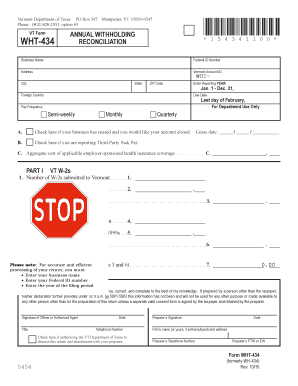
Completing the VT WHT-434 online can simplify your annual withholding reconciliation process. This guide provides you with clear and concise instructions to ensure you accurately fill out each section of the form.
Follow the steps to accurately complete your VT WHT-434 online.
- Click ‘Get Form’ button to access the document and open it for editing.
- Enter the business name in the designated field. This should be the official name your business operates under.
- Next, fill in the federal ID number assigned to your business to ensure proper identification by the tax authority.
- Provide the complete business address, including city, state, and ZIP code, to verify your business location.
- Input the reporting year for which you are filing. This should reflect the year the income was earned.
- Indicate the due date for submission, which is the last day of February following the end of the reporting year.
- Select the pay frequency by checking the appropriate box for either semi-weekly, monthly, or quarterly payment schedules.
- If applicable, check the box indicating if your business has ceased operations and indicate the cease date.
- Mark if you are reporting third-party sick pay by checking the corresponding box.
- In Part I, enter the number of W-2s submitted to Vermont, the total Vermont wages paid per W-2s, and the total Vermont tax withheld per W-2s in the provided fields.
- In Part II, record the number of 1099s submitted, total nonwage payments reported, and total Vermont tax withheld per 1099s.
- Calculate the total Vermont tax withheld by adding the amounts from Part I and Part II and enter the total in Part III.
- In Part IV, certify the accuracy of the information by signing the form. Include your title, date, and telephone number.
- If applicable, authorize the Vermont Department of Taxes to discuss this return with your preparer by checking the corresponding box and filling out the preparer's information.
- Review all entries for accuracy. Save your changes, and then proceed to download, print, or share the form as needed.
Complete your Vermont WHT-434 online today to ensure timely and accurate reporting.
Get form
Experience a faster way to fill out and sign forms on the web. Access the most extensive library of templates available.
Yes, you can file Vermont state taxes online through various platforms, including uslegalforms. Filing online simplifies the process, making it more efficient and less time-consuming. Be sure to refer to the VT WHT-434 guidelines while preparing your state tax return to ensure compliance with all necessary requirements.
Get This Form Now!
Use professional pre-built templates to fill in and sign documents online faster. Get access to thousands of forms.