Loading
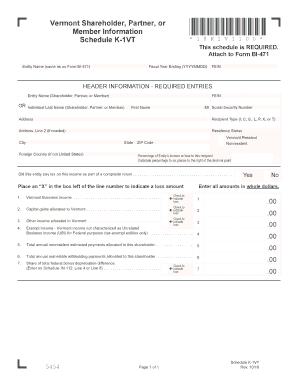
Get Vt Schedule K-1vt 2018
How it works
-

Open form follow the instructions
-

Easily sign the form with your finger
-

Send filled & signed form or save
How to fill out the VT Schedule K-1VT online
Filling out the VT Schedule K-1VT is essential for accurately reporting your income as a shareholder, partner, or member of an entity in Vermont. This guide will provide you with clear, step-by-step instructions to complete the form online.
Follow the steps to successfully fill out the VT Schedule K-1VT.
- Press the ‘Get Form’ button to access the VT Schedule K-1VT and open it in your preferred online editor.
- Enter the entity name exactly as it appears on Form BI-471 in the designated field at the top of the form. Ensure that all details are correct to avoid issues.
- Fill in the fiscal year ending date in the YYYYMMDD format. This information helps specify the accounting period for which the form is relevant.
- Input the Federal Employer Identification Number (FEIN) of the entity, which is critical for federal tax purposes.
- Provide your personal information, including your last name, first name, middle initial, and Social Security number. Accurate entry of this information is important for identification.
- Enter the complete address where you reside, including any secondary address line if applicable. This ensures all correspondence reaches you.
- Select your recipient type by choosing from the options: I, C, S, L, P, X, or T. This indicates your role in relation to the entity.
- Indicate your residency status by checking either 'Vermont Resident' or 'Nonresident' as appropriate.
- Calculate and enter the percentage of the entity’s income or loss allocated to you. Ensure you round the figure to six decimal places.
- Answer the question regarding whether the entity paid tax on this income as part of a composite return by selecting 'Yes' or 'No'.
- If applicable, place an ‘X’ in the box next to the relevant line items if you are indicating a loss amount.
- Fill in the amounts for Vermont business income, capital gains, other income, and exempt income as required, entering all amounts in whole dollars.
- Complete the sections for total annual nonresident estimated payments and total annual real estate withholding payments by providing the appropriate amounts.
- Provide your share of the total federal bonus depreciation difference if relevant by entering the amount.
- Once all fields are completed and reviewed for accuracy, save your changes, download a copy for your records, print it if necessary, or share it as required.
Complete your documents online today for a smoother filing experience.
Get form
Experience a faster way to fill out and sign forms on the web. Access the most extensive library of templates available.
Form 1041 is used to report income, deductions, and credits for estates and trusts. Executors or trustees must file this form to report any income received by the estate or trust. If you're involved in such a situation, integrating information from the VT Schedule K-1VT might be necessary for accurate reporting of your income from partnerships or S corporations.
Get This Form Now!
Use professional pre-built templates to fill in and sign documents online faster. Get access to thousands of forms.