Get Vt Fgr-615 (formerly Fg-601) 2014
How it works
-

Open form follow the instructions
-

Easily sign the form with your finger
-

Send filled & signed form or save
How to fill out the VT FGR-615 (Formerly FG-601) online
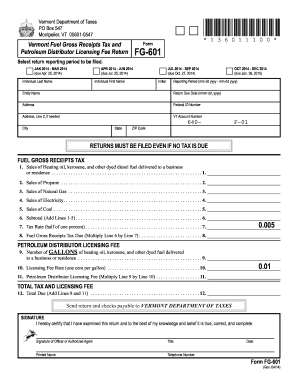
Filling out the VT FGR-615 form is an essential part of complying with Vermont's Fuel Gross Receipts Tax and Petroleum Distributor Licensing Fee regulations. This guide provides step-by-step instructions on how to accurately complete the form online.
Follow the steps to accurately complete the VT FGR-615 online.
- Press the ‘Get Form’ button to access the VT FGR-615 form and open it in your editor.
- Select the reporting period to be filed. This selection will automatically populate the 'Reporting Period' and 'Return Due Date' fields below.
- In the 'Individual Last Name' and 'Individual First Name' fields, enter the respective names of the person filing the form.
- Fill in the 'Entity Name' if the return is being filed on behalf of a business.
- Provide the 'Federal ID Number' and 'VT Account Number' in the designated fields.
- Complete the address section, including 'Address,' 'Address Line 2' (if necessary), 'City,' 'State,' and 'ZIP Code.'
- Begin detailing the sales figures for different fuel types. Enter the total sales of heating oil, kerosene, and dyed diesel in Line 1, followed by the sales for propane, natural gas, electricity, and coal in Lines 2-5 respectively.
- Calculate the subtotal by adding Lines 1-5 and enter the total in Line 6.
- Use the applicable tax rate (0.005 or half of one percent) to calculate the 'Fuel Gross Receipts Tax Due' by multiplying the subtotal on Line 6 by the tax rate and enter this amount in Line 8.
- For the petroleum distributor licensing fee, enter the number of gallons delivered in Line 9.
- Use the licensing fee rate (0.01 or one cent per gallon) to find the total petroleum distributor licensing fee by multiplying the gallons by the rate and enter this in Line 11.
- Finally, sum the amounts from Line 8 and Line 11 for the total tax and licensing fee due, and enter this figure in Line 12.
- Sign the form and print your name, title, date, and telephone number where indicated.
- Once you have completed all sections, make sure to save your changes and download, print, or share the form as necessary.
Complete your filing for the VT FGR-615 online today to ensure compliance with Vermont tax regulations.
Get form
To mail your Vermont taxes, send your completed returns and payment to the Vermont Department of Taxes, P.O. Box 547, Montpelier, VT 05601-0547. This address is ideal for both personal and business tax returns, ensuring that your forms are directed to the appropriate processing center. Always keep a copy of your return for your records and confirm any additional instructions that may apply. For comprehensive assistance, you can use resources like the VT FGR-615 (Formerly FG-601).