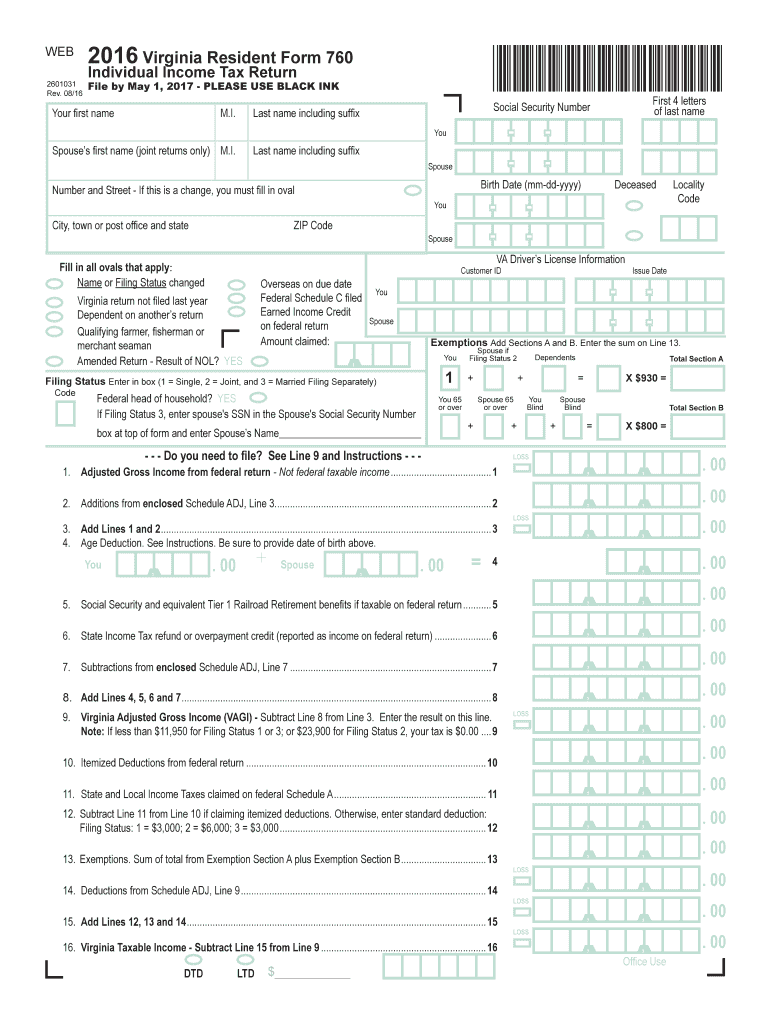
M.I. Last name including suffix Spouse s first name (joint returns only) M.I. Last name including suffix You - - Spouse - - ZIP Code You - - Spouse - VA Driver s License Information Fill in all ovals that apply: Name or Filing Status changed Virginia return not filed last year Dependent on another s return Qualifying farmer, fisherman or merchant seaman Amended Return - Result of NOL? YES Overseas on due date Federal Schedule C filed Earned Income Credit on federal re.
Loading

Open form follow the instructions

Easily sign the form with your finger

Send filled & signed form or save
How to fill out the VA DoT 760 online
Filling out the VA DoT 760 form online can seem daunting, but with the right guidance, you can navigate each section with ease. This guide provides step-by-step instructions tailored for users with varying levels of experience.
Follow the steps to complete the VA DoT 760 form online.
- Click ‘Get Form’ button to access the VA DoT 760 form and open it in the designated tool.
- Begin by entering your personal information, including your first name, middle initial, last name (with any suffix), and the same details for your spouse if filing jointly. Provide your ZIP code for accurate processing.
- Fill out the Virginia Driver’s License Information section. Indicate if any applicable ovals like name or filing status changes, or if you were overseas on the due date.
- Declare your filing status by entering the appropriate number indicating whether you are single, filing jointly, or married filing separately.
- List your income details in Section A. Enter the adjusted gross income from your federal return, and provide information about any applicable deductions and credits such as the age deduction if applicable.
- Continue to Section B and detail any additional income and deductions, such as Social Security benefits and state tax refunds.
- Calculate your Virginia Adjusted Gross Income (VAGI) by subtracting your deductions from your total income as indicated in the form.
- Complete the Tax Calculation section where you will determine the amount of tax owed or any tax credit available based on the figures provided in previous sections.
- If applicable, indicate any tax payments already made and the desired method for receiving refunds, whether through direct deposit or check.
- Finally, review all entries carefully, then save your changes. You can download, print, or share the VA DoT 760 form as needed.
Start completing your VA DoT 760 form online today for a smooth and efficient filing process.
Experience a faster way to fill out and sign forms on the web. Access the most extensive library of templates available.
Related content
If you choose a state other than Virginia as your residency and have a break in military...
A person subject to this part must not operate a commercial motor vehicle unless he or she...
Never open the front case or terminal covers while the power is ON or the unit is running...
Get answers to your most pressing questions about US Legal Forms API.
Who must file a Virginia partnership return?
A Virginia partnership return must be filed by any partnership doing business in Virginia or having income derived from Virginia sources. Each partner is then responsible for reporting their share of the partnership’s income on their personal returns, including the VA DoT 760, if applicable. You can find helpful resources through uslegalforms for properly filing partnership returns.
Where do I mail my Virginia form 763?
You should mail your Virginia form 763 to the address specified in the form’s instructions. This address can vary, so be sure to verify that you send it to the correct location to ensure processing of your VA DoT 760-related documents. To help with this, uslegalforms provides comprehensive mailing instructions for all Virginia tax forms.
What is a 760, 760PY or 763 Virginia return?
A 760, 760PY, and 763 Virginia return refer to different tax forms based on residency status. Form 760 is for residents, 760PY is for part-year residents, and form 763 is for non-residents. Understanding which form to use is vital for filing accurate taxes in Virginia, and uslegalforms can guide you through selecting the appropriate one for your situation.
Where do I mail my federal tax return in Virginia?
If you are mailing your federal tax return from Virginia, you will send it to the specific address provided by the IRS, based on whether you are including a payment or not. This location is separate from where you would submit your VA DoT 760. For detailed information on mailing addresses and deadlines, please refer to the IRS guidelines.
What is a VA760CG form?
The VA760CG form is used to calculate the Virginia tax credit for certain low-income taxpayers. This form plays a significant role in the VA DoT 760 process as it can help reduce your tax liability. To effectively navigate this form, you can use resources available at uslegalforms to ensure you complete it correctly.
Do you want to file form VA 760C?
Filing form VA 760C is necessary if you need to claim a credit for a prior year’s taxes. This form complements the VA DoT 760 by allowing you to adjust your current year’s liabilities. You can simplify this process by accessing the right forms and guidance through uslegalforms.
Where do I file VA form 760?
You can file the VA form 760 either electronically or by mailing it to the appropriate address listed on the form’s instructions. Be sure to double-check that you use the right submission method to avoid delays with your VA DoT 760 processing. For your convenience, uslegalforms provides step-by-step filing guides to help you through the process.
Can Virginia amended returns be filed electronically?
Yes, Virginia amended returns can be filed electronically using the VA DoT 760 form. By utilizing e-filing options, you can ensure a quicker processing time and minimize potential delays. If you choose to use uslegalforms, you can streamline this process and securely submit your amendments online.
What is a reasonable cause for penalty abatement in Virginia?
A reasonable cause for penalty abatement in Virginia might include circumstances such as natural disasters, serious illness, or the inability to obtain necessary tax documents on time. When requesting abatement, provide detailed documentation supporting your claim. Being clear and concise in your reasoning can increase your chances of a favorable outcome.
How to fill out EZ tax form?
To fill out the EZ tax form, start by entering your basic personal information, such as your name, address, and Social Security number. Next, report your income and any applicable deductions in the designated sections. Lastly, review your information for accuracy, ensuring you comply with all requirements for using this simplified form.
Use professional pre-built templates to fill in and sign documents online faster. Get access to thousands of forms.
If you believe that this page should be taken down, please follow our DMCA take down process here.
This form is available in several versions. Select the version you need from the drop-down list below.