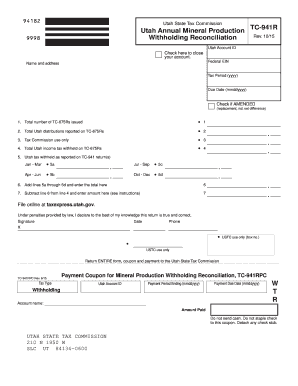
V File and pay by mail at: Utah State Tax Commission 210 N 1950 W Salt Lake City UT 84134-0600 Line Instructions Line 1 Enter the total number of TC-675Rs you issued for the year. Line 2 Enter the total amount of all gross payments issued for the year (TC-675R, Box 5). Line 3 Tax Commission use only. Leave this line blank. Line 4 Enter the total amount of Utah mineral production withholding tax shown on TC-675Rs for the year. Lines 5a-5d Enter the amounts from each quarterly return.
Open form follow the instructions
Easily sign the form with your finger
Send filled & signed form or save
How to fill out the UT USTC TC-941R online
Filling out the UT USTC TC-941R form online is essential for mineral producers to reconcile their withholding tax obligations. This guide provides clear, step-by-step instructions to help users accurately complete and submit the form.
Follow the steps to complete and submit your TC-941R online.
- Press the ‘Get Form’ button to access the TC-941R form and open it for editing.
- Enter your Utah Account ID in the designated field to identify your tax account.
- Input your Federal EIN to establish your federal tax identification.
- Complete the Name and Address section with your business name and mailing address.
- Specify the Tax Period by entering the year in the format 'yyyy' in the provided field.
- Indicate the Due Date by entering it in the format 'mmddyyyy' in the appropriate field.
- If applicable, check the box to signify an amended return, which is used for corrections.
- Fill in Line 1 with the total number of TC-675Rs issued during the year.
- Enter the total Utah distributions reported on TC-675Rs in Line 2.
- Line 3 is for Tax Commission use only; leave this blank.
- On Line 4, input the total amount of Utah income tax withheld as shown on TC-675Rs.
- Report the amounts from each quarterly return in Lines 5a through 5d for each quarter.
- Calculate Line 6 by adding together Lines 5a through 5d and enter the total.
- In Line 7, subtract Line 6 from Line 4 and enter the result.
- Review all entered details for accuracy before final submission.
- Finalize your form by saving any changes, then proceed to download, print, or share as needed.
Complete your UT USTC TC-941R online today to ensure timely compliance with tax regulations.
Experience a faster way to fill out and sign forms on the web. Access the most extensive library of templates available.
Related content
January 31, Give forms W-2 and 1099 to employees and payees. File all TC-941E...
Get answers to your most pressing questions about US Legal Forms API.
Do you need a Utah income tax withholding account?
Yes, if you have employees in Utah, you need a Utah income tax withholding account to collect and remit state income taxes. This account ensures compliance with state tax laws. Using the UT USTC TC-941R can provide you with all the necessary information to manage your withholding account effectively.
What is UT TC 941?
UT TC 941 is a tax form used by employers in Utah to report employee wages and withholding amounts. This form is essential for both tax reporting and ensuring proper compliance with state tax regulations. Understanding the UT USTC TC-941R can further enhance your knowledge of its requirements and benefits.
How do I get a Utah withholding account number?
To get a Utah withholding account number, you should register your business with the Utah State Tax Commission. This process involves filling out an application and providing relevant documentation. For clear instructions and compliance, the UT USTC TC-941R can help facilitate your application.
How to get a Utah state tax ID number?
You can acquire a Utah state tax ID number by registering with the Utah State Tax Commission online. Be sure to provide all necessary business information during the application. The UT USTC TC-941R offers valuable guidance on navigating the tax ID application efficiently.
Does Utah have state withholding?
Yes, Utah has state withholding for income taxes. Employers are required to withhold state tax from their employees' wages. If you need guidance on how to comply with state withholding regulations, the UT USTC TC-941R can provide comprehensive insights to simplify the process.
How do I get a Utah state withholding number?
To obtain a Utah state withholding number, you can apply online through the Utah State Tax Commission's website. Be prepared to supply necessary information about your business or employment. Utilizing the UT USTC TC-941R will be beneficial, as it assists in ensuring your application process runs smoothly.
What is your withholding number?
Your withholding number is a unique identifier assigned to you by the state for tracking your income tax withholdings. This number is crucial for managing your tax obligations accurately. If you need further assistance with your withholding number, consider referring to the UT USTC TC-941R, which provides relevant details.
How do I find my state withholding number?
To find your state withholding number, you can check your recent tax documents or payroll records. Alternatively, visit the Utah State Tax Commission website for direct assistance. It's important to have your UT USTC TC-941R on hand, as this document may guide you in locating your number easily.
How to close a Utah withholding account?
To close your Utah withholding account, you will need to complete a specific form indicating your intent to close the account. Send it to the Utah State Tax Commission for processing. Ensure you settle any outstanding UT USTC TC-941R requirements before proceeding.
How do I contact the Utah State Tax Commission?
You can contact the Utah State Tax Commission via their official website, where you’ll find contact details for phone and email inquiries. For specific inquiries regarding the UT USTC TC-941R, consider visiting their site for the most direct information.
Use professional pre-built templates to fill in and sign documents online faster. Get access to thousands of forms.
If you believe that this page should be taken down, please follow our DMCA take down process here.
This form is available in several versions. Select the version you need from the drop-down list below.