Loading
Get Ut Tc-62s 2015
How it works
-

Open form follow the instructions
-

Easily sign the form with your finger
-

Send filled & signed form or save
How to fill out the UT TC-62S online
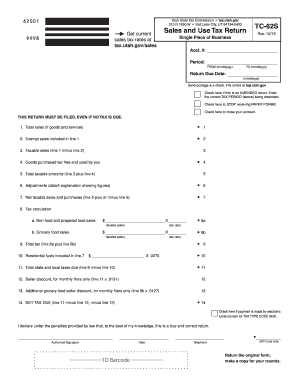
Filling out the UT TC-62S form online is a crucial process for reporting sales and use tax in Utah. This comprehensive guide provides clear, step-by-step instructions to help users navigate each section of the form efficiently and accurately.
Follow the steps to complete your UT TC-62S form online.
- Press the ‘Get Form’ button to obtain the UT TC-62S form and open it in the online editor.
- Begin by entering your company name and address in the designated field beneath the account number section.
- Specify the tax period by filling in the 'FROM' and 'TO' date fields using the required mmddyyyy format.
- Enter the return due date in the mmddyyyy format, ensuring it is accurate.
- If applicable, check the box indicating whether this return is an amended return and provide the correct tax period being amended.
- Indicate if you wish to stop receiving paper forms or if you intend to close your account by checking the respective boxes.
- Complete line 1 by entering the total sales of goods and services without including sales tax.
- Report the total exempt sales included in line 1 on line 2. Ensure this amount is not greater than the amount reported in line 1.
- Calculate taxable sales by subtracting line 2 from line 1, then enter the result on line 3.
- Report any goods purchased tax-free and used by you on line 4.
- Add line 3 and line 4 to determine the total taxable amounts, and enter that figure on line 5.
- Include any adjustments in line 6 with an explanation attached if necessary.
- Calculate net taxable sales and purchases by adding or subtracting line 6 from line 5, and enter the result on line 7.
- For line 8a, report non-food and prepared food sales tax by multiplying taxable sales by the applicable tax rate.
- For line 8b, calculate grocery food sales tax using the specific tax rate for grocery food and enter the total on line 8b.
- Calculate total tax due by adding line 8a and line 8b and entering the total on line 9.
- Determine any residential fuel credits for line 10, and do not enter a negative amount.
- Complete line 11 by subtracting line 10 from line 9 to get the total state and local taxes due.
- If currently a monthly filer, calculate seller discount using line 11 for line 12.
- For line 13, calculate any additional grocery food seller discount based on line 8b if qualified.
- Finalize your NET TAX DUE on line 14 by subtracting line 12 and line 13 from line 11.
- Indicate if you made payment through electronic funds transfer by checking the provided box.
- Sign and date the form where indicated, ensuring the declaration is accurately completed.
- After reviewing all information and ensuring accuracy, save changes, download, print, or share your completed form as necessary.
Start completing your UT TC-62S online today for a streamlined filing experience.
Get form
Experience a faster way to fill out and sign forms on the web. Access the most extensive library of templates available.
Filing employer withholding tax involves submitting Form TC-675R, which details the withholdings collected from employee wages. It’s crucial to adhere to deadlines to maintain compliance with state regulations. If the process seems daunting, uslegalforms offers tools and guidance that can help you manage your employer withholding tax, ensuring forms like UT TC-62S are utilized properly.
Get This Form Now!
Use professional pre-built templates to fill in and sign documents online faster. Get access to thousands of forms.