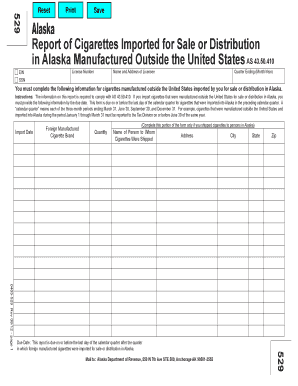
Ensee Quarter Ending (Month/Year) You must complete the following information for cigarettes manufactured outside the United States imported by you for sale or distribution in Alaska. Instructions: The information on this report is required to comply with AS 43.50.410. If you import cigarettes that were manufactured outside the United States for sale or distribution in Alaska, you must provide the following information by the due date. This form is due on or before the last day of the calendar.
Open form follow the instructions
Easily sign the form with your finger
Send filled & signed form or save
How to fill out the AK DoR 529 online
Filling out the AK DoR 529 form is a crucial step for businesses that import cigarettes manufactured outside the United States for sale or distribution in Alaska. This guide provides clear, step-by-step instructions to help you complete the form accurately and efficiently.
Follow the steps to complete the AK DoR 529 form online.
- Press the ‘Get Form’ button to access the AK DoR 529 form and open it in your editor.
- Enter your license number in the designated field. This number is critical for identifying your business in Alaska.
- Fill in the name and address of the licensee accurately. This information should reflect the official records registered with the Alaska Department of Revenue.
- Indicate the quarter ending date in the specified month and year format. Remember, this date represents the period for which you are reporting.
- Provide the import date for the cigarettes you imported, ensuring it corresponds with the period outlined in the instructions.
- List the foreign manufactured cigarette brands you imported. Make sure to include the correct brand names as they appear on the packaging.
- Specify the quantity of each cigarette brand imported into Alaska for the reporting period.
- If applicable, complete the section regarding shipments to persons in Alaska. Provide the name and address of the person to whom the cigarettes were shipped.
- Review all the filled-out information for accuracy and completeness before proceeding.
- Once all fields are completed, you can save the changes, download, print, or share the form as necessary.
Complete your AK DoR 529 form online today to ensure compliance with state regulations.
Experience a faster way to fill out and sign forms on the web. Access the most extensive library of templates available.
Related content
Update charitable pledges to the Pick.Click.Give or Alaska529 programs through August 31st...
Cam, 04:23:32.80, +74:52:50.3 ; IM Eri, 04:24:41.11, -20:07:11.8 ; Dor, 04:25:38.64...
Get answers to your most pressing questions about US Legal Forms API.
How to report 529 on tax return?
To report the AK DoR 529 on your tax return, start by gathering your Form 1099-Q and any documentation for contributions or distributions. Enter the necessary information in the education section of your chosen tax software. If you have specific questions, platforms like uslegalforms can help guide you through the process to ensure accurate reporting.
Where do I enter 592 B in TurboTax?
In TurboTax, to enter Form 592-B for your AK DoR 529, you will go to the state taxes section dedicated to income from S Corporations or Limited Liability Companies. This form is usually related to California taxes, so make sure you're looking at applicable data for your specific situation. Seek assistance if necessary for proper documentation.
Where do I enter 529 contributions on my taxes?
When filing your taxes, contributions to the AK DoR 529 should be entered in the educational expenses section or the designated area for 529 plans in your tax filing software. Each platform might vary slightly, so look for prompts related to educational savings accounts. Keeping detailed records of contributions can simplify this process.
What IRS form do I need for 529 plan?
For the AK DoR 529 plan, you will primarily need IRS Form 1099-Q to report qualified distributions. If you made contributions, be sure to keep records, as you may need to refer to other forms, like Schedule C or related documents. Always consult the latest IRS guidelines to ensure full compliance and to take advantage of any available benefits.
Where do I enter my 529 contributions in TurboTax?
If you use TurboTax to manage your taxes, the section to enter your AK DoR 529 contributions will be found under the education tab. There, you will see prompts for educational expenses and contributions to 529 plans. Ensure that you accurately input your contributions to receive any eligible tax benefits.
Where do I enter contributions on TurboTax?
To enter contributions for the AK DoR 529 plan in TurboTax, navigate to the section specifically for education expenses. You can find options for 529 plans or educational savings accounts to enter the appropriate contribution amounts. Keep in mind that you may need to have your account details ready to accurately input the information.
Is 1099-Q reported on parent or student?
When dealing with the AK DoR 529, the 1099-Q form is generally reported on the tax return of the student who is the beneficiary of the account. However, if the parent or guardian is the account owner, they may also need to report the income depending on who received the distribution. It is essential to assess your specific tax situation and consult tax guidance when filing.
Where does 529 distribution go on a tax return?
For the AK DoR 529 plan, distributions typically need to be reported on the tax return of the beneficiary. You'll do this by using IRS Form 1099-Q, which provides information about the distributions received. Make sure you keep accurate records of all withdrawals to ensure compliance and to verify that the funds were used for qualified educational expenses.
How do I report 529 expenses?
When reporting AK DoR 529 expenses, ensure you have all necessary documentation ready. These expenses should be included when you file your federal tax return, typically in a section dedicated to education-related deductions. This structured reporting helps validate your use of funds for qualified education expenses.
How do I show 529 contributions on my tax return?
To show AK DoR 529 contributions on your tax return, you will typically report them on the designated lines of your income tax forms. Each state has different regulations regarding how to report these contributions. Be sure to consult your state’s tax guidelines to ensure accuracy and compliance.
Use professional pre-built templates to fill in and sign documents online faster. Get access to thousands of forms.
If you believe that this page should be taken down, please follow our DMCA take down process here.