Loading
Form preview
  • US Legal Forms
  • Other Templates
  • Tax Forms
  • Texas Tax Forms
  • Tx Comptroller 50-244 2017

Get Tx Comptroller 50-244 2017-2026

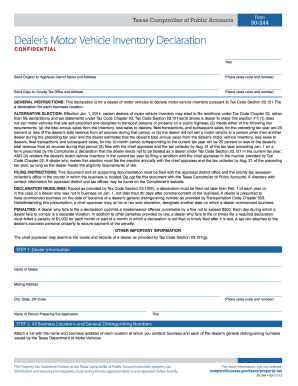
Who fails to file a declaration commits a misdemeanor offense punishable by a fine not to exceed $500. Each day during which a dealer fails to comply is a separate violation. In addition to other penalties provided by law, a dealer who fails to file or timely file a required declaration must forfeit a penalty of $1,000 for each month or part of a month in which a declaration is not filed or timely filed after it is due. A tax lien attaches to the dealer s business personal property to secure.

How it works

  1. Open form

    Open form follow the instructions

  2. Easily sign form

    Easily sign the form with your finger

  3. Share form

    Send filled & signed form or save

How to fill out the TX Comptroller 50-244 online

The TX Comptroller 50-244 form is essential for dealers of motor vehicles to declare their inventory as mandated by Texas tax law. This guide will walk you through the steps to accurately complete the form online, ensuring you meet all requirements and deadlines.

Follow the steps to fill out the form correctly.

  1. Press the ‘Get Form’ button to obtain the TX Comptroller 50-244 form and open it in your preferred online editor. This will allow you to begin filling out the declaration.
  2. Provide dealer information. Fill in the name of the dealer, mailing address, city, state, ZIP code, and phone number. Also, include the name and title of the person preparing the application.
  3. List all business locations and their corresponding general distinguishing numbers. You may need to attach a separate document detailing each location’s name and address as well as their specific numbers issued by the Texas Department of Motor Vehicles.
  4. Enter business location information. State the business name, general distinguishing number for that specific location, physical address including street and ZIP code, and account number if known. If your business started after January 1, include the start date.
  5. Report the number of units sold and corresponding sale totals for the previous 12-month period. This includes sales for motor vehicle inventory, fleet transactions, dealer sales, and subsequent sales. Be sure to record the total dollar amounts for each category.
  6. Compute the market value of your motor vehicle inventory for the current tax year. This is based on total annual sales, subtracting sales to dealers, fleet transactions, and subsequent sales. Divide the annual total by 12 to find the monthly market value.
  7. Finally, review and sign the declaration. Ensure that the authorized representative of the dealer prints their name, title, signs, and dates the form. This signature certifies the accuracy of the information provided.
  8. Once completed, you can save your changes, download the form, print, or share it as required for submission.

Complete the TX Comptroller 50-244 form online today to ensure compliance with Texas tax laws.

Get form

Experience a faster way to fill out and sign forms on the web. Access the most extensive library of templates available.
Get form

Related content

Dealer's Motor Vehicle Inventory Declaration
GENERAL INSTRUCTIONS: This declaration is for a dealer of motor vehicles to declare motor...
Learn more
SPECIAL INVENTORY TAX
Nov 25, 2024 — (50-244). • Dealer's Motor Vehicle Inventory Tax Statement. (50-246)...
Learn more

Related links form

NOTIFICATION BY AN EMPLOYER OF AN EMPLOYEE WHO IS ABOUT TO CEASE TO BE EMPLOYED (IR56F) FOR SMALL ESTATE AFFIDAVIT - Fill Out And Sign Printable ... District Court Forms For Oahu (First Circuit) Civil ... - Judiciary Requirements For Filing A Small Estate Affidavit In ...

Questions & Answers

Get answers to your most pressing questions about US Legal Forms API.

Contact support

To obtain property tax relief in Texas, you can apply through your local appraisal district. The application may vary based on the type of relief you seek, such as homestead exemptions. Understanding the processes related to TX Comptroller 50-244 can simplify your application. The uslegalforms platform provides pertinent forms and instructions to assist you with your property tax relief needs.

Claiming compensation from the Texas Comptroller involves filling out specific forms related to your case. You must provide detailed information and documentation to support your claim. If you need further guidance, the uslegalforms platform offers resources to help you navigate the requirements of submitting a claim related to the TX Comptroller 50-244.

To receive a certificate of account status from the Texas Comptroller, you need to submit a request online or via mail. This certificate confirms your account's standing regarding tax obligations. Make sure to include your TX Comptroller 50-244 number for faster processing. The uslegalforms platform offers tools and templates to assist you in this request process.

The Texas Comptroller oversees the state's financial matters and enforces tax laws. It manages revenue collection, distributes funds to local governments, and provides financial reports. Understanding how the TX Comptroller 50-244 operates is vital for any business owner. Engaging with the resources from the uslegalforms platform can help clarify these processes.

Finding your Texas tax account number is straightforward. You can access it by logging into your account on the Texas Comptroller's website. You may also find it on your tax return documents or correspondence from the TX Comptroller 50-244. If you need help, consider visiting the uslegalforms platform for additional resources.

Any business that sells taxable goods or services in Texas must register with the Texas Comptroller. This registration ensures that you are compliant with state tax laws. If you plan to operate a business in Texas, obtaining your TX Comptroller 50-244 registration is essential. It helps you manage sales tax collections and filings effectively.

To obtain your TX Comptroller XT number, you must complete a registration process through the Texas Comptroller's website. Start by providing your business details and selecting the appropriate application type. This will help ensure that you receive your TX Comptroller 50-244 number accurately. Once submitted, your account will be created, and your number will be issued.

To speak with someone at the Texas Comptroller’s office, you can call their customer service number during business hours. Be prepared with your questions ready to ensure a smooth conversation. Alternatively, you can visit their website for additional resources and options for contacting them directly. Remember, having the TX Comptroller 50-244 form handy can be beneficial during your call.

To file your Texas Comptroller information by phone, you need to follow the prompts on the provided phone line. This service is convenient for quick filings or inquiries. Ensure you have all relevant information at hand before making the call. For thorough guidance, consider using uslegalforms; they provide useful tools for navigating processes related to the TX Comptroller 50-244.

The phone number for the Texas Comptroller Webfile service is readily available on their official website. By calling this number, you can get assistance with filing your taxes online, including questions related to the TX Comptroller 50-244. Having this contact handy helps streamline your interaction with the Comptroller’s office.

Get This Form Now!

Use professional pre-built templates to fill in and sign documents online faster. Get access to thousands of forms.
Get form
If you believe that this page should be taken down, please follow our DMCA take down processhere.
Get TX Comptroller 50-244
Get form
  • Adoption
  • Bankruptcy
  • Contractors
  • Divorce
  • Home Sales
  • Employment
  • Identity Theft
  • Incorporation
  • Landlord Tenant
  • Living Trust
  • Name Change
  • Personal Planning
  • Small Business
  • Wills & Estates
  • Packages A-Z
  • Affidavits
  • Bankruptcy
  • Bill of Sale
  • Corporate - LLC
  • Divorce
  • Employment
  • Identity Theft
  • Internet Technology
  • Landlord Tenant
  • Living Wills
  • Name Change
  • Power of Attorney
  • Real Estate
  • Small Estates
  • Wills
  • All Forms
  • Forms A-Z
  • Other Templates
  • Legal Hub
  • About Us
  • Help Portal
  • Legal Resources
  • Blog
  • Affiliates
  • Contact Us
  • Delete My Account
  • Site Map
  • Industries
  • Forms in Spanish
  • Localized Forms
  • State-specific Forms
  • Forms Kit
  • Real Estate Handbook
  • All Guides
  • Notarize
  • Incorporation services
  • For Consumers
  • For Small Business
  • For Attorneys
  • USLegal
  • FormsPass
  • pdfFiller
  • signNow
  • altaFlow
  • DocHub
  • Instapage
Form Packages
  • Adoption
  • Bankruptcy
  • Contractors
  • Divorce
  • Home Sales
  • Employment
  • Identity Theft
  • Incorporation
  • Landlord Tenant
  • Living Trust
  • Name Change
  • Personal Planning
  • Small Business
  • Wills & Estates
  • Packages A-Z
Form Categories
  • Affidavits
  • Bankruptcy
  • Bill of Sale
  • Corporate - LLC
  • Divorce
  • Employment
  • Identity Theft
  • Internet Technology
  • Landlord Tenant
  • Living Wills
  • Name Change
  • Power of Attorney
  • Real Estate
  • Small Estates
  • Wills
  • All Forms
  • Forms A-Z
  • Other Templates
Customer Service
  • Legal Hub
  • About Us
  • Help Portal
  • Legal Resources
  • Blog
  • Affiliates
  • Contact Us
  • Delete My Account
  • Site Map
  • Industries
  • Forms in Spanish
  • Localized Forms
  • State-specific Forms
  • Forms Kit
Legal Guides
  • Real Estate Handbook
  • All Guides
Prepared for you
  • Notarize
  • Incorporation services
Our Customers
  • For Consumers
  • For Small Business
  • For Attorneys
Our Sites
  • USLegal
  • FormsPass
  • pdfFiller
  • signNow
  • altaFlow
  • DocHub
  • Instapage
Social Media
Call us now toll free:
+1 833 426 79 33
As seen in:
© Copyright 1999-2026 airSlate Legal Forms, Inc. 17 Station Street, Ste. 203, Brookline, MA 02445
  • Your Privacy Choices
  • Terms of Service
  • Privacy Notice
  • Content Takedown Policy
  • Bug Bounty Program