Loading
Get Tn Rv-f1403901 2015-2025
How it works
-

Open form follow the instructions
-

Easily sign the form with your finger
-

Send filled & signed form or save
How to fill out the TN RV-F1403901 online
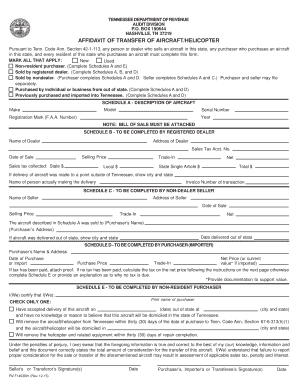
Completing the TN RV-F1403901 form is essential for anyone involved in the transfer of an aircraft or helicopter in Tennessee. This guide will assist you in accurately filling out the form online, ensuring compliance with state requirements.
Follow the steps to complete the form with ease.
- Press the ‘Get Form’ button to obtain the TN RV-F1403901 form and open it for completion.
- Begin by indicating the status of the aircraft transfer in the 'MARK ALL THAT APPLY' section. Check each relevant box based on whether the aircraft is new, used, sold by a registered dealer, or if you are a non-resident purchaser.
- Proceed to 'SCHEDULE A - DESCRIPTION OF AIRCRAFT'. Fill in the model, make, serial number, year, and registration mark (F.A.A. number). Remember to attach the bill of sale with your submission.
- Go to 'SCHEDULE B - TO BE COMPLETED BY REGISTERED DEALER' if applicable. Provide the dealer's name, address, sales tax account number, date of sale, selling price, and sales tax collected. Include details regarding delivery location if the delivery was made outside of Tennessee.
- If you are a non-dealer seller, complete 'SCHEDULE C'. Input the seller's name, address, date of sale, selling price, and trade-in information. Also, include the purchaser's name and address as well as the delivery date and location if applicable.
- In 'SCHEDULE D - TO BE COMPLETED BY PURCHASER (IMPORTER)', fill out the purchaser's name and address, date of purchase, and the net price or import value. Attach proof of tax payment if applicable. If no tax has been pre-paid, calculate and include the required tax information.
- Complete 'SCHEDULE E - TO BE COMPLETED BY NON-RESIDENT PURCHASER' if relevant. Certify your agreement by printing the purchaser's name and providing the details regarding delivery acceptance and future domicile of the aircraft.
- Finally, gather signatures from both the seller and purchaser or transferee, ensuring to date the document as required.
- Review the completed form for accuracy. Once satisfied, you can save any changes made, download, print, or share the completed form as necessary.
Start completing the TN RV-F1403901 form online today to ensure a smooth aircraft transfer process.
Yes, you can get an extension on excise tax in Tennessee by filing the TN RV-F1403901 form. This allows you additional time to submit your excise tax return. It is important to file for the extension before the original deadline to avoid penalties. If you need help, consider using tools from platforms like US Legal Forms to simplify the process.
Industry-leading security and compliance
US Legal Forms protects your data by complying with industry-specific security standards.
-
In businnes since 199725+ years providing professional legal documents.
-
Accredited businessGuarantees that a business meets BBB accreditation standards in the US and Canada.
-
Secured by BraintreeValidated Level 1 PCI DSS compliant payment gateway that accepts most major credit and debit card brands from across the globe.