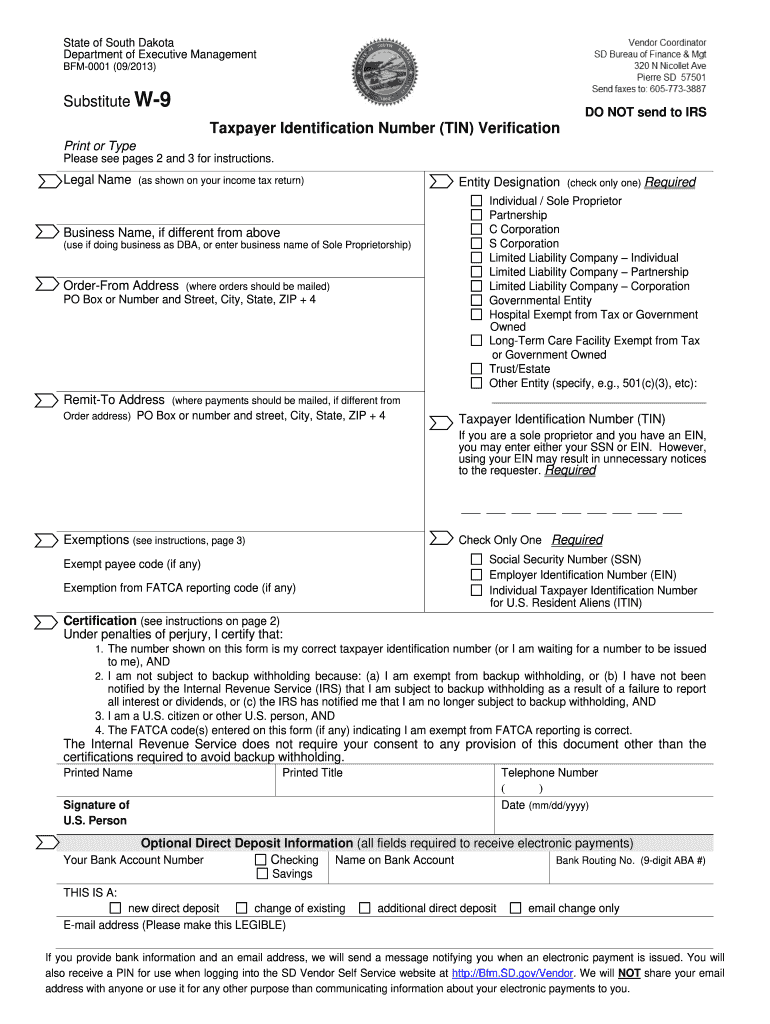
Otifying you when an electronic payment is issued. You will also receive a PIN for use when logging into the SD Vendor Self Service website at http://Bfm.SD.gov/Vendor. We will NOT share your email address with anyone or use it for any other purpose than communicating information about your electronic payments to you. BFM-0001 (09/2013) Substitute W-9 Form, page 2 Instructions for Completing Taxpayer Identification Number (TIN) Verification Legal Name (as shown on your income tax form) Indiv.
Loading

Open form follow the instructions

Easily sign the form with your finger

Send filled & signed form or save
How to fill out the SD BFM-0001 online
Filling out the SD BFM-0001, also known as the Substitute W-9 form, can seem like a daunting task. This guide provides you with clear, step-by-step instructions to help you easily complete the form online, ensuring that you provide all necessary information accurately.
Follow the steps to complete the SD BFM-0001 online.
- Click the ‘Get Form’ button to access the SD BFM-0001 and open it for editing.
- Enter your legal name as it appears on your income tax return in the 'Legal Name' section.
- If applicable, fill in the 'Entity Designation' by checking the appropriate box that describes your business entity.
- Provide your business name in the 'Business Name' field if it differs from your legal name.
- Complete the 'Order-From Address' and 'Remit-To Address' sections with the corresponding addresses where orders and payments should be sent.
- In the 'Taxpayer Identification Number (TIN)' section, enter your Social Security Number (SSN), Employer Identification Number (EIN), or Individual Taxpayer Identification Number (ITIN).
- Check the appropriate 'Exemptions' box if you qualify for exemption from backup withholding or FATCA reporting.
- Certify the information by reviewing the certification statement and, if applicable, striking out the necessary item related to backup withholding.
- Fill in the 'Printed Name', 'Printed Title', 'Telephone Number', 'Date', and sign the form in the provided space.
- Optional: If you wish to set up direct deposit, complete the necessary bank information fields including account number and routing number.
- Once all sections are complete, save your changes. You may then download, print, or share the completed SD BFM-0001 as needed.
Complete your SD BFM-0001 online today to ensure timely processing of your information!
Experience a faster way to fill out and sign forms on the web. Access the most extensive library of templates available.
Related content
BFM-0001 (V03/201907). Substitute ... You will also receive a PIN for use when logging...
The HSC shall calculate and bill each patient for a daily room rate based upon the cost...
There is also an alphabetical index, accessible from the navigation block, to help you...
Get answers to your most pressing questions about US Legal Forms API.
How to get a sales tax license in SD?
To acquire a sales tax license in South Dakota, you must first register your business online with the South Dakota Department of Revenue. This involves completing the application form, where you detail your business activities. Once registered, you will receive your sales tax license, allowing you to collect sales tax on taxable sales. This license is crucial for ensuring your business stays compliant with state regulations.
How can I get a US tax ID?
Obtaining a US tax ID, which can be an EIN, involves completing Form SS-4, available on the IRS website. This number identifies your business for tax purposes and is essential for compliance. After filling out the form and submitting it online, you will quickly receive your tax ID. This identification is critical for opening bank accounts and hiring employees.
How to get a federal EIN number?
To secure your federal EIN number, fill out Form SS-4 correctly, ensuring all required details are included. You can submit this form online through the IRS website for almost immediate processing. Once your application is reviewed, you’ll receive the EIN number necessary for fulfilling tax obligations. This process is straightforward and vital for managing your business transactions.
Who cannot get an EIN number?
Certain individuals are ineligible for obtaining an EIN number. For instance, non-resident aliens without a valid Social Security Number cannot apply for an EIN. Additionally, if you're applying for a business that's purely for personal use and not registered as an entity, you may also be disqualified. It’s crucial to ensure you meet eligibility criteria before applying for an EIN.
Should I get an EIN or LLC first?
Deciding whether to obtain an EIN or form an LLC first depends on your business structure. Generally, it is advisable to register your LLC first because this establishes your business legally. Afterward, you can apply for an EIN number, which is necessary for tax identification and handling employee payroll. This sequence ensures that you operate under a recognized entity for tax purposes.
How do I get a federal EIN number?
Getting a federal EIN number involves filling out Form SS-4 either online or by mail. Submitting it online via the IRS website is recommended for a quicker response. Ensure you have all necessary business information ready, including your legal name and address. After successful submission, expect to receive your EIN number right away, which you’ll need for tax filings and opening a business account.
How to get EIN number in South Dakota?
To obtain an EIN number in South Dakota, you can apply online through the IRS website, which is the fastest method. You will need to complete Form SS-4, providing accurate information about your business. Once submitted, you will receive your EIN number immediately upon approval. Remember, having the EIN number is essential for various business activities and tax purposes.
How do I fill out my withholding form?
To fill out your withholding form, begin by inputting your personal details, which include your name, address, and Social Security number. Next, decide how many exemptions you want to claim, as this affects your federal income tax withholding. It's a straightforward process, but be sure to review the SD BFM-0001 for an easy and effective completion of your withholding form.
How to fill out a withholding allowance form?
When you fill out a withholding allowance form, enter your personal information and the number of allowances you wish to claim. Your allowances will influence the tax amount held back from your paycheck, so carefully assess your deductions and credits. Accuracy is key, and using the SD BFM-0001 helps ensure your form is filled out correctly.
How to fill out sales and use tax unit exemption certificate?
To fill out a sales and use tax unit exemption certificate, start by providing your business name and address along with the name of the exemption. Include any identification numbers required for your business and describe the purchased items that qualify for the exemption. Remember, proper documentation ensures compliance, and the SD BFM-0001 can simplify the process for you.
Use professional pre-built templates to fill in and sign documents online faster. Get access to thousands of forms.
If you believe that this page should be taken down, please follow our DMCA take down process here.
This form is available in several versions. Select the version you need from the drop-down list below.