Loading
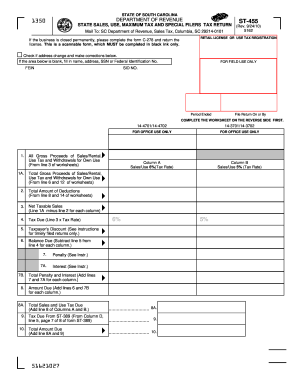
Get Sc St-455 2010
How it works
-

Open form follow the instructions
-

Easily sign the form with your finger
-

Send filled & signed form or save
How to fill out the SC ST-455 online
The SC ST-455 is an essential document for reporting state sales, use, maximum tax, and special filers tax returns in South Carolina. This guide provides comprehensive steps to fill out the form online efficiently and accurately.
Follow the steps to complete the SC ST-455 online.
- Click 'Get Form' button to obtain the form and open it in the editor.
- Enter your business information in the fields provided, including your name, address, Social Security Number (SSN) or Federal Identification Number (FEIN). If there is an address change, check the respective box and provide the new address.
- Review the worksheet on the reverse side of the form to gather your gross proceeds of sales, rental, and any applicable use tax information.
- Fill in line 1A with the total gross proceeds of sales and rentals, as well as any withdrawals for your own use from the worksheets.
- Complete columns A and B by entering the appropriate totals for sales/use at 6% and 5%. Ensure you accurately compute the net taxable sales by subtracting total deductions from gross proceeds for each column.
- Calculate the tax due by multiplying net taxable sales by the corresponding tax rate for each column. Record this amount in the 'Tax Due' sections.
- If applicable, enter any taxpayer's discount for timely filed returns, and then calculate the balance due by subtracting the discount from the tax due.
- Continue completing the penalty and interest lines if applicable, then sum these amounts to find the total penalty and interest.
- Add the total tax due and any amounts from line 9 to determine the total amount due for submission.
- Be sure to sign and date the return before submitting it to confirm that all information is accurate and true.
- Finally, save your changes, download, print, or share the completed form as required.
Start completing your SC ST-455 online today for accurate and timely tax reporting.
Get form
Experience a faster way to fill out and sign forms on the web. Access the most extensive library of templates available.
Obtaining a SC tax ID number requires you to register with the South Carolina Department of Revenue. This number is important for tax purposes and is often needed for business transactions. You might find it beneficial to use uslegalforms to assist you with this registration process, as they can provide templates and expert advice.
Get This Form Now!
Use professional pre-built templates to fill in and sign documents online faster. Get access to thousands of forms.