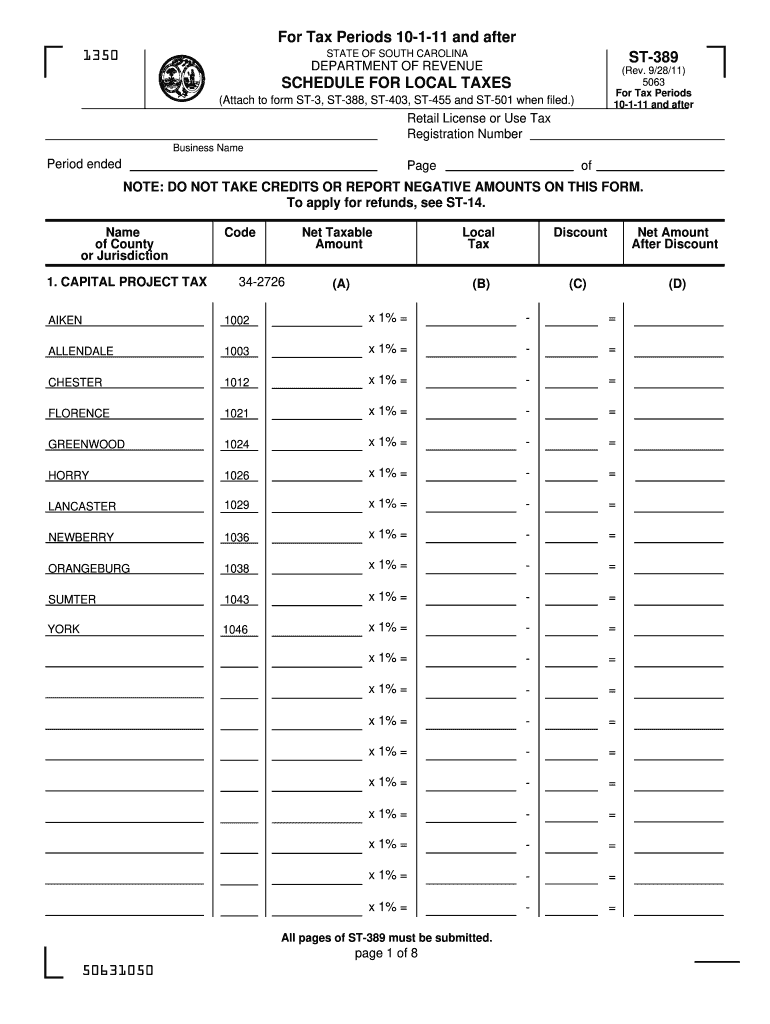
-388, ST-403, ST-455 and ST-501 when filed.) Retail License or Use Tax Registration Number Business Name Period ended Page of NOTE: DO NOT TAKE CREDITS OR REPORT NEGATIVE AMOUNTS ON THIS FORM. To apply for refunds, see ST-14. Name of County or Jurisdiction 1. CAPITAL PROJECT TAX Code Net Taxable Amount 34-2726 (A) Local Tax Discount Net Amount After Discount (B) (C) (D) AIKEN 1002 x 1% - ALLENDALE 1003 x 1% - CHESTER 1012 x 1% - FLORENCE 1021 x 1%.
Loading

Open form follow the instructions

Easily sign the form with your finger

Send filled & signed form or save
How to fill out the SC ST-389 online
The SC ST-389 form is essential for reporting various types of local taxes in South Carolina. This guide will walk you through each section of the form, providing clear and concise instructions for completing it online.
Follow the steps to successfully complete the SC ST-389 online.
- Press the ‘Get Form’ button to obtain the ST-389 and open it in your editing tool.
- Begin filling out the form by providing your retail license or use tax registration number, business name, and the period ended at the top of the form.
- In the ‘Name of County or Jurisdiction’ section, enter the name of the county or jurisdiction where your sales occurred.
- Continue this process for the ‘School District/Education Capital Improvement Tax’, ‘Transportation Tax’, and other applicable taxes by entering the required fields as instructed.
- Ensure that all entries are accurately filled; remember not to take credits or report negative amounts on this form.
- Once all fields are complete, review your entries for correctness.
Complete your SC ST-389 form online with confidence!
Experience a faster way to fill out and sign forms on the web. Access the most extensive library of templates available.
Related content
Before claiming a deduction on the ST-389 Worksheet, you must report your gross sales...
SC DOR Form ST-3 (State) [pdf] · SC DOR Form ST-389 (Local) [pdf]. Contact Tax...
Apr 12, 2012 — 389. vCred. 5 Valor do Crédito. Outorgado/Presumido. E. N. 0 - 1. 13...
Get answers to your most pressing questions about US Legal Forms API.
How do I claim sales on my tax return?
When claiming sales on your tax return, you must list all qualifying sales and use the SC ST-389 form to report them. This allows you to detail your sales and any applicable deductions. Be diligent in keeping records to substantiate your claims, which can make filing easier and more accurate.
How do I get a SC sales tax number?
Obtaining a SC sales tax number requires registering your business with the South Carolina Department of Revenue. Fill out the appropriate forms online or in-person, ensuring you have all necessary business information handy. Once registered, you will receive a sales tax number, which you will need for reporting and paying sales tax.
How do I get a SC tax exemption certificate?
To obtain a SC tax exemption certificate, you must fill out the appropriate application form and provide necessary identification. This certificate allows you to make tax-exempt purchases for certain qualifying items. You can find the application on the SC Department of Revenue's website to get started.
Is SC tax refund taxable?
Generally, a SC tax refund is not taxable if you did not receive a tax benefit from the expense in the previous year. However, if you claimed a deduction for sales tax previously, you might need to report the refund as income. Keep track of your records to understand how it may affect your tax situation.
How do I claim my SC sales tax refund?
To claim your SC sales tax refund, you will need to fill out and submit Form SC ST-389. This form allows you to request a refund for sales tax overpaid on qualified purchases. Ensure that you include all necessary documentation to support your claim to facilitate the processing of your refund.
How do I claim sales tax deductions?
To claim sales tax deductions, you must keep detailed records of your purchases throughout the year. Use Form SC ST-389 to report your eligible purchases and deductions when filing your taxes. Be sure to consult the IRS guidelines to ensure you meet all requirements for maximizing your deductions.
How to fill out a ST-3 form?
To properly fill out a ST-3 form, start by providing your organization's name, address, and federal tax ID number. Clearly indicate the type of exemption you are claiming and complete all necessary fields accurately. It’s essential to sign and date the form before submitting it to avoid any delays. If you need more assistance with forms like the SC ST-389, uslegalforms offers various resources to guide you.
How to fill out a third party authorization form?
Filling out a third party authorization form involves providing accurate details about the taxpayer and the designated third party. Specify the relationship to the taxpayer and provide relevant identification numbers. Ensure that both parties sign and date the form before submitting it to the appropriate tax office. If you seek guidance on forms like the SC ST-389, you may find tools on uslegalforms that simplify the process.
How to fill out a certificate of exemption?
To fill out a certificate of exemption, start by collecting all necessary information, such as your name, address, and tax identification number. Next, enter the specific details related to the SC ST-389 form, indicating the nature of your exemption. Ensure that you sign and date the document, then submit it according to the instructions provided by your state tax authority.
How to fill out an employee withholding certificate form?
To fill out an employee withholding certificate form, start with your personal information like your name and address. Next, indicate your filing status and any exemptions you wish to claim. Make sure to review the state-specific instructions if they reference SC ST-389 or other relevant documents for clarity. Once completed, submit the form to your employer promptly to ensure accurate withholding.
Use professional pre-built templates to fill in and sign documents online faster. Get access to thousands of forms.
If you believe that this page should be taken down, please follow our DMCA take down process here.
This form is available in several versions. Select the version you need from the drop-down list below.