T to the State sales tax rate of 6%. Sales and purchases generally reported in this section include charges for meals, gift items, and additional guest charges (such as room service, amenities, telephone charges, etc.). However, sales of accommodations are excluded from this worksheet section. Total sales of accommodations (subject to State tax rate of 7%) are reported on Worksheet #3 (for 5% tax reporting) and Worksheet #4 (for 2% tax reporting) to determine the total State sales tax due. Item.
Loading

Open form follow the instructions

Easily sign the form with your finger

Send filled & signed form or save
How to fill out the SC ST-388 online
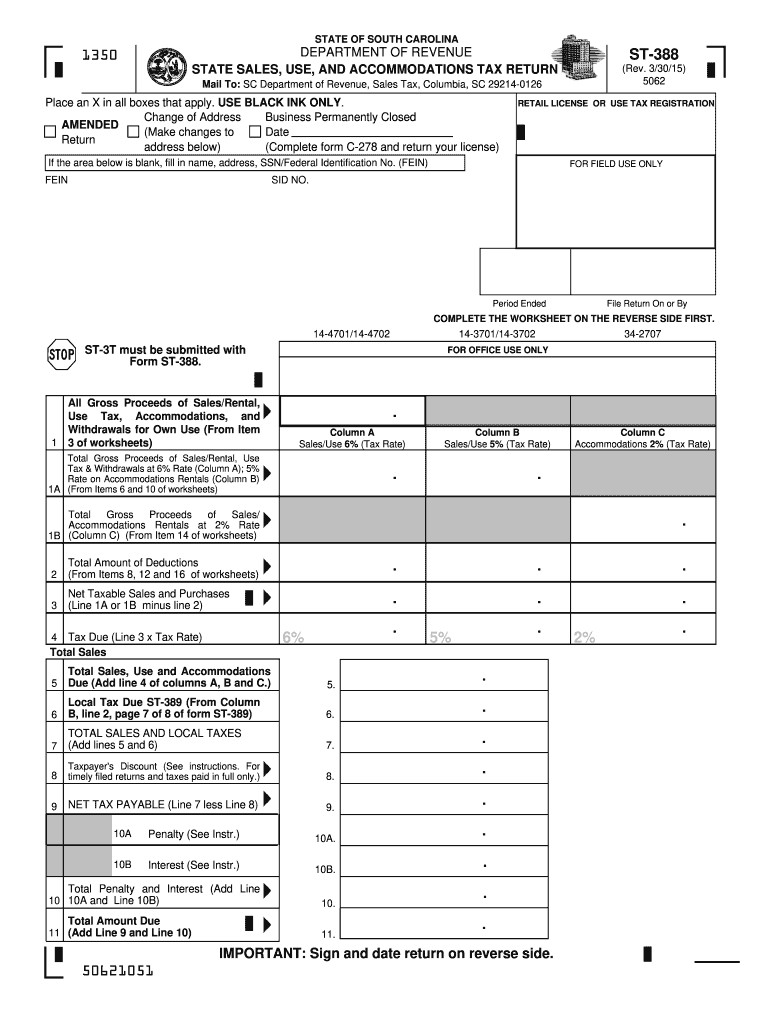
Filling out the SC ST-388, the state sales, use, and accommodations tax return, is essential for compliance with South Carolina tax regulations. This guide provides step-by-step instructions to help you accurately complete the form online.
Follow the steps to successfully fill out the SC ST-388 online.
- Click ‘Get Form’ button to obtain the form and open it in the editor.
- Identify the relevant sections at the top of the form, including marking any applicable checkboxes such as 'Change of Address' or 'Business Permanently Closed.' Make sure to use only black ink if filling out a physical copy.
- Fill in your retail license or use tax registration information, including your name, address, and SSN or Federal Identification Number (FEIN). If this section is blank, ensure you complete it.
- For the period ended and the file return due date, carefully enter the relevant information as required.
- Complete the worksheet on the reverse side of the form before proceeding to the main sections.
- In the Gross Proceeds of Sales/Rental section, list the total of all sales and rental proceeds, including use tax and withdrawals for own use. Ensure that the amount of sales tax is not included in this total.
- Record the deductions in the respective section based on the worksheet, entering detailed itemizations of deductions where necessary.
- Calculate the net taxable sales and purchases by subtracting total deductions from total gross proceeds.
- Determine the tax due by applying the correct tax rates to your net taxable sales as shown in the form.
- Finally, after all calculations, sign and date the return on the reverse side before submitting digitally or printing it for mail delivery. Ensure to save your changes if submitting online.
Start completing your SC ST-388 online today to ensure timely and accurate tax compliance.
Experience a faster way to fill out and sign forms on the web. Access the most extensive library of templates available.
Related content
May 11, 2022 — Taxpayers are required to file and pay their Accommodations Tax Return...
by ED Sharda Jackson Smith · Cited by 1 — South Carolina's Act 388 (2006) authorized...
Apr 12, 2012 — Schema XML. Observação. CTe. 1.04 cte_v104.xsd. Leiaute do CT-e (parte...
Get answers to your most pressing questions about US Legal Forms API.
How do I claim my SC sales tax refund?
Claiming a South Carolina sales tax refund requires you to submit a refund request to the South Carolina Department of Revenue. You may need to provide proof of your purchases and any completed forms, including the SC ST-388 if exemptions apply. For a clearer understanding of the process, use US Legal Forms to find the necessary resources.
How do I get a SC tax exemption certificate?
To secure a South Carolina tax exemption certificate, begin by filling out the SC ST-388 form. Ensure you meet all eligibility requirements, then submit your application to the Department of Revenue. For a more guided approach, consider using US Legal Forms to assist with your paperwork.
What qualifies you to be a tax-exempt individual?
In South Carolina, certain criteria qualify individuals for tax exemption, including specific income thresholds and charitable purposes. You will need to provide documentation supporting your claims when applying via the SC ST-388 form. It's wise to review the guidelines from the South Carolina Department of Revenue, or you can simplify your search with resources at US Legal Forms.
How do I get a SC sales tax number?
To obtain a South Carolina sales tax number, you must register your business with the South Carolina Department of Revenue. Fill out the relevant forms, including the SC ST-388 if your business qualifies for exemptions. You can complete the registration online or seek assistance with US Legal Forms.
How do I get my exemption certificate?
To receive your exemption certificate, you generally need to apply through the appropriate state agency. In South Carolina, completion of the SC ST-388 form is often a required step. After submitting your application, keep track of your request status through the state’s website, or check with US Legal Forms for guidance.
How do I get a SC withholding number?
To acquire a South Carolina withholding number, you must register with the South Carolina Department of Revenue. This process typically involves submitting specific forms, including the SC ST-388 if applicable, and providing your business details. For assistance, consider visiting US Legal Forms for a streamlined experience.
How do I get a tax exemption certificate in South Carolina?
To obtain a tax exemption certificate in South Carolina, first, ensure you meet the qualifications for exemption. Then, complete the SC ST-388 form and provide any supporting documents. Submit your application to the South Carolina Department of Revenue for processing, or utilize US Legal Forms to simplify the process.
How to apply for South Carolina property tax exemption?
To apply for the South Carolina property tax exemption, you need to complete the SC ST-388 form. Gather necessary documentation, such as proof of ownership and income if required. Once you have filled out the form, submit it to your local county tax office. You can also find more assistance on platforms like US Legal Forms.
How many miles over the speed limit can you go in SC?
In South Carolina, you cannot legally exceed the speed limit under any circumstance. There is no allowance for a certain number of miles over the limit; doing so may lead to citations and fines. Being aware of speed limits is vital for safe driving and avoiding legal issues. For more information on traffic laws, you can rely on resources from US Legal Forms.
What is SC statute on speeding?
The South Carolina statute on speeding outlines the regulations regarding speed limits on highways and local streets. Violations can result in fines and demerits on a driving record. It’s essential for drivers to stay informed about these laws to avoid penalties. If you have questions about speeding regulations, consider using US Legal Forms for detailed legal guidance.
Use professional pre-built templates to fill in and sign documents online faster. Get access to thousands of forms.
If you believe that this page should be taken down, please follow our DMCA take down process here.
This form is available in several versions. Select the version you need from the drop-down list below.