As room service, amenities, telephone charges, etc.). However, sales of accommodations are excluded from this worksheet section. Total sales of accommodations (subject to State tax rate of 7%) are reported on Worksheet #3 (for 5% tax reporting) and Worksheet #4 (for 2% tax reporting) to determine the total State sales tax due. Item 4. Gross Proceeds of Sales/Rentals and Withdrawals of Inventory for Own Use 4. (Sales subject to 6% tax rate requirements) Item 5. Out-of-State Purchases Subject to.
Loading

Open form follow the instructions

Easily sign the form with your finger

Send filled & signed form or save
How to fill out the SC ST-388 online
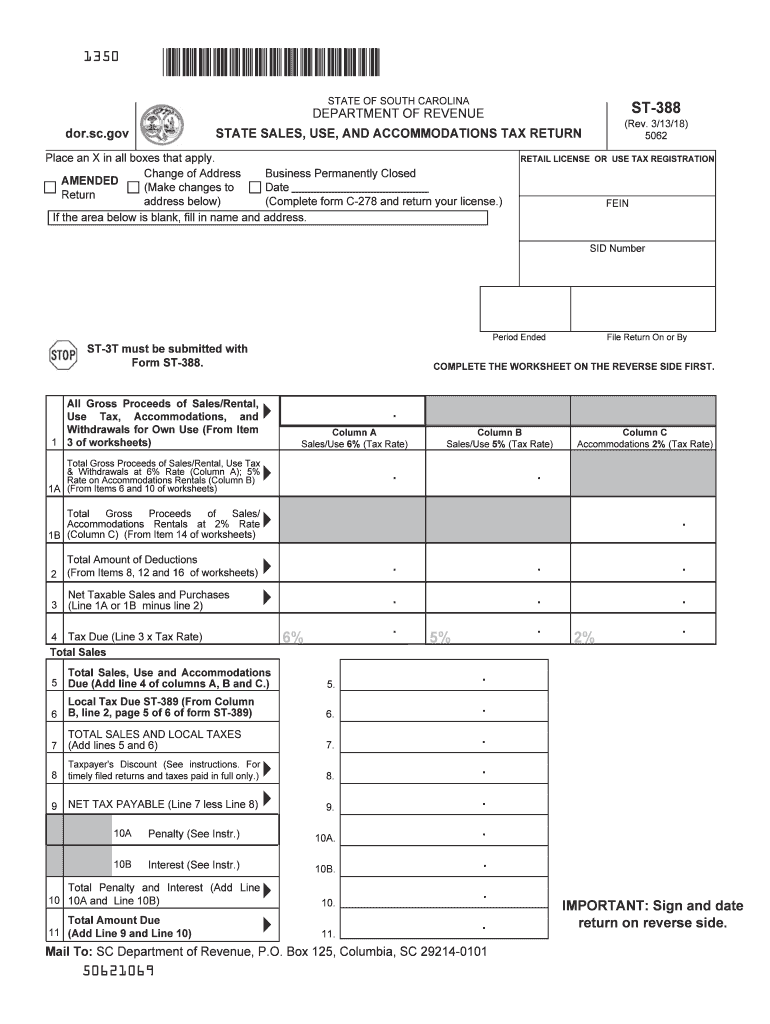
The SC ST-388 form is essential for reporting sales, use, and accommodations tax in the state of South Carolina. This guide provides a clear and user-friendly approach to filling out the form online, ensuring you complete each section accurately.
Follow the steps to successfully complete the SC ST-388 online.
- Click the ‘Get Form’ button to obtain the SC ST-388 form and open it in your preferred online editor.
- Fill in the owner or business name and address in the relevant section unless it is already filled out.
- Indicate any applicable changes such as a change of address or if the business is permanently closed by placing an X in the appropriate boxes.
- Enter the retail license or use tax registration number, Federal Employer Identification Number (FEIN), and the sales tax identification (SID) number in their designated fields.
- Specify the period ended for which you are filing this tax return.
- Transfer the totals from the worksheet onto the main form in the respective columns (A, B, C) as instructed.
- Calculate your deductions based on the items listed and enter the total deductions in the dedicated field.
- Determine your net taxable sales and purchases by subtracting total deductions from total gross sales.
- Compute the tax due by multiplying the net taxable amount by the appropriate tax rates indicated.
- Add any local tax amounts, if applicable, as derived from the ST-389 worksheet.
- Finally, review the total amount due and certify the information by signing and dating the return.
- Once completed, save your changes, download a copy for your records, and follow the instructions for submitting the form as required.
Start filling out your SC ST-388 online today to ensure timely and accurate reporting.
Experience a faster way to fill out and sign forms on the web. Access the most extensive library of templates available.
Related content
May 11, 2022 — Taxpayers are required to file and pay their Accommodations Tax Return...
by ED Sharda Jackson Smith · Cited by 1 — South Carolina's Act 388 (2006) authorized...
Apr 12, 2012 — Schema XML. Observação. CTe. 1.04 cte_v104.xsd. Leiaute do CT-e (parte...
Get answers to your most pressing questions about US Legal Forms API.
How to fill out an Employee's withholding exemption Certificate?
When filling out an Employee's withholding exemption Certificate, include your personal details, indicate how many allowances you wish to claim, and provide any required signatures. Make sure to consult the SC ST-388 for guidelines to avoid mistakes. The uslegalforms platform can help you understand each section and provide tips for accurate completion.
How to fill out a certificate of exemption?
Filling out a certificate of exemption involves providing your relevant tax information and identifying the reason for the exemption. You can refer to the SC ST-388 for necessary guidance and information on specific requirements for South Carolina exemptions. The uslegalforms platform can simplify this process by providing tailored forms and instructions.
How many allowances should I claim for exempt?
The number of allowances you should claim for exempt largely depends on your individual financial circumstances. You can use the SC ST-388 to help determine your situation and understand what qualifies for exemption. It is advisable to calculate this carefully to avoid any unexpected tax withholding or liabilities during tax time.
How to fill out an ST-3 form?
To correctly complete the ST-3 form, gather the necessary information about your exempt purchases and fill in the details accurately. Utilize the SC ST-388 as a reference to understand exemptions applicable to your situation. If you need help, the uslegalforms platform offers step-by-step instructions designed to assist you throughout the process.
How to fill out a Employee withholding Exemption Certificate?
Filling out an Employee withholding Exemption Certificate requires you to provide your personal information, indicate your exemption status, and sign the form. Make sure to accurately reflect your current tax situation, and refer to the SC ST-388 for any specific exemptions applicable to South Carolina residents. The uslegalforms platform can guide you through every necessary step.
How much SC state tax should be withheld?
The amount of SC state tax withheld from your paycheck depends on your earnings, filing status, and number of allowances. You can use the SC ST-388 as a useful reference to determine the appropriate withholding amount. For precise calculations, consider using online tools or consulting with tax professionals for personalized advice.
How do I claim my SC sales tax refund?
To claim your SC sales tax refund, you generally need to fill out the appropriate form and provide necessary receipts demonstrating your eligible purchases. Ensure you reference the SC ST-388 for specific instructions and guidelines tailored to your situation. You can quickly access resources on the uslegalforms platform to assist you with your refund claim.
How do you apply sales tax to a number?
To apply sales tax to a number, determine the taxable amount first. Multiply that figure by the current SC sales tax rate. Make sure your SC ST-388 number is on all relevant documentation to ensure compliance with South Carolina's tax regulations.
How do I get a SC tax exemption certificate?
If you need a SC tax exemption certificate, you will need to apply through the South Carolina Department of Revenue. Ensure your eligibility for the exemption before applying. Having your SC ST-388 number handy will make the application smoother.
How do I get a SC sales tax ID number?
Getting a SC sales tax ID number is part of the business registration process in South Carolina. You can register online through the South Carolina Department of Revenue's website. As a new business, you will be issued an SC ST-388 number, key for conducting sales.
Use professional pre-built templates to fill in and sign documents online faster. Get access to thousands of forms.
If you believe that this page should be taken down, please follow our DMCA take down process here.
This form is available in several versions. Select the version you need from the drop-down list below.