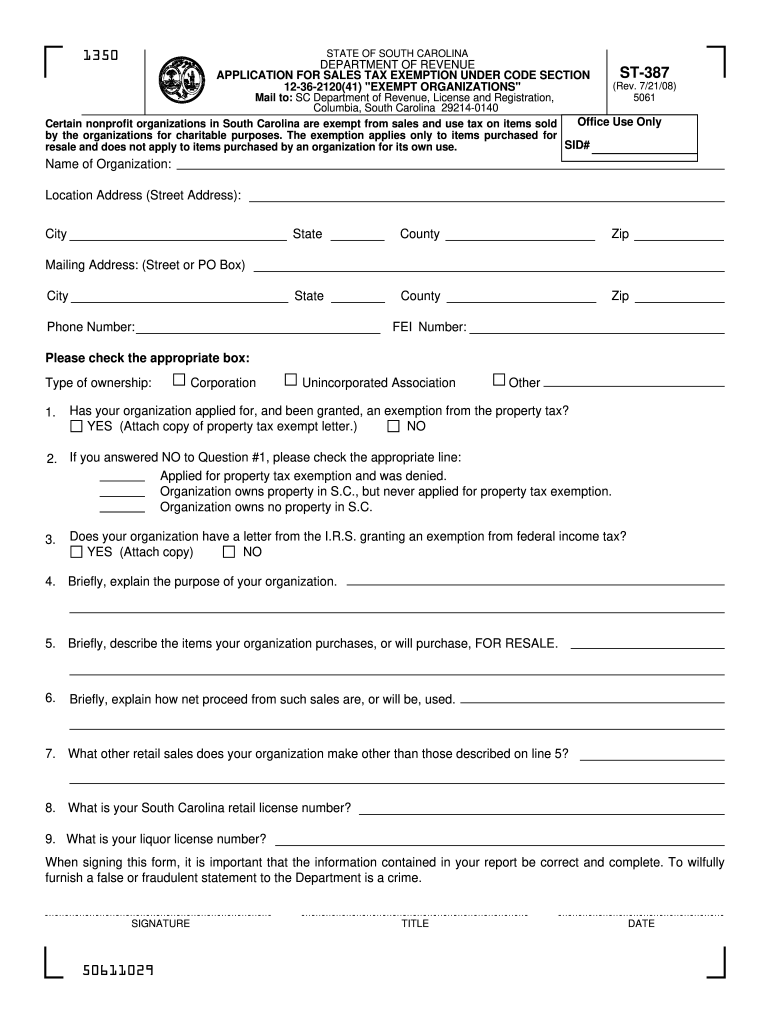
Venue, License and Registration, Columbia, South Carolina 29214-0140 Office Use Only Certain nonprofit organizations in South Carolina are exempt from sales and use tax on items sold by the organizations for charitable purposes. The exemption applies only to items purchased for SID# resale and does not apply to items purchased by an organization for its own use. Name of Organization: Location Address (Street Address): City State County Zip State County Zip Mailing Address: (Street or PO.
Loading

Open form follow the instructions

Easily sign the form with your finger

Send filled & signed form or save
How to fill out the SC ST-387 online
The SC ST-387 form is an essential document for nonprofit organizations in South Carolina seeking a sales tax exemption. This guide provides a clear, step-by-step process to assist users in completing this form accurately and efficiently.
Follow the steps to successfully complete the SC ST-387 online.
- Click the ‘Get Form’ button to access the SC ST-387 application and display it in your preferred online document editor.
- Begin filling out the form by providing the name of your organization and its location address, including the street address, city, state, county, and zip code.
- Enter the mailing address of the organization and include the corresponding city, phone number, and FEI number.
- Indicate the type of ownership by checking the appropriate box for Corporation, Unincorporated Association, or Other.
- Answer whether your organization has applied for and received a property tax exemption. If yes, attach a copy of the property tax exempt letter. If no, check the appropriate line regarding your organization's property tax status.
- Specify whether your organization has a letter from the Internal Revenue Service granting an exemption from federal income tax, and attach the necessary documentation if applicable.
- Provide a brief explanation of your organization’s purpose, making sure to articulate its mission clearly.
- Describe the types of items your organization purchases or will purchase for resale, focusing on the specifics.
- Explain how the net proceeds from the sales of these items will be utilized by your organization.
- List any other retail sales made by your organization that were not covered in the previous description.
- Enter your South Carolina retail license number and liquor license number if applicable.
- Sign the form, ensuring all provided information is correct and complete. Remember that submitting false information may have legal consequences.
- Once all sections are completed, save your changes and consider downloading, printing, or sharing the form as needed.
Complete your SC ST-387 form online today and take the first step towards obtaining your sales tax exemption.
Experience a faster way to fill out and sign forms on the web. Access the most extensive library of templates available.
Related content
Apr 29, 2022 — You'll need the following information to get started: o Your FEIN, SSN...
PURPOSE: This form is required for those organizations wishing to obtain an exemption from...
Apr 12, 2012 — Schema XML. Observação. CTe. 1.04 cte_v104.xsd. Leiaute do CT-e (parte...
Get answers to your most pressing questions about US Legal Forms API.
How do I claim a personal exemption on my taxes?
To claim a personal exemption on your taxes, you'll need to include it on your tax return. Be sure to review the eligibility requirements and complete the appropriate sections on your forms. If you’re filing an amended return and want to include this exemption, the SC ST-387 can guide you effectively. Uslegalforms provides resources that can assist you in ensuring your exemption is claimed correctly.
Can you amend just a state return?
Yes, you can amend just a state return without affecting your federal return. When you file an amendment, use the specific state form designed for this purpose, such as the SC 1040X. Be sure to keep all documentation organized to support your changes. For assistance tailored to the SC ST-387, consider using resources from uslegalforms.
How to fill out a ST-3 form?
Filling out a ST-3 form involves collecting information regarding your business purchases and sales. Begin by providing details about your business and the items purchased. Make sure to carefully follow the instructions to ensure accuracy on the SC ST-387. If needed, uslegalforms offers comprehensive guidance to help you navigate this form smoothly.
Is there a penalty for filing an amended tax return?
Generally, there is no penalty for filing an amended tax return if you are correcting your information. However, if your amendment results in additional taxes owed, you may face interest on the unpaid balance. It’s wise to file your amendment as soon as possible to minimize any potential fees. Utilizing resources on the SC ST-387 from uslegalforms can help guide you through the process.
How do I amend a tax return that I already filed?
To amend a tax return you already filed, use the SC 1040X form. Carefully explain the reasons for your changes and include any necessary documentation. It’s crucial to submit your amendment promptly to ensure compliance with state regulations. If you need assistance, consider visiting uslegalforms for easy-to-use resources related to the SC ST-387.
How do I file an amended SC tax return?
Filing an amended SC tax return is straightforward. You must fill out the SC 1040X form and provide details about the changes you are making. It’s important to follow the instructions carefully to avoid errors. Additionally, if you're unsure, uslegalforms can provide useful templates and guidance on how to correctly file using the SC ST-387.
How to file an amended South Carolina tax return?
To file an amended South Carolina tax return, you need to complete the SC 1040X form. This form allows you to make changes to your previously filed return. Make sure to include any new information, such as income adjustments or deductions. If applicable, be prepared to submit any supporting documents along with the SC ST-387.
How do I find my state withholding number?
To find your state withholding number, refer to your previous tax correspondence or payroll records. It’s usually included on your payroll tax filings or business registration documents. If you cannot locate it, consider contacting the South Carolina Department of Revenue for assistance. They can help you retrieve it quickly and ensure you are compliant with all applicable tax laws.
Does South Carolina have a state withholding form?
Yes, South Carolina provides a state withholding form, which is important for all employers. This form helps you report and withhold state taxes from employee wages. For best results, ensure you have the latest version of the form from the Department of Revenue's website. Using the correct form simplifies your payroll processes and ensures compliance with SC tax regulations.
How do I get a South Carolina withholding number?
To obtain your South Carolina withholding number, register with the South Carolina Department of Revenue online. This process involves providing details about your business and its employment status. After the application is reviewed, you will receive your withholding number, which is necessary for complying with state tax laws. Keep this number safe, as it will be needed for all employee tax withholdings.
Use professional pre-built templates to fill in and sign documents online faster. Get access to thousands of forms.
If you believe that this page should be taken down, please follow our DMCA take down process here.
This form is available in several versions. Select the version you need from the drop-down list below.