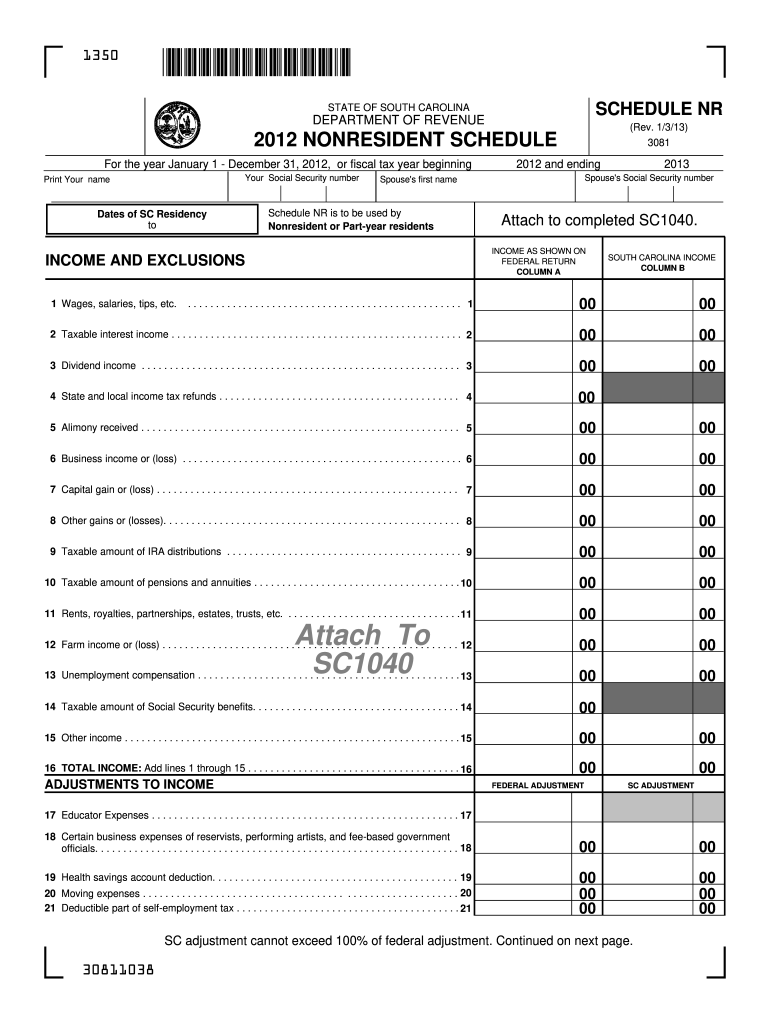
Urity number Print Your name Dates of SC Residency to 3081 2012 and ending Schedule NR is to be used by Nonresident or Part-year residents Attach to completed SC1040. INCOME AS SHOWN ON FEDERAL RETURN COLUMN A INCOME AND EXCLUSIONS 2013 Spouse's Social Security number Spouse's first name SOUTH CAROLINA INCOME COLUMN B ................................................. 1 00 00 2 Taxable interest income . . . . . . . . . . . . . . . . . . . . . . . . . . . . . . . . . . . . . . . . .
Loading

Open form follow the instructions

Easily sign the form with your finger

Send filled & signed form or save
How to fill out the SC Schedule NR online
Filling out the SC Schedule NR online can be a manageable process when you have clear guidance. This guide provides step-by-step instructions to help you accurately complete the form as a nonresident or part-year resident of South Carolina.
Follow the steps to fill out the SC Schedule NR efficiently.
- Click ‘Get Form’ button to access the SC Schedule NR and open it in your preferred online editor.
- Enter your Social Security number in the designated field at the top of the form. This is essential for identification purposes.
- Provide your full name as it appears on your federal tax return. Ensure the spelling is accurate.
- Indicate the dates of your South Carolina residency. Enter the start and end dates as required.
- In 'Income as shown on federal return', complete Column A with the relevant income amounts. This includes wages, dividends, and other income as listed.
- In Column B, input the corresponding amounts of South Carolina income derived from the federal income figures you provided. This requires you to calculate the income allocated to South Carolina.
- Proceed to the adjustments section. Enter any necessary federal adjustments in the appropriate fields.
- Complete the South Carolina adjustments, ensuring that you adhere to any specific restrictions on each adjustment listed.
- Calculate your total South Carolina adjustments and modified adjusted gross income as per the form's guidance.
- For deductions, follow the instructions regarding standard vs. itemized deductions. Input the correct figures based on your chosen method.
- Finalize your calculations by determining the South Carolina taxable income using the formula provided in the form.
- Once you have completed all sections of the form, review your entries for accuracy. Save any changes, and then proceed to download, print, or share your completed form as necessary.
Complete your SC Schedule NR online today for a smoother tax filing experience.
Experience a faster way to fill out and sign forms on the web. Access the most extensive library of templates available.
Related content
Dec 31, 2024 — Attach this form and a complete copy of your federal return to your...
MyDORWAY is the preferred way to securely upload W-2 and 1099 forms, register for...
Ocular examination conducted two weeks prior to the scheduled sacrifices for Subgroups B...
Get answers to your most pressing questions about US Legal Forms API.
What are the tax advantages of South Carolina?
South Carolina offers several tax advantages, such as lower property tax rates and generous tax deductions for certain retirement income. Additionally, the state has a range of credits and exemptions that can benefit residents and non-residents alike. Taking advantage of these benefits can be essential for optimizing your tax situation when using the SC Schedule NR.
Do I need to file a South Carolina nonresident tax return?
If you earn income in South Carolina as a non-resident, you are typically required to file a non-resident tax return. This filing allows you to report any income subject to South Carolina taxes. Completing the SC Schedule NR will help ensure you meet all the filing requirements.
What is the non-resident withholding in SC?
In South Carolina, non-resident withholding refers to the portion of tax withheld from income earned by non-residents. Employers are generally responsible for withholding taxes on wages and other payments sent to non-residents. Understanding this withholding system is essential for non-residents to accurately reflect their income on the SC Schedule NR.
What is the tax form for a non-resident in South Carolina?
Non-residents in South Carolina typically need to use the SC1040NR form for tax filing. This form allows non-residents to report income earned within the state while also detailing applicable deductions and credits. Using the SC Schedule NR in conjunction with the SC1040NR ensures comprehensive reporting.
What is a state tax addback?
A state tax addback refers to specific expenses or deductions that must be added back to your federal taxable income when filing state taxes. South Carolina has its own rules for these additions, which can affect your overall tax liability. If you're using the SC Schedule NR, it's important to consider these addbacks to ensure accurate tax reporting.
What items are included in taxable income?
Taxable income generally includes wages, salaries, dividends, capital gains, and other forms of earnings. Additional items such as certain pensions and rental income also contribute to your taxable income. Understanding what constitutes taxable income is essential for properly completing your SC Schedule NR.
What items are added back to your federal taxable income for South Carolina purposes?
South Carolina requires certain adjustments to your federal taxable income, known as addbacks. Common items include federal deductions related to state and local taxes, some tax-exempt interest, and specific business expenses. It is crucial to understand these adjustments when filing with the SC Schedule NR.
What is included in federal tax return?
A federal tax return typically includes your income, deductions, credits, and tax payments. For most individuals, this means reporting wages, interest, and any other sources of income. Using the SC Schedule NR, you can accurately complete your return and ensure you include all relevant data.
Does 1040nr have Schedule A?
Form 1040NR, used by non-residents to file their income tax returns, does not include Schedule A, which is designated for itemized deductions. Instead, non-residents might have different forms or schedules to report income and deductions specific to their situations. Understanding the proper documentation is essential, and SC Schedule NR can aid in organizing your financial reporting. You can find helpful resources on uslegalforms to ensure you comply with all requirements.
What is the non resident property tax rate in SC?
In South Carolina, the non-resident property tax rate varies based on the type of property and its location. Generally, non-residential properties are taxed at different rates compared to residential properties. Familiarizing yourself with the relevant tax laws, including the use of SC Schedule NR, is crucial for accurate reporting. Consider visiting uslegalforms for specific forms and guidance that suit your situation.
Use professional pre-built templates to fill in and sign documents online faster. Get access to thousands of forms.
If you believe that this page should be taken down, please follow our DMCA take down process here.
This form is available in several versions. Select the version you need from the drop-down list below.