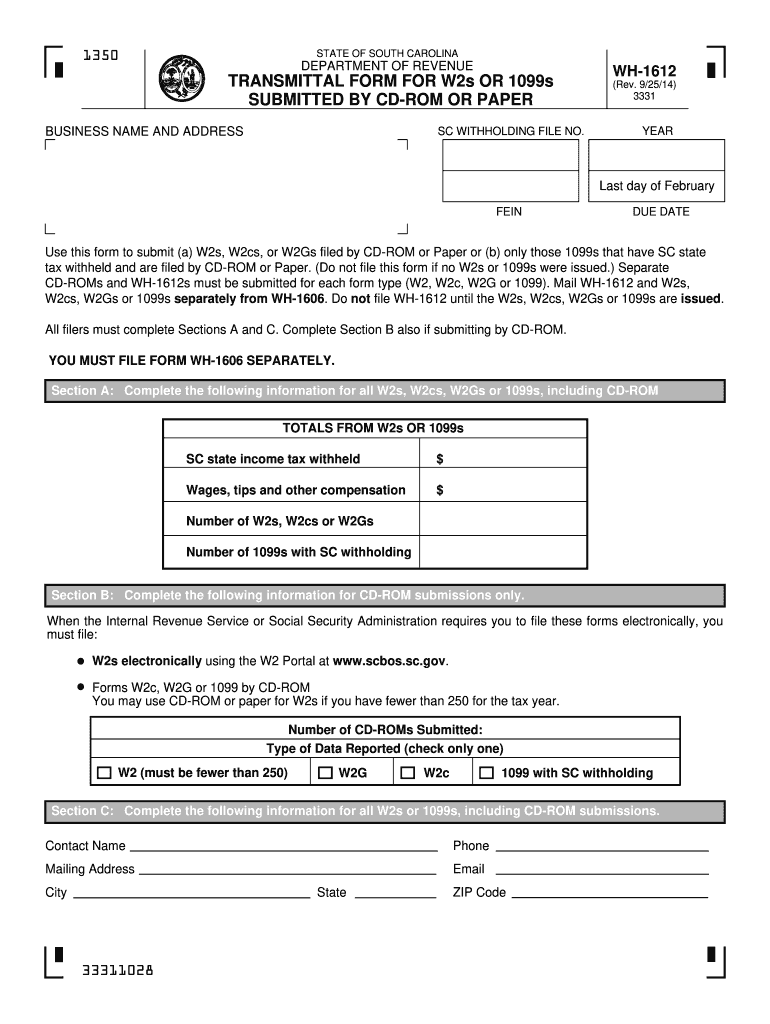
Employer Identification Number (FEIN) and the year for which you are filing. Preparers only may omit the SC Withholding File Number. INSTRUCTIONS Section A: Enter total SC state income tax withheld. This is the sum of income tax withheld from W2s or 1099s. Enter total wages, tips, and other compensation. Enter the number of W2s, W2cs or W2Gs submitted by Paper or CD-ROM but not both. Enter the number of all forms in the federal Form 1099 series with SC withholding submitted by Paper or CD-ROM bu.
Loading

Open form follow the instructions

Easily sign the form with your finger

Send filled & signed form or save
How to fill out the SC DoR WH-1612 online
Filling out the SC DoR WH-1612 form is an essential step for those submitting W2s or 1099s with South Carolina state tax withheld. This guide will provide you with clear and comprehensive instructions to complete the form efficiently online.
Follow the steps to accurately fill out the SC DoR WH-1612 form.
- Click ‘Get Form’ button to obtain the form and open it in the editor.
- In Section A, enter the total South Carolina state income tax withheld. This amount represents the income tax withheld from all W2s or 1099s submitted.
- For Section A, also enter the total wages, tips, and other compensation that are reported on the W2s or 1099s.
- Specify the number of W2s, W2cs, or W2Gs that you are submitting. Ensure that this number corresponds to the forms you are including.
- Indicate the number of 1099s that have South Carolina withholding and are being submitted as well.
- Move to Section B if submitting by CD-ROM. Enter the number of CD-ROMs being submitted and select the appropriate type of data reported by checking one box. Only one type can be selected per submission.
- In Section C, fill out your contact information including your name, phone number, mailing address, email, city, state, and ZIP code.
- Once all sections have been completed, ensure that you review the form for accuracy. Save the changes to your document.
- You can now choose to download, print, or share the filled-out form as needed.
Complete your SC DoR WH-1612 form online today to ensure timely filing!
Experience a faster way to fill out and sign forms on the web. Access the most extensive library of templates available.
Related content
WH-1612 INSTRUCTIONS Enter total SC state Income Tax withheld. This is the sum of...
Columbia, SC 29202, WH-1612; Paper W-2 and 1099 forms South Carolina Department...
a 280.dor'b_vl92 dor four.color (bhck, violet, grecn and white) displry in rhc original...
Get answers to your most pressing questions about US Legal Forms API.
What is the difference between EIN and sales tax ID?
An Employer Identification Number (EIN) is used primarily for federal tax purposes and is assigned by the IRS, while a sales tax ID is specific to state sales tax registrations and is issued by state authorities such as the South Carolina Department of Revenue. The SC DoR WH-1612 may be involved when handling certain exemptions for sales tax. Understanding these differences is essential for compliance, and platforms like uslegalforms provide informative resources to help clarify tax requirements.
How to get a SC sales tax ID number?
To obtain a South Carolina sales tax ID number, you must register your business with the South Carolina Department of Revenue. During registration, you may need to complete the SC DoR WH-1612 form if your business qualifies for exemptions. Gathering accurate business information will help in the smooth acquisition of your sales tax ID. Resources on uslegalforms can serve as a useful guide through this registration process.
How to set up a tax ID number?
To set up a tax ID number in South Carolina, you need to complete the required registration process with the South Carolina Department of Revenue. This often includes submitting the SC DoR WH-1612 form if applicable. Make sure to gather all necessary business information and documents to facilitate the registration. Utilizing uslegalforms can help you obtain the correct forms and instructions to simplify the setup.
How do I find my SC/SID number?
Your South Carolina (SC) or Sales and Use Tax ID number (SID) can typically be found on tax documents or correspondence from the South Carolina Department of Revenue. If you have misplaced your number, you can contact the department directly for assistance. Additionally, resources on uslegalforms offer guidance on retrieving lost numbers and managing your tax obligations effectively.
How do I get a South Carolina withholding number?
You can obtain a South Carolina withholding number by registering your business with the South Carolina Department of Revenue. Completing the SC DoR WH-1612 form is necessary during registration if you intend to withhold taxes from employees' wages. Ensure that you have all required information ready to streamline the application. Services like uslegalforms provide valuable resources that simplify the registration process for new businesses.
Where to mail SC form WH-1612?
After completing the SC form WH-1612, you should mail it directly to the South Carolina Department of Revenue at the address indicated on the form. Make sure to include any supporting documents required for your exemption claim. Mailing your form to the correct address ensures faster processing of your request. You can find additional mailing options and tips on uslegalforms to help you navigate the submission process smoothly.
How do I get a SC tax exemption certificate?
To get a SC tax exemption certificate, you need to complete the SC DoR WH-1612 form, which allows businesses and individuals to claim tax exemptions in South Carolina. You must ensure that you qualify for exemptions under the state's tax laws. After filling out the form, you can submit it to the South Carolina Department of Revenue for processing. Using uslegalforms can make this process easier by providing you with the correct templates and guidance.
Does South Carolina tax retirement income?
South Carolina does tax retirement income, but there are exemptions available for seniors. Certain types of retirement income, including Social Security benefits and income from some retirement accounts, may qualify for tax exemptions. It is important to review the specifics of how SC DoR applies these exemptions to determine your tax obligations. Consulting with a tax professional can also provide clarity on your situation.
What is the tax break for seniors in South Carolina?
South Carolina offers several tax breaks for seniors, primarily through the property tax exemption. Eligible seniors may benefit from a significant reduction in their home’s assessed value, thus lowering their property taxes. Additionally, retirement income is partially exempt for seniors, making it beneficial to understand these provisions. For more detailed information, consult the South Carolina Department of Revenue documentation.
At what age do you stop paying state taxes in South Carolina?
In South Carolina, there is no specific age at which you stop paying state taxes. However, retirees may qualify for certain exemptions or deductions that can reduce their tax liability. It is advisable to check the SC DoR guidelines to ensure you take advantage of all available tax breaks. Staying informed about tax laws helps you plan your finances effectively.
Use professional pre-built templates to fill in and sign documents online faster. Get access to thousands of forms.
If you believe that this page should be taken down, please follow our DMCA take down process here.
This form is available in several versions. Select the version you need from the drop-down list below.