Loading
Form preview
  • US Legal Forms
  • Other Templates
  • Tax Forms
  • South Carolina Tax Forms
  • Sc Dor Sch.tc-57a 2015

Get Sc Dor Sch.tc-57a 2015

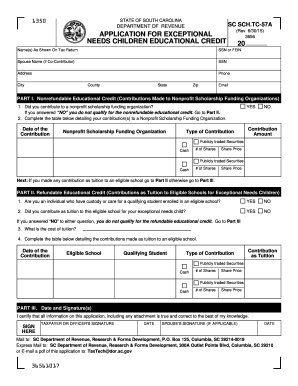
N Spouse Name (if Co-Contributor) SSN Address Phone City County State Zip Email PART I. Nonrefundable Educational Credit (Contributions Made to Nonprofit Scholarship Funding Organizations) 1. Did you contribute to a nonprofit scholarship funding organization? If you answered NO you do not qualify for the nonrefundable educational credit. Go to Part II. 2. Complete the table below detailing your contribution(s) to a Nonprofit Scholarship Funding Organization. Date of the Contribu.

How it works

  1. Open form

    Open form follow the instructions

  2. Easily sign form

    Easily sign the form with your finger

  3. Share form

    Send filled & signed form or save

How to fill out the SC DoR SCH.TC-57A online

The SC DoR SCH.TC-57A form is designed for users to apply for the Educational Credit for Exceptional Needs Children. This guide provides detailed, step-by-step instructions to help you complete the form accurately and efficiently while filing online.

Follow the steps to fill out the SC DoR SCH.TC-57A form online successfully.

  1. Press the ‘Get Form’ button to access the form and open it in the editor.
  2. Enter the name(s) as shown on your tax return in the designated field.
  3. Input the Social Security Number (SSN) or Federal Employer Identification Number (FEIN) in the appropriate box.
  4. If applicable, provide the spouse's name and their SSN, if you are filing jointly.
  5. Fill in your address, including phone number, city, county, state, and zip code.
  6. Include your email address in the provided field for communication purposes.
  7. In Part I, answer whether you contributed to a nonprofit scholarship funding organization by selecting 'YES' or 'NO.' If 'NO,' proceed to Part II.
  8. If 'YES,' complete the contribution details in the table by entering the date of the contribution, the nonprofit organization name, type of contribution, and amount contributed.
  9. If you made any tuition contributions to an eligible school, proceed to Part II; otherwise, go to Part III.
  10. In Part II, answer whether you have custody or care for a qualifying student and whether you contributed tuition for this child. Respond with 'YES' or 'NO' to both questions.
  11. Enter the cost of tuition in the designated field.
  12. Complete the tuition contribution table by entering the date of the contribution, name of the eligible school, qualifying student’s name, type of contribution, and tuition contribution amount.
  13. If contributions were made on behalf of multiple children, attach a separate sheet containing the required information for each child.
  14. In Part III, sign and date the application to certify that all information is true and correct.
  15. After completing the form, save your changes, and choose to download, print, or share the document as needed.

Complete your SC DoR SCH.TC-57A form online today to take advantage of the educational credits available!

Get form

Experience a faster way to fill out and sign forms on the web. Access the most extensive library of templates available.

Related content

SC SCH TC 57
You will receive a letter from the SCDOR stating the amount of credit you have been...
Learn more
south carolina tax incentives for economic...
May 9, 2018 — This publication cites many South Carolina code sections, regulations...
Learn more
Parkinson
by E Dias-Tosta — Os efeitos colaterais mais comuns são: ansiedade, insônia...
Learn more

Related links form

CT JD-HM-5 2019 IA Revised Uniform Limited Liability Company Act 2017 MD Advance Directive: Planning For Future Health Care Decisions NC Health Care Power Of Attorney

Questions & Answers

Get answers to your most pressing questions about US Legal Forms API.

Contact support

To acquire a tax exemption certificate in South Carolina, begin by filling out the SC DoR SCH.TC-57A form. It's vital to provide accurate information and any necessary documentation to demonstrate your eligibility. After submitting your application to the appropriate authority, the processing time may vary, but you will be notified once your exemption is approved. This certificate can significantly reduce your tax expenditures.

Obtaining a SC withholding number starts with completing the relevant applications, such as the SC DoR SCH.TC-57A. This number is essential for businesses that withhold state income tax from employee paychecks. Once you submit your application with the necessary details, you should receive your number through the Department of Revenue. This helps ensure compliance with state tax laws.

To qualify for the SC tuition tax credit, you must meet specific eligibility requirements stated in the SC DoR SCH.TC-57A form. Factors such as your income level and the type of educational institution can influence your qualification. It’s wise to have your tax documents ready when applying to streamline the process. Consider consulting a tax professional for personalized advice.

Gaining your exemption certificate in South Carolina involves completing the SC DoR SCH.TC-57A form. You must submit this form with any required supporting documents to the appropriate agency. The processing time may vary, but keeping track of your submission can help ensure you receive your certificate efficiently. This certificate will allow you tax savings on certain purchases.

To obtain a SC sales tax ID number, you can fill out the SC DoR SCH.TC-57A application form online or through mail. This number will enable you to collect sales tax from customers if you operate a business in South Carolina. Make sure to provide accurate and complete information on your application to avoid delays. Once approved, you will receive your sales tax ID number promptly.

To qualify as a tax-exempt individual in South Carolina, you typically need to meet specific criteria outlined by the SC DoR SCH.TC-57A form. This may include factors like income level or type of organization you represent, such as nonprofit status. Be prepared to provide documentation that verifies your eligibility, as this will help streamline the application process. Always check the latest guidelines for any updates.

Getting a SC tax exemption certificate involves filling out the appropriate application, like the SC DoR SCH.TC-57A. You should visit the South Carolina Department of Revenue’s website to find the required forms and guidelines. After completing your application, submit it to the designated agency for processing. A tax exemption certificate can benefit you by reducing your sales tax burden.

To apply for a South Carolina property tax exemption, you should complete the SC DoR SCH.TC-57A form, which is essential for claiming the exemption. You can submit this application to your local county assessor’s office. It's crucial to gather necessary documentation, such as proof of eligibility, to support your application. Once submitted, expect a review process that may take several weeks.

Receiving a letter from the South Carolina Department of Revenue typically indicates that there is important information regarding your tax return or account. It may request additional documentation, clarify your tax status, or notify you of changes. Staying informed, including matters related to SC DoR SCH.TC-57A, is essential. U.S. Legal Forms can help you address any inquiries efficiently and correctly.

The exceptional child tax credit provides financial relief to families with children who have disabilities or exceptional needs. This credit serves as support to offset the costs associated with caring for a child with special needs. To learn how to effectively apply for this credit, including the SC DoR SCH.TC-57A, U.S. Legal Forms can assist you in finding the necessary forms and guidance.

Get This Form Now!

Use professional pre-built templates to fill in and sign documents online faster. Get access to thousands of forms.
If you believe that this page should be taken down, please follow our DMCA take down processhere.
Get SC DoR SCH.TC-57A
  • Adoption
  • Bankruptcy
  • Contractors
  • Divorce
  • Home Sales
  • Employment
  • Identity Theft
  • Incorporation
  • Landlord Tenant
  • Living Trust
  • Name Change
  • Personal Planning
  • Small Business
  • Wills & Estates
  • Packages A-Z
  • Affidavits
  • Bankruptcy
  • Bill of Sale
  • Corporate - LLC
  • Divorce
  • Employment
  • Identity Theft
  • Internet Technology
  • Landlord Tenant
  • Living Wills
  • Name Change
  • Power of Attorney
  • Real Estate
  • Small Estates
  • Wills
  • All Forms
  • Forms A-Z
  • Other Templates
  • Legal Hub
  • About Us
  • Help Portal
  • Legal Resources
  • Blog
  • Affiliates
  • Contact Us
  • Delete My Account
  • Site Map
  • Industries
  • Forms in Spanish
  • Localized Forms
  • State-specific Forms
  • Forms Kit
  • Real Estate Handbook
  • All Guides
  • Notarize
  • Incorporation services
  • For Consumers
  • For Small Business
  • For Attorneys
  • USLegal
  • FormsPass
  • pdfFiller
  • signNow
  • altaFlow
  • DocHub
  • Instapage
Form Packages
  • Adoption
  • Bankruptcy
  • Contractors
  • Divorce
  • Home Sales
  • Employment
  • Identity Theft
  • Incorporation
  • Landlord Tenant
  • Living Trust
  • Name Change
  • Personal Planning
  • Small Business
  • Wills & Estates
  • Packages A-Z
Form Categories
  • Affidavits
  • Bankruptcy
  • Bill of Sale
  • Corporate - LLC
  • Divorce
  • Employment
  • Identity Theft
  • Internet Technology
  • Landlord Tenant
  • Living Wills
  • Name Change
  • Power of Attorney
  • Real Estate
  • Small Estates
  • Wills
  • All Forms
  • Forms A-Z
  • Other Templates
Customer Service
  • Legal Hub
  • About Us
  • Help Portal
  • Legal Resources
  • Blog
  • Affiliates
  • Contact Us
  • Delete My Account
  • Site Map
  • Industries
  • Forms in Spanish
  • Localized Forms
  • State-specific Forms
  • Forms Kit
Legal Guides
  • Real Estate Handbook
  • All Guides
Prepared for you
  • Notarize
  • Incorporation services
Our Customers
  • For Consumers
  • For Small Business
  • For Attorneys
Our Sites
  • USLegal
  • FormsPass
  • pdfFiller
  • signNow
  • altaFlow
  • DocHub
  • Instapage
Social Media
Call us now toll free:
+1 833 426 79 33
As seen in:
© Copyright 1999-2026 airSlate Legal Forms, Inc. 17 Station Street, Ste. 203, Brookline, MA 02445
  • Your Privacy Choices
  • Terms of Service
  • Privacy Notice
  • Content Takedown Policy
  • Bug Bounty Program
SC DoR SCH.TC-57A
This form is available in several versions.
Select the version you need from the drop-down list below.
2022 SC DoR SCH.TC-57A
Select form
  • 2022 SC DoR SCH.TC-57A
  • 2019 SC DoR SCH.TC-57A
  • 2018 SC DoR SCH.TC-57A
  • 2015 SC DoR SCH.TC-57A
Select form