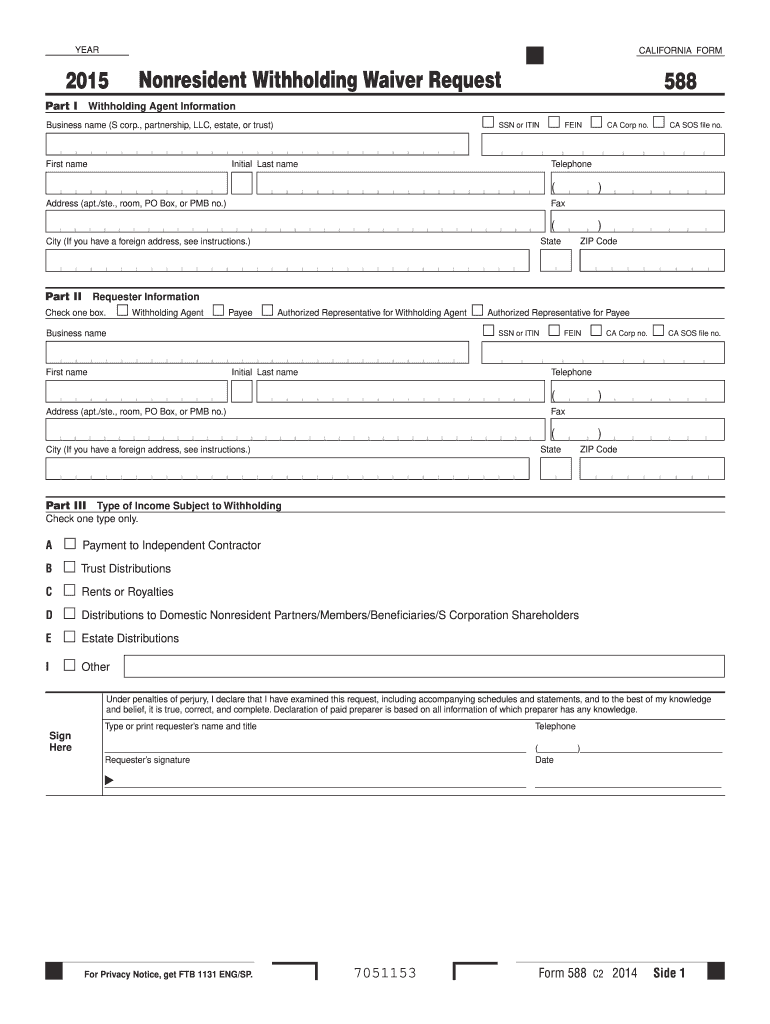
(S corp., partnership, LLC, estate, or trust) First name 588 Initial Last name Telephone ( ) Address (apt./ste., room, PO Box, or PMB no.) Fax ( ) State City (If you have a foreign address, see instructions.) ZIP Code Part II Requester Information Check one box. Business name Withholding Agent Payee Authorized Representative for Withholding Agent Authorized Representative for Payee SSN or ITIN FEIN CA Corp no. CA.
Loading

Open form follow the instructions

Easily sign the form with your finger

Send filled & signed form or save
How to fill out the CA FTB 588 online
The CA FTB 588 form, known as the Nonresident Withholding Waiver Request, is essential for seeking a waiver from withholding on certain payments made to nonresident individuals by withholding agents. This guide will provide clear, step-by-step instructions to assist users in completing the form online.
Follow the steps to correctly fill out the CA FTB 588 online.
- Click ‘Get Form’ button to obtain the form and open it in the editor.
- In Part I, provide the withholding agent's information. Indicate the appropriate Taxpayer Identification Number by checking the relevant box and entering the corresponding number. Include the business name, first and last names, contact number, and address details.
- In Part II, specify the requester information. Check the relevant box to identify whether the requester is a withholding agent, payee, or authorized representative. Fill in the necessary business or individual name, contact details, and address.
- Proceed to Part III, where you must select the type of income subject to withholding. Check only one box that corresponds to the nature of the income, such as payment to an independent contractor or trust distributions.
- In Part IV, provide details for each payee. Again, check the respective TIN box and input their identification number. Include the business name, first and last names, address, and reason for the waiver request by selecting the applicable letter code.
- Ensure all required information is filled in accurately, including the requester’s name and title. Once all parts of the form are completed, sign and date the request.
- After reviewing the form for accuracy, you can save changes, download, print, or share the completed CA FTB 588 form.
Complete your CA FTB 588 form online today to request your nonresident withholding waiver.
Experience a faster way to fill out and sign forms on the web. Access the most extensive library of templates available.
Related content
Use Form 588, Nonresident Withholding Waiver Request, to request a waiver from withholding...
A Payee has California state tax returns on file for the two most current taxable years in...
THIS MATERIAL IS THE EXCLUSIVE PROPERTY OF. TOSHIBA INTERNATIONAL CORPORATION AND SHALL...
Get answers to your most pressing questions about US Legal Forms API.
How do you avoid the underpayment penalty?
To avoid the underpayment penalty, make timely estimated tax payments that align with your expected tax obligations. Keep an eye on your income fluctuations and adjust your payments accordingly. Utilizing tools like CA FTB 588 ensures that you stay organized and compliant with your reporting.
What is the California underpayment penalty rate?
The California underpayment penalty rate is based on the amount of tax underpaid and the duration of the underpayment. It varies depending on specific circumstances and can change yearly. To prevent incurring this penalty, refer to the CA FTB guidelines and ensure timely payments.
How to claim California nonwage withholding credit?
To claim the California nonwage withholding credit, you report the withheld amounts on your tax return using CA FTB 588. Keep thorough records of all applicable income and withholdings. By ensuring your filings are correct, you can effectively reduce your overall tax liability.
What is a reasonable cause for penalty waiver in California?
A reasonable cause for a penalty waiver in California may include circumstances such as serious illness, natural disasters, or other situations outside your control. When addressing penalties on your tax forms, including CA FTB 588, citing such reasons can be helpful. Always provide documentation to support your claims.
How to avoid CA health insurance penalty?
To avoid the CA health insurance penalty, ensure you have qualifying health coverage during the entire year. Familiarize yourself with the state’s minimum essential coverage requirements. Filing correctly with the form CA FTB 588 also plays a role in showing your compliance.
What is California form 588?
California form 588 is used to report nonwage withholding for California residents. This form allows you to declare tax withheld on income that does not fall under regular wages. Understanding how to file CA FTB 588 can help you manage your tax responsibilities effectively.
Where to fax form 588?
You can fax form 588 to the California Franchise Tax Board (FTB) at the appropriate fax number provided on the form’s instructions. Ensure that you check the latest guidelines from the CA FTB website for any updates. Sending the form accurately is vital for timely processing, so double-check the recipient details.
How do I certify that I am not subject to California withholding?
To certify that you are not subject to California withholding, complete the appropriate forms, such as Form W-8 or similar certificates. Present this documentation to your payers to verify your exemption status. Ensure you provide all requested and relevant information to avoid any misunderstandings. You may find helpful templates on US Legal Forms to ease this process.
Who must file a California fiduciary income tax return?
A California fiduciary income tax return must be filed by fiduciaries managing estates, trusts, or other entities with California-source income. If the entity has a taxable income or is required to withhold non-wage amounts, then filing is mandatory. For assistance with the filing process, refer to CA FTB 588 for additional regulations, or consult US Legal Forms to ensure compliance.
How do I claim exemption from California withholding?
To claim an exemption from California withholding, complete Form DE 4 or the appropriate forms for your specific situation. You must submit this form to your employer or payer, who will then adjust your withholding accordingly. Keep in mind to accurately provide the necessary information to avoid any complications. US Legal Forms can be a helpful resource for finding and completing these forms.
Use professional pre-built templates to fill in and sign documents online faster. Get access to thousands of forms.
If you believe that this page should be taken down, please follow our DMCA take down process here.
This form is available in several versions. Select the version you need from the drop-down list below.