Ollars for each table owned or operated." Type II machines include the following: 1. Type II machines as defined in Section 12-21-2720(2): "A machine for the playing of amusements or video games, without free play feature, or machines of the crane type operated by a slot in which is deposited a coin or thing of value and a machine for the playing of games or amusements, which has a free play feature, operated by a slot in which is deposited a coin or thing of value, and the machine is .
Loading

Open form follow the instructions

Easily sign the form with your finger

Send filled & signed form or save
How to fill out the SC DoR L-2081 online
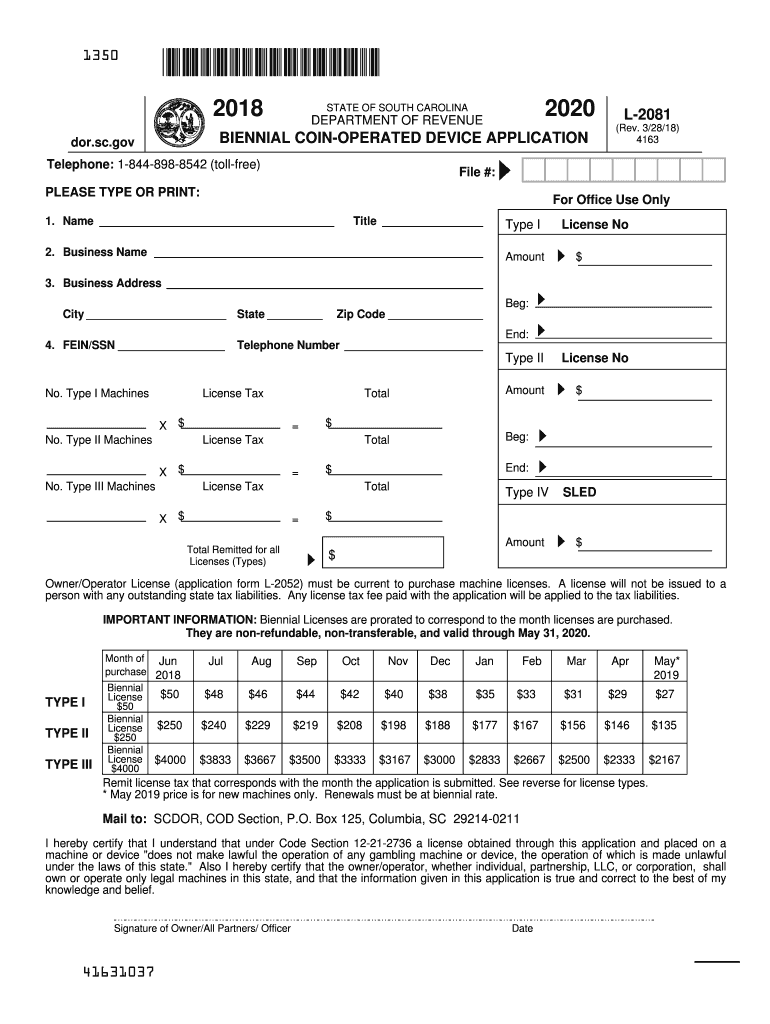
Filling out the SC DoR L-2081, a vital form for the biennial coin-operated device application, is an essential task for ensuring compliance with South Carolina’s regulations. This guide will provide you with detailed, step-by-step instructions for completing this form online effectively.
Follow the steps to complete your SC DoR L-2081 application online.
- Press the ‘Get Form’ button to access the SC DoR L-2081 and open it in your editing interface.
- Begin filling out the form by entering your name and title in the designated fields. Make sure your input is clear and legible.
- Input your business name in the corresponding field. This is crucial for ensuring that your application is properly associated with your business.
- Enter your business address, including the starting address and city. Be thorough to avoid delays in processing.
- Provide the state and zip code for your business address to finalize this section.
- In the FEIN/SSN field, input your Federal Employer Identification Number or Social Security Number as required for identification.
- Enter your telephone number in the designated section to ensure you can be reached regarding your application.
- Indicate the number of Type I and Type II machines you are applying for along with the corresponding license tax fees as outlined in the form.
- Complete sections for Type III and Type IV machines if applicable and calculate the total license tax due. Make sure all calculations are accurate.
- Affix your signature and the date in the required section, certifying the accuracy of the information provided and acknowledging your understanding of the associated regulations.
- After reviewing your entries for accuracy, save your changes, and proceed to download or print the form if necessary.
- Finally, submit your completed application by mailing it to the specified address, or choose to share it as required.
Complete your SC DoR L-2081 application online today for a smooth processing experience.
Experience a faster way to fill out and sign forms on the web. Access the most extensive library of templates available.
Related content
L-2081. (Rev 2/13/25). 4163. Your Owner/Operator License must be current to purchase...
by G Olivo · 2013 · Cited by 1 — Aos Médicos Veterinários que permitiram a nossa...
by E Dias-Tosta — A (L-dopa) é a terapia mais eficaz no controle dos sintomas pre...
Get answers to your most pressing questions about US Legal Forms API.
How do I contact SC State tax?
To contact South Carolina State Tax, you can visit their official website for various contact options, including phone numbers, email addresses, and live chat options. For inquiries specifically about SC DoR L-2081, using the designated phone line can ensure that your questions are answered promptly and accurately. Always have your tax information ready for the fastest service.
How to track SC state tax refund?
To track your South Carolina state tax refund, visit the South Carolina Department of Revenue's refund tracking tool on their website. You will typically need to provide your Social Security number and filing status. For issues linked to SC DoR L-2081, this tool can be particularly helpful in providing status updates regarding your refund.
What is the SC Dor Form C 278?
SC Dor Form C 278 is a specific form used by residents when filing for certain tax credits or refunds in South Carolina. This form can be crucial for individuals who qualify for specific deductions or need to apply for refunds associated with SC DoR L-2081. Ensure you're using the latest version of the form, as requirements may change.
What is the phone number for SC state refund?
The phone number for South Carolina state refund inquiries can usually be found on the South Carolina Department of Revenue’s official website. It's important to use this number for direct assistance regarding SC DoR L-2081. Having this information handy will help you resolve any issues related to your refund efficiently.
How long are SC tax refunds taking?
Typically, South Carolina tax refunds take about 8 to 12 weeks to process after you submit your return. However, processing times can vary based on several factors, including the method of filing and whether additional information is required. For updates related to SC DoR L-2081, you might want to check the South Carolina Department of Revenue's site for the most accurate information.
Where is my refund state phone number?
To find your refund state phone number, visit the official South Carolina Department of Revenue website or contact their main line for assistance. You can often locate the number in the FAQs or contact sections. If you're dealing with SC DoR L-2081 issues, having direct access to these resources can streamline your refund inquiries.
How to get SCDOR file number?
Getting your SC DoR file number is essential for your tax records. Start by checking your previous tax returns or notices from the SCDOR, where it is typically printed. If you're unable to locate it, utilize the resources on the South Carolina Department of Revenue website or contact their customer service for assistance.
How do I find my South Carolina UI account number?
To locate your South Carolina Unemployment Insurance (UI) account number, refer to any official correspondence from the South Carolina Department of Employment and Workforce. This number is essential for managing your unemployment benefits. If you still have difficulty finding it, accessing online services or reaching out to the department can provide clarity on your UI account.
How to find scdor file number?
Finding your SCDOR file number is straightforward. You can locate it on official documents from the South Carolina Department of Revenue, such as tax returns or notices. If you require additional assistance, contacting SCDOR directly or accessing their online resources can help you retrieve your SC DoR L-2081 file number easily.
Where is my SC refund number?
To find your South Carolina refund number, check the correspondence you received from the SCDOR after filing your tax return. Your refund number should be clearly indicated in the documentation. If you cannot find it, consider visiting the SCDOR website and using their online tools to track your refund status with your personal details.
Use professional pre-built templates to fill in and sign documents online faster. Get access to thousands of forms.
If you believe that this page should be taken down, please follow our DMCA take down process here.
This form is available in several versions. Select the version you need from the drop-down list below.