Get Ca Ftb 588 2017
How it works
-

Open form follow the instructions
-

Easily sign the form with your finger
-

Send filled & signed form or save
How to fill out the CA FTB 588 online
Filling out the CA FTB 588 form online can streamline the process of submitting your nonresident withholding waiver request. This guide provides clear and detailed instructions to help you easily navigate each section of the form while ensuring accuracy and compliance.
Follow the steps to complete the CA FTB 588 online form seamlessly.
- Click ‘Get Form’ button to access the form. This action will allow you to open the CA FTB 588 in an editable format.
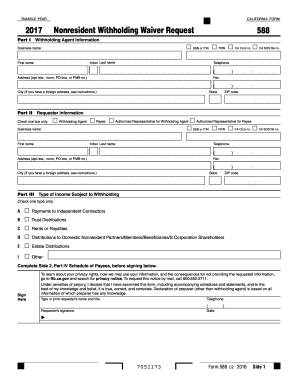
- In Part I, enter the withholding agent's information. Include your social security number (SSN) or individual taxpayer identification number (ITIN), business name, initial and last name, and federal employer identification number (FEIN). You can also add California corporation number or Secretary of State (SOS) file number if applicable.
- Continue by providing your telephone number and address, which should include your city, state, and ZIP code. If your address is foreign, follow the specific instructions for foreign addresses.
- In Part II, enter the requester information by selecting only one checkbox to indicate your role as a withholding agent, payee, or authorized representative. Repeat the entry of SSN or ITIN, FEIN, or CA corporation number as needed, and include your name and contact details.
- For Part III, identify the type of income subject to withholding by checking only one option that applies to your situation. Available options include payments to independent contractors, rents, royalties, distributions to nonresident partners, and others.
- Proceed to Part IV to complete the schedule of payees. This section requires details about each payee, including their name, taxpayer identification number, and address. It's crucial not to create additional schedules and use only the one provided.
- Select the reason for the waiver request by checking the appropriate box next to a reason code. If your reason relates to a newly admitted date, ensure to include the date as specified in the instructions.
- Before signing, review all provided information for accuracy. After confirming everything is complete and correct, type or print your name and title, sign, and date the form.
- Once finished, you can download, print, or share your completed form as needed. Make sure to save any changes made.
Start filling out your CA FTB 588 online today to ensure compliance and a smooth process.
Get form
California form 588 is a crucial document used for requesting a refund of withholding on California-source income. This form plays a vital role in allowing taxpayers to reclaim excess withholdings based on their actual tax liabilities. Utilizing the CA FTB 588 ensures that your withholding aligns with your tax situation. Having accurate information on this form can facilitate smoother interactions with the tax authorities.