Loading
Get Mn Dor Pcr 2019
How it works
-

Open form follow the instructions
-

Easily sign the form with your finger
-

Send filled & signed form or save
How to fill out the MN DoR PCR online
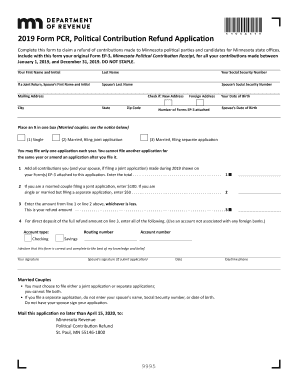
This guide provides a comprehensive overview of the Minnesota Department of Revenue Political Contribution Refund (PCR) application process. By following these instructions, you can successfully complete your application online and claim your refund for political contributions made during 2019.
Follow the steps to complete your MN DoR PCR application online.
- Press the ‘Get Form’ button to obtain the MN DoR PCR and open it in your designated editor.
- Begin filling out the form by entering your first name, initial, and last name in the designated fields.
- Input your Social Security number in the appropriate section to identify your tax record.
- If you are submitting a joint application, include your spouse’s first name, initial, last name, and Social Security number.
- Fill in your mailing address including city, state, and zip code. Check the box if you have a new address.
- Indicate the number of Form EP-3s attached to ensure your refund application is complete.
- Enter your date of birth and, if applicable, your spouse's date of birth.
- Mark the appropriate filing status box: single, married-filing jointly, or married-filing separately.
- Add up all contributions from your Form EP-3s and enter the total in the specified line.
- Depending on your filing status, enter the correct refund amount: $100 for joint applications, $50 for single or separate applications.
- Record the amount from the prior step in the designated box as your refund amount.
- If you prefer direct deposit, fill in your bank routing number, account type, and account number.
- Ensure your signature is included, along with your spouse’s signature if filing jointly.
- Review the completed form for accuracy, and once satisfied, save your changes, download, print, or share the form as needed.
Start filling out your MN DoR PCR application online today to claim your refund!
Get form
Experience a faster way to fill out and sign forms on the web. Access the most extensive library of templates available.
In Minnesota, the income limit for CRP eligibility is established annually and can vary based on filing status. Generally, individuals and families must meet specific income thresholds to qualify for the renter's credit. The MN DoR PCR uses this information to guide potential applicants. For current limits and guidelines, uslegalforms provides updated resources.
Get This Form Now!
Use professional pre-built templates to fill in and sign documents online faster. Get access to thousands of forms.