Loading
Get Irs 8302 2018-2026
This website is not affiliated with IRS
How it works
-

Open form follow the instructions
-

Easily sign the form with your finger
-

Send filled & signed form or save
How to fill out the IRS 8302 online
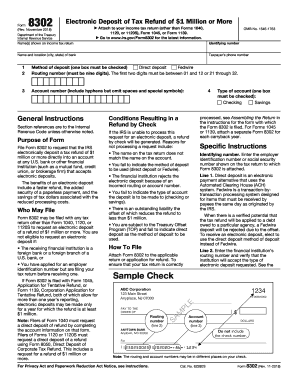
Filling out the IRS 8302 form online allows you to request the electronic deposit of a tax refund of $1 million or more. This comprehensive guide provides you with clear instructions on each section of the form to ensure a successful submission.
Follow the steps to complete the IRS 8302 form online.
- Click ‘Get Form’ button to obtain the form and open it in your preferred editor.
- Enter the name(s) as shown on your income tax return in the designated field.
- Provide the identifying number, which can be either your employer identification number or social security number.
- Specify the name and location (city, state) of your bank in the appropriate section.
- Fill in your phone number so the IRS can contact you if needed.
- Select the method of deposit by checking either 'Direct deposit' or 'Fedwire.' Ensure to choose one.
- Input the routing number of your financial institution. This number must be nine digits and begin with either 01 to 12 or 21 to 32.
- Enter your account number, including hyphens, while omitting any spaces and special symbols.
- Select the type of account for the deposit by checking either 'Checking' or 'Savings.'
- Review all the provided information for accuracy before saving your changes.
- Once completed, save the changes and download, print, or share the form as needed.
Start completing your IRS 8302 form online today for a faster and secure tax refund process.
The IRS may request form 8962 if there are discrepancies related to your premium tax credits. This form is important for reconciling the amount of credit you received against your actual income. If you're confused about this request, consulting with tax professionals or using resources from platforms like U.S. Legal Forms can provide clarity on how to respond accurately.