Loading
Form preview
  • US Legal Forms
  • Other Templates
  • Tax Forms
  • Rhode Island Tax Forms
  • Ri Dot Ri-1040x-nr 2016

Get Ri Dot Ri-1040x-nr 2016-2026

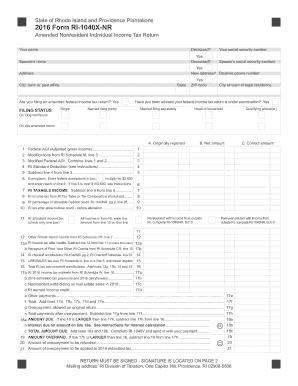
Attach only the supporting forms and schedules for the items changed. If you do not attach the required information, your Form RI-1040X-NR may not be approved. Under penalties of perjury, I declare that I have examined this return and accompanying schedules and statements, and to the best of my knowledge and belief, it is true, accurate and complete. Declaration of preparer (other than taxpayer) is based on all information of which preparer has any knowledge. Your signature Spouse s signatu.

How it works

  1. Open form

    Open form follow the instructions

  2. Easily sign form

    Easily sign the form with your finger

  3. Share form

    Send filled & signed form or save

How to fill out the RI DoT RI-1040X-NR online

Filling out the RI DoT RI-1040X-NR is an essential process for nonresidents who need to amend their Rhode Island income tax return. This guide will provide you with a clear and step-by-step approach to complete the form accurately online.

Follow the steps to fill out the RI DoT RI-1040X-NR online effectively.

  1. Click ‘Get Form’ button to obtain the RI DoT RI-1040X-NR form and open it in your preferred editing tool.
  2. Enter your name in the designated field. If you are a deceased person, check the 'Yes' box.
  3. Input your Social Security number (SSN) in the specified area.
  4. Fill in your spouse’s name if applicable, and indicate if they are deceased by checking the 'Yes' box.
  5. Provide your spouse's Social Security number, if applicable.
  6. Enter your current address, and indicate if it is a new address by checking 'Yes'.
  7. Fill in your daytime phone number, city, and state of residence.
  8. Select your filing status by checking the appropriate box (e.g., Single, Married Filing Jointly, etc.).
  9. Answer the question about whether you are filing an amended federal income tax return by checking 'Yes' if applicable.
  10. Complete the income section by entering the Federal AGI and any modifications from RI Schedule M.
  11. Calculate your Rhode Island taxable income by following the instructions for deductions and exemptions.
  12. If you have any tax credits or checkoff contributions, enter them as specified.
  13. Review your calculations for any amounts due or overpayments.
  14. In the signature section, ensure you and your spouse (if applicable) sign and date the form.
  15. Once all fields are accurately filled, save your changes, and if needed, download, print, or share the completed form.

Complete your RI DoT RI-1040X-NR online to ensure accurate and timely tax processing.

Get form

Experience a faster way to fill out and sign forms on the web. Access the most extensive library of templates available.
Get form

Related content

Personal Income Tax Forms - RI Division of...
Jan 6, 2025 — Available forms include RI-1040 for residents, RI-1040NR for...
Learn more
2020 IRS form 1040
... NR revision. Form. 1040-NR has been revised to more closely follow the format of Forms...
Learn more
THE KEY BUSINESS PROGRAMS
Practical-Computing-1986-01-S-OCR January 1986 Volume 9 Issue 1 £1.25 PRACTICAL COMPUTING...
Learn more

Related links form

VT Clinician Orders For DNR/CPR And Life-Sustaining Treatment WY Provider Orders For Life-Sustaining Treatment (POLST) 2015 UK NSV001 2018 UK HMRC SA400 2017

Questions & Answers

Get answers to your most pressing questions about US Legal Forms API.

Contact support

To file a non-resident tax return, gather your income documentation, and use the appropriate non-resident form, such as the RI DoT RI-1040X-NR. Fill out the form accurately, reporting all applicable income from sources within the state. You can file electronically or mail it directly to the state tax division. Utilizing tools like your online tax service can simplify this process significantly.

To file taxes for a state you don't live in, you'll typically need to use the non-resident tax form for that specific state, like the RI DoT RI-1040X-NR for Rhode Island. Gather all necessary documents, including W-2s and 1099s reflecting income earned in that state. Online tax preparation services can also help simplify the process and ensure you meet all requirements. Be sure to check state-specific rules as they can vary significantly.

For non-residents, taxable income includes earnings from work conducted within Rhode Island and income derived from Rhode Island sources. This may include wages, rental income, and business profits in the state. Understanding what counts as taxable can help you accurately fill out your RI DoT RI-1040X-NR. If you have questions about specific income types, it can be beneficial to consult a tax expert.

Yes, you can file a nonresident state tax return using TurboTax. This software has options specifically designed for non-residents, making it easier for you to complete your RI DoT RI-1040X-NR filing. TurboTax guides you through the intricacies of nonresident tax laws, allowing you to maximize your deductions and credits. Consider using it for a more streamlined experience.

You can get Rhode Island tax forms through the Rhode Island Division of Taxation website. They provide downloadable forms including the RI DoT RI-1040X-NR for non-residents. Alternatively, state offices and certain financial institutions may also have physical copies available. Ensuring you have the right form is key to a smooth filing process.

You can obtain a 1040 tax booklet from the official IRS website as well as local post offices and libraries. Additionally, many tax preparation offices offer these booklets to help individuals file their taxes correctly. If you are looking for specific Rhode Island tax forms, consider visiting the RI Division of Taxation’s website. This is particularly helpful if you need to file the RI DoT RI-1040X-NR.

In Rhode Island, an estate tax return must be filed if the gross estate exceeds a certain threshold set by the state. This requirement applies to both residents and non-residents with property in Rhode Island. Filing the appropriate return is essential for compliance with state laws, and using resources from uslegalforms can simplify this process for you. They provide tools to help ensure accurate and timely filings.

The residency requirement for Rhode Island states that an individual is considered a resident if they maintain a permanent home in the state or spend significant time here. Non-residents, on the other hand, may still earn income from Rhode Island sources. Understanding this classification is crucial, especially when filing taxes using forms like RI DoT RI-1040X-NR. Proper classification can affect your tax liabilities.

Many states require nonresident withholding, each with its own rules and regulations. Rhode Island, for example, implements these requirements to ensure tax compliance from non-resident individuals. States like California, New York, and Arizona also have similar withholding mandates. Staying informed about these regulations can help non-residents navigate their tax obligations effectively.

The threshold for non-resident withholding in Rhode Island depends on the type of income received. Generally, any payment made to a non-resident exceeding a specific dollar amount triggers withholding requirements. The RI DoT specifies these figures annually, so it is important to check the latest guidelines. This ensures that all applicable taxes are withheld appropriately.

Get This Form Now!

Use professional pre-built templates to fill in and sign documents online faster. Get access to thousands of forms.
Get form
If you believe that this page should be taken down, please follow our DMCA take down processhere.
Get RI DoT RI-1040X-NR
Get form
  • Adoption
  • Bankruptcy
  • Contractors
  • Divorce
  • Home Sales
  • Employment
  • Identity Theft
  • Incorporation
  • Landlord Tenant
  • Living Trust
  • Name Change
  • Personal Planning
  • Small Business
  • Wills & Estates
  • Packages A-Z
  • Affidavits
  • Bankruptcy
  • Bill of Sale
  • Corporate - LLC
  • Divorce
  • Employment
  • Identity Theft
  • Internet Technology
  • Landlord Tenant
  • Living Wills
  • Name Change
  • Power of Attorney
  • Real Estate
  • Small Estates
  • Wills
  • All Forms
  • Forms A-Z
  • Other Templates
  • Legal Hub
  • About Us
  • Help Portal
  • Legal Resources
  • Blog
  • Affiliates
  • Contact Us
  • Delete My Account
  • Site Map
  • Industries
  • Forms in Spanish
  • Localized Forms
  • State-specific Forms
  • Forms Kit
  • Real Estate Handbook
  • All Guides
  • Notarize
  • Incorporation services
  • For Consumers
  • For Small Business
  • For Attorneys
  • USLegal
  • FormsPass
  • pdfFiller
  • signNow
  • altaFlow
  • DocHub
  • Instapage
Form Packages
  • Adoption
  • Bankruptcy
  • Contractors
  • Divorce
  • Home Sales
  • Employment
  • Identity Theft
  • Incorporation
  • Landlord Tenant
  • Living Trust
  • Name Change
  • Personal Planning
  • Small Business
  • Wills & Estates
  • Packages A-Z
Form Categories
  • Affidavits
  • Bankruptcy
  • Bill of Sale
  • Corporate - LLC
  • Divorce
  • Employment
  • Identity Theft
  • Internet Technology
  • Landlord Tenant
  • Living Wills
  • Name Change
  • Power of Attorney
  • Real Estate
  • Small Estates
  • Wills
  • All Forms
  • Forms A-Z
  • Other Templates
Customer Service
  • Legal Hub
  • About Us
  • Help Portal
  • Legal Resources
  • Blog
  • Affiliates
  • Contact Us
  • Delete My Account
  • Site Map
  • Industries
  • Forms in Spanish
  • Localized Forms
  • State-specific Forms
  • Forms Kit
Legal Guides
  • Real Estate Handbook
  • All Guides
Prepared for you
  • Notarize
  • Incorporation services
Our Customers
  • For Consumers
  • For Small Business
  • For Attorneys
Our Sites
  • USLegal
  • FormsPass
  • pdfFiller
  • signNow
  • altaFlow
  • DocHub
  • Instapage
Social Media
Call us now toll free:
+1 833 426 79 33
As seen in:
© Copyright 1999-2026 airSlate Legal Forms, Inc. 17 Station Street, Ste. 203, Brookline, MA 02445
  • Your Privacy Choices
  • Terms of Service
  • Privacy Notice
  • Content Takedown Policy
  • Bug Bounty Program