Loading
Form preview
  • US Legal Forms
  • Form Library
  • Tax Forms
  • Rhode Island Tax Forms
  • Ri Dot Ri-1040 2016

Get Ri Dot Ri-1040 2016

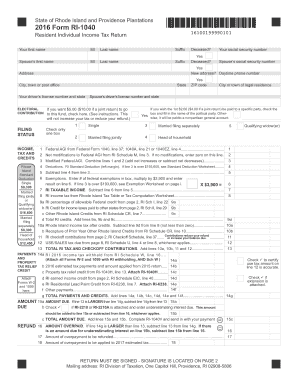
Deceased? Your social security number Suffix Yes Deceased? Spouse s social security number Yes New address? Daytime phone number Address City, town or post office State Your driver s license number and state will not increase your tax or reduce your refund.) INCOME, TAX AND CREDITS Rhode Island Standard Deduction Single $8,300 Married filing jointly or Qualifying widow(er) $16,600 Married filing separately $8,300 Head of household $12,450 Attach Forms W-2 and 1099 here. If you wi.

How it works

  1. Open form

    Open form follow the instructions

  2. Easily sign form

    Easily sign the form with your finger

  3. Share form

    Send filled & signed form or save

How to fill out the RI DoT RI-1040 online

Filing your resident individual income tax return in Rhode Island can be a straightforward process when approached step by step. This guide provides detailed instructions on completing the RI DoT RI-1040 form online, ensuring that users of all experience levels can navigate through the process with confidence.

Follow the steps to successfully complete your tax return.

  1. Click ‘Get Form’ button to obtain the form and open it in the editor.
  2. Begin by entering your personal information, including your first name, middle initial, last name, and social security number. If applicable, provide your spouse’s information following the same format.
  3. Indicate your filing status by checking the appropriate box (Single, Married filing jointly, Married filing separately, or Head of household). Ensure to check only one box.
  4. Fill out your income details by providing your Federal adjusted gross income, as indicated on your federal income tax return. Include any modifications needed for Rhode Island and calculate your modified Federal AGI.
  5. Calculate your deductions by subtracting the standard deduction from your modified Federal AGI. Make sure to refer to the provided standard deduction amounts for your filing status.
  6. List the number of exemptions you are claiming from your federal return and calculate the total by multiplying by the exemption amount.
  7. Calculate your Rhode Island taxable income by subtracting your exemptions from your deductions.
  8. Refer to the Rhode Island Tax Table or Tax Computation Worksheet to determine your Rhode Island income tax amount based on your taxable income.
  9. Enter any allowable credits, such as income tax paid to other states or specific Rhode Island credits, totaling these amounts.
  10. Calculate your total tax by subtracting any credits from your computed tax amount.
  11. Input your payments, including any tax withheld or estimated tax payments, and total these amounts.
  12. If applicable, indicate any amounts due or overpaid by subtracting your total payments from your total tax.
  13. Complete the rest of the form as directed, ensuring all required fields are filled accurately.
  14. After reviewing your entries for accuracy, save your changes, download, print, or share the form as necessary.

Complete your RI DoT RI-1040 online now and ensure a smooth filing experience.

Get form

Experience a faster way to fill out and sign forms on the web. Access the most extensive library of templates available.

Related content

2023 Form RI-1040
The 2023 Form RI-1040 is a Resident Individual Income Tax Return. It requires W-2 and 1099...
Learn more
Withholding Tax Forms | RI Division of Taxation...
Dec 9, 2024 — A larger business registrant will be required to use electronic means to...
Learn more
X1 Yoga and X1 Carbon Hardware Maintenance Manual
When installing: Plug the orange cable into the main connector and the blue cable into the...
Learn more

Related links form

NV DLD-136 2017 NV VP-147 2015 MT 34-0100 2015 NC PF-2 2019

Questions & Answers

Get answers to your most pressing questions about US Legal Forms API.

Contact support

If you are a resident of Rhode Island and your income meets the filing threshold, you must file a state tax return using the RI DoT RI-1040. This requirement applies to most individuals earning income in the state. Always check the latest guidelines to confirm your filing obligations.

The RI DoT RI-1040 is the state income tax return form used by residents of Rhode Island. This document reports your income, deductions, and tax liability for the year. Filing this form accurately is crucial for compliance and can affect your eligibility for credits and refunds.

To email the Rhode Island Division of Taxation, you should visit their official website to find the appropriate contact email. Using the email can help you address specific inquiries related to your RI DoT RI-1040. Ensure to provide all necessary information to receive a prompt response.

To mail your RI DoT RI-1040, use the designated address provided on the tax return form. If you are mailing a payment with your return, it may differ from the address for those submitting electronically. Confirm the correct mailing address to avoid any issues with processing your return.

You should send your completed RI DoT RI-1040 to the appropriate address listed on the form instructions. Typically, it will depend on whether you are enclosing payment or filing without payment. Make sure to check the latest details to ensure your return reaches the right department without delay.

Yes, you can file your RI DoT RI-1040 online. The Rhode Island Division of Taxation offers an online platform that makes the filing process convenient and efficient. By filing online, you can ensure faster processing and receive confirmation of your submission promptly.

When completing your RI DoT RI-1040, it is essential to use your current residential address. This address should match the location where you reside as of December 31 of the tax year. If your address changes after filing, you should notify the Rhode Island Division of Taxation to ensure you receive important correspondence.

The RI-1040 form is the state-specific tax return for residents of Rhode Island, used to report income and calculate state income tax. It is essential for accurately fulfilling your tax responsibilities at the state level. By using platforms like uslegalforms, you can simplify the process of filling out the RI DoT RI-1040 and stay in compliance with state requirements.

RI state income tax is a tax levied on all personal income earned by residents of Rhode Island. Rates can vary depending on your income levels, making it essential for residents to understand their obligations. The RI DoT RI-1040 form helps you file your state income tax correctly and ensures that you take advantage of any potential deductions.

Generally, you need to file a RI tax return if you are a resident with taxable income, whether from wages, self-employment, or investments. Even some non-residents may need to file based on specific income types sourced in Rhode Island. The RI DoT RI-1040 form assists you in fulfilling these obligations accurately.

Get This Form Now!

Use professional pre-built templates to fill in and sign documents online faster. Get access to thousands of forms.
If you believe that this page should be taken down, please follow our DMCA take down processhere.
Get RI DoT RI-1040
  • Adoption
  • Bankruptcy
  • Contractors
  • Divorce
  • Home Sales
  • Employment
  • Identity Theft
  • Incorporation
  • Landlord Tenant
  • Living Trust
  • Name Change
  • Personal Planning
  • Small Business
  • Wills & Estates
  • Packages A-Z
  • Affidavits
  • Bankruptcy
  • Bill of Sale
  • Corporate - LLC
  • Divorce
  • Employment
  • Identity Theft
  • Internet Technology
  • Landlord Tenant
  • Living Wills
  • Name Change
  • Power of Attorney
  • Real Estate
  • Small Estates
  • Wills
  • All Forms
  • Forms A-Z
  • Form Library
  • Legal Hub
  • About Us
  • Help Portal
  • Legal Resources
  • Blog
  • Affiliates
  • Contact Us
  • Delete My Account
  • Site Map
  • Industries
  • Forms in Spanish
  • Localized Forms
  • State-specific Forms
  • Forms Kit
  • Real Estate Handbook
  • All Guides
  • Notarize
  • Incorporation services
  • For Consumers
  • For Small Business
  • For Attorneys
  • USLegal
  • FormsPass
  • pdfFiller
  • signNow
  • altaFlow
  • DocHub
  • Instapage
Form Packages
  • Adoption
  • Bankruptcy
  • Contractors
  • Divorce
  • Home Sales
  • Employment
  • Identity Theft
  • Incorporation
  • Landlord Tenant
  • Living Trust
  • Name Change
  • Personal Planning
  • Small Business
  • Wills & Estates
  • Packages A-Z
Form Categories
  • Affidavits
  • Bankruptcy
  • Bill of Sale
  • Corporate - LLC
  • Divorce
  • Employment
  • Identity Theft
  • Internet Technology
  • Landlord Tenant
  • Living Wills
  • Name Change
  • Power of Attorney
  • Real Estate
  • Small Estates
  • Wills
  • All Forms
  • Forms A-Z
  • Form Library
Customer Service
  • Legal Hub
  • About Us
  • Help Portal
  • Legal Resources
  • Blog
  • Affiliates
  • Contact Us
  • Delete My Account
  • Site Map
  • Industries
  • Forms in Spanish
  • Localized Forms
  • State-specific Forms
  • Forms Kit
Legal Guides
  • Real Estate Handbook
  • All Guides
Prepared for you
  • Notarize
  • Incorporation services
Our Customers
  • For Consumers
  • For Small Business
  • For Attorneys
Our Sites
  • USLegal
  • FormsPass
  • pdfFiller
  • signNow
  • altaFlow
  • DocHub
  • Instapage
Social Media
Call us now toll free:
+1 833 426 79 33
As seen in:
© Copyright 1999-2026 airSlate Legal Forms, Inc. 17 Station Street, Suite 303, Brookline, MA 02445
  • Your Privacy Choices
  • Terms of Service
  • Privacy Notice
  • Content Takedown Policy
  • Bug Bounty Program
RI DoT RI-1040
This form is available in several versions.
Select the version you need from the drop-down list below.
2022 RI DoT RI-1040
Select form
  • 2022 RI DoT RI-1040
  • 2020 RI DoT RI-1040
  • 2019 RI DoT RI-1040
  • 2017 RI DoT RI-1040
  • 2016 RI DoT RI-1040
  • 2015 RI DoT RI-1040
  • 2014 RI DoT RI-1040
  • 2013 RI DoT RI-1040
  • 2011 RI DoT RI-1040
  • 2001 RI DoT RI-1040
Select form