Loading
Form preview
  • US Legal Forms
  • Other Templates
  • Tax Forms
  • Connecticut Tax Forms
  • Ct Drs Reg-1 2006

Get Ct Drs Reg-1 2006

How it works

  1. Open form

    Open form follow the instructions

  2. Easily sign form

    Easily sign the form with your finger

  3. Share form

    Send filled & signed form or save

How to fill out the CT DRS REG-1 online

Filling out the CT DRS REG-1 is an essential step for businesses looking to register for taxes in Connecticut. This guide will provide you with a clear and supportive overview of each section of the form, ensuring a smooth online completion process.

Follow the steps to complete the CT DRS REG-1 form online.

  1. Press the ‘Get Form’ button to access the form and open it in your chosen editor.
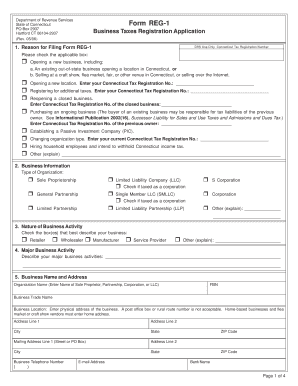
  2. Identify the reason for filing the REG-1. Check the applicable box based on your situation, such as opening a new business or registering for additional taxes.
  3. Provide your business information including the organization type you will be registering under and check the relevant box.
  4. Specify the nature of your business activity by selecting the boxes that best represent your business operations.
  5. Describe your major business activity in the space provided, offering a concise overview of your operations.
  6. Enter your business name and physical address. Ensure you provide a complete address; post office boxes are not acceptable.
  7. List all owners, partners, corporate officers, or LLC members. Provide their names, titles, home addresses, and relevant details.
  8. Indicate if you intend to withhold income tax and respond to all related questions about payroll and employment.
  9. Address questions related to sales and use taxes if applicable, including whether you will sell or lease goods.
  10. Complete the room occupancy tax section if your business involves lodging.
  11. Fill out information regarding the business entity tax, including your organization state and date of organization.
  12. Complete the business use tax section only if registering for sales and use taxes.
  13. Fill out the registration fee schedule based on your applications and add the total registration fee due.
  14. Sign the declaration to confirm the accuracy of your application and provide your contact details.

Start your online registration process for the CT DRS REG-1 today!

Get form

Experience a faster way to fill out and sign forms on the web. Access the most extensive library of templates available.

Related content

Connecticut State Department of Revenue Services
All new businesses must now complete Form REG-1, Business Taxes Registration Application...
Learn more
state of connecticut department of revenue...
DRS notifies the person of their designation as a withholding agent. A person may request...
Learn more
Installation Guide v3.2
connected to the CANBUS DRS port without external power connection depends on power...
Learn more

Related links form

CN 14-1219R) Is A Weekly Open-access (OA) Peer-reviewed Journal Export License Aita Registration Aita Registration

Questions & Answers

Get answers to your most pressing questions about US Legal Forms API.

Contact support

In Connecticut, your tax bracket depends on your income level and filing status. The state has progressive tax rates, meaning higher incomes are taxed at higher rates. To determine your specific bracket, you can refer to the Connecticut Department of Revenue Services guidelines. Filing your information correctly on the CT DRS REG-1 can also influence your understanding of your tax responsibilities.

The DRS payment plan in Connecticut enables businesses and individuals to manage tax liabilities with installment payments. This option is particularly valuable if you face challenges in paying your taxes in full and want to avoid penalties. By adhering to the terms set forth by the DRS, you can maintain compliance. Understanding your obligations with the CT DRS REG-1 can also assist in managing your tax responsibilities.

You can run a business from home in Connecticut, but you must comply with local zoning regulations. Additionally, depending on the type of business, you may need to register and file certain forms, such as the CT DRS REG-1. Always verify the specific requirements for your business type to ensure you are operating legally. Integrating your home business into the state system can prove beneficial for growth.

Yes, registering your business in CT is essential for legal operation. Registering not only helps you comply with state laws, but it also enhances your credibility with customers and suppliers. Ensure that you complete the registration process through the CT DRS REG-1 for a smooth start. This will also allow you to take advantage of state-specific resources available to you.

The Reg 1 in Connecticut refers to a registration form required for businesses to operate legally within the state. This form collects important information about your business structure and ownership. Completing the CT DRS REG-1 is essential to ensure you meet state regulations and can access various business resources. It effectively serves as your official business registration.

Failing to register your small business in Connecticut can lead to legal complications. Operating without proper registration may expose you to fines or other penalties. Moreover, you could lose the ability to enforce contracts in court. It's crucial to complete your registration using the CT DRS REG-1 to remain compliant with state laws.

Yes, registering your business in Connecticut is often necessary to operate legally. This process helps establish your business as a recognized entity. Additionally, registering can provide certain legal protections and access to state resources. To navigate this, consider utilizing the CT DRS REG-1 form, which is designed to simplify business registration.

To write a handwritten bill of sale for a car, first gather essential information like the vehicle's make, model, year, and VIN. Then, include details about the buyer and seller, such as names and addresses. Ensure to incorporate your CT DRS REG-1 where necessary, providing clarity for any tax implications that might arise.

To fill out a CT bill of sale, start by entering the seller's and buyer's information. Include a detailed description of the item, including its condition and any identifying numbers. Don't forget to add your CT DRS REG-1 number if applicable, as it may streamline any related tax processes.

Filling out a CT bill of sale requires several important details. You need to provide information about the seller, the buyer, and the item being sold, including any serial numbers. Additionally, including the CT DRS REG-1 number may enhance the document’s credibility, especially for tax-related transactions.

Get This Form Now!

Use professional pre-built templates to fill in and sign documents online faster. Get access to thousands of forms.
If you believe that this page should be taken down, please follow our DMCA take down processhere.
Get CT DRS REG-1
  • Adoption
  • Bankruptcy
  • Contractors
  • Divorce
  • Home Sales
  • Employment
  • Identity Theft
  • Incorporation
  • Landlord Tenant
  • Living Trust
  • Name Change
  • Personal Planning
  • Small Business
  • Wills & Estates
  • Packages A-Z
  • Affidavits
  • Bankruptcy
  • Bill of Sale
  • Corporate - LLC
  • Divorce
  • Employment
  • Identity Theft
  • Internet Technology
  • Landlord Tenant
  • Living Wills
  • Name Change
  • Power of Attorney
  • Real Estate
  • Small Estates
  • Wills
  • All Forms
  • Forms A-Z
  • Other Templates
  • Legal Hub
  • About Us
  • Help Portal
  • Legal Resources
  • Blog
  • Affiliates
  • Contact Us
  • Delete My Account
  • Site Map
  • Industries
  • Forms in Spanish
  • Localized Forms
  • State-specific Forms
  • Forms Kit
  • Real Estate Handbook
  • All Guides
  • Notarize
  • Incorporation services
  • For Consumers
  • For Small Business
  • For Attorneys
  • USLegal
  • FormsPass
  • pdfFiller
  • signNow
  • altaFlow
  • DocHub
  • Instapage
Form Packages
  • Adoption
  • Bankruptcy
  • Contractors
  • Divorce
  • Home Sales
  • Employment
  • Identity Theft
  • Incorporation
  • Landlord Tenant
  • Living Trust
  • Name Change
  • Personal Planning
  • Small Business
  • Wills & Estates
  • Packages A-Z
Form Categories
  • Affidavits
  • Bankruptcy
  • Bill of Sale
  • Corporate - LLC
  • Divorce
  • Employment
  • Identity Theft
  • Internet Technology
  • Landlord Tenant
  • Living Wills
  • Name Change
  • Power of Attorney
  • Real Estate
  • Small Estates
  • Wills
  • All Forms
  • Forms A-Z
  • Other Templates
Customer Service
  • Legal Hub
  • About Us
  • Help Portal
  • Legal Resources
  • Blog
  • Affiliates
  • Contact Us
  • Delete My Account
  • Site Map
  • Industries
  • Forms in Spanish
  • Localized Forms
  • State-specific Forms
  • Forms Kit
Legal Guides
  • Real Estate Handbook
  • All Guides
Prepared for you
  • Notarize
  • Incorporation services
Our Customers
  • For Consumers
  • For Small Business
  • For Attorneys
Our Sites
  • USLegal
  • FormsPass
  • pdfFiller
  • signNow
  • altaFlow
  • DocHub
  • Instapage
Social Media
Call us now toll free:
+1 833 426 79 33
As seen in:
© Copyright 1999-2026 airSlate Legal Forms, Inc. 17 Station Street, Ste. 203, Brookline, MA 02445
  • Your Privacy Choices
  • Terms of Service
  • Privacy Notice
  • Content Takedown Policy
  • Bug Bounty Program
CT DRS REG-1
This form is available in several versions.
Select the version you need from the drop-down list below.
2019 CT DRS REG-1
Select form
  • 2019 CT DRS REG-1
  • 2018 CT DRS REG-1
  • 2012 CT DRS REG-1
  • 2011 CT DRS REG-1
  • 2006 CT DRS REG-1
Select form