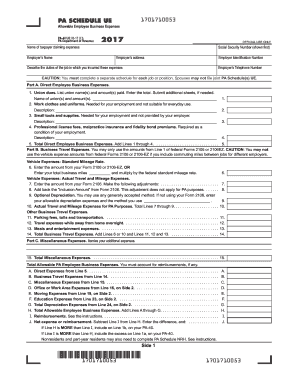
PA SCHEDULE UE. Allowable Employee Business Expenses. 2017. OFFICIAL USE ONLY. Describe the duties of the job in which you incurred these expenses.
Open form follow the instructions
Easily sign the form with your finger
Send filled & signed form or save
How to fill out the PA Schedule UE online
The PA Schedule UE, used for reporting allowable employee business expenses, is an important document for taxpayers looking to claim unreimbursed expenses related to their employment. This guide provides a clear and straightforward approach to assist users in completing the form accurately and efficiently.
Follow the steps to complete the PA Schedule UE online.
- Press the ‘Get Form’ button to access the PA Schedule UE and open it in the editor.
- Enter the name of the taxpayer claiming expenses, followed by the Social Security Number of the primary taxpayer.
- Fill in your employer’s name and address accurately for proper identification.
- Detail the duties of your job which led to these expenses, ensuring specificity.
- For Part A, enter direct employee business expenses in the designated fields for union dues, work clothes, small tools, and professional fees.
- In Part B, report business travel expenses, including vehicle expenses, noting standard mileage rates where applicable.
- For Part C, itemize any miscellaneous expenses that do not fit into other categories, ensuring you keep receipts.
- Move to Part D and answer the three questions regarding office or work area expenses, as required.
- Complete Part E to claim moving expenses, ensuring you meet the distance test criteria.
- Add up all expenses to determine the total allowable business expenses on Side 1, transferring those amounts as needed.
- Lastly, review all information for accuracy, then save your changes, download, or print the form as necessary.
Complete your PA Schedule UE online to claim your allowable employee business expenses today.
Experience a faster way to fill out and sign forms on the web. Access the most extensive library of templates available.
Related content
SECTION I – Direct Employee Business Expenses. 1. Union dues. List union name(s) and...
Mar 15, 2021 — Review the instructions from the PA Department of Revenue for completing...
Use somente o adaptador CA Yamaha, PA-4 ou o PA-40 neste instrumen- to. O uso de outros...
Get answers to your most pressing questions about US Legal Forms API.
What is PA schedule GL?
PA Schedule GL is essential for reporting global income and any relevant adjustments on your tax return. It ensures transparency for any income received outside of Pennsylvania, helping you accurately complete your tax filings. Familiarity with this form is vital for ensuring compliance and avoiding any potential issues with your tax return.
What is PA schedule O?
PA Schedule O is used to provide additional information about certain tax situations that may not fit into the regular tax return forms. This schedule allows you to explain any additional deductions or unique circumstances clearly. It supports the preparation of your tax return by providing clarity and context to your filings.
What is PA schedule UE?
The PA Schedule UE allows taxpayers in Pennsylvania to list and deduct unreimbursed business expenses from their income. This advantage is particularly beneficial for employees who incur costs while performing their job duties. By accurately using the PA Schedule UE, you can significantly reduce your taxable income.
How do I set up pa withholding?
Setting up PA withholding requires you to fill out the Employee’s Withholding Exemption Certificate, known as Form REV-419. This form indicates your tax withholding preferences based on your financial situation. To ensure accurate withholding, consider using resources from USLegalForms, which can offer step-by-step guidance.
What is Pennsylvania schedule GL?
Pennsylvania Schedule GL is a form that provides details about any global income and its adjustments. It is typically used by residents with income from outside Pennsylvania. If you are completing your PA tax return, understanding Schedule GL can help you report all applicable income accurately.
How to claim unreimbursed business expenses?
To claim unreimbursed business expenses, you need to complete the Pennsylvania Schedule UE and itemize your deductions. You'll list all eligible expenses related to your job that your employer did not reimburse. Understanding the criteria for which costs qualify is essential, and our platform, USLegalForms, offers resources to guide you in this process.
What is Pennsylvania schedule UE?
Pennsylvania Schedule UE is a form that allows employees to report unreimbursed business expenses. This schedule helps you deduct expenses not covered by your employer, helping to lower your taxable income. Utilizing the PA Schedule UE can assist you in maximizing your tax return by capturing all eligible expenses.
Are union dues tax deductible in PA?
Yes, union dues are generally considered deductible unreimbursed employee expenses on your PA Schedule UE. These dues can reduce your taxable income, impacting the overall taxes you may owe. To maximize your tax benefits, ensure you accurately report these dues when filing your Pennsylvania taxes.
Where do I put unreimbursed employee expenses?
You will report unreimbursed employee expenses on the PA Schedule UE. This form requires you to list the various expenses you incurred that were not reimbursed by your employer. Properly completing this schedule is essential to obtain the tax relief you deserve.
What is PA Schedule E?
PA Schedule E is a form used for reporting income from rentals, partnerships, and trusts in Pennsylvania. Taxpayers who earn income from property or partnerships should complete this schedule to declare their earnings correctly. Utilizing PA Schedule E helps you accurately declare income and meet state tax requirements.
Use professional pre-built templates to fill in and sign documents online faster. Get access to thousands of forms.
If you believe that this page should be taken down, please follow our DMCA take down process here.
This form is available in several versions. Select the version you need from the drop-down list below.