Loading
Get Pa Rev-956 2015
How it works
-

Open form follow the instructions
-

Easily sign the form with your finger
-

Send filled & signed form or save
How to fill out the PA REV-956 online
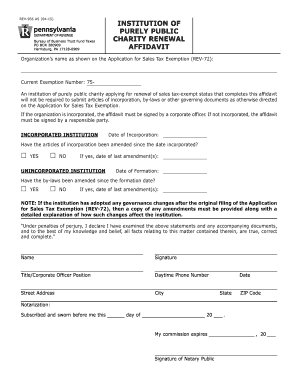
The PA REV-956 is an important affidavit for institutions of purely public charity seeking to renew their sales tax-exempt status. This guide will provide you with a clear step-by-step process for completing the form online, ensuring that you can easily navigate through its components.
Follow the steps to complete the PA REV-956 online.
- Press the ‘Get Form’ button to obtain the form and open it in the digital editor.
- Enter the organization’s name as it appears on the Application for Sales Tax Exemption (REV-72). Ensure accuracy to avoid processing delays.
- Input the current exemption number. This is essential for identifying the organization's existing tax-exempt status.
- If the organization is incorporated, provide the date of incorporation. This information helps verify the organization's legal status.
- Indicate whether the articles of incorporation have been amended since incorporation. Check ‘YES’ or ‘NO’ accordingly.
- If you answered ‘YES’ to step 5, provide the date of the last amendment(s) to the articles.
- For unincorporated institutions, enter the date of formation in the specified field.
- Indicate if the by-laws have been amended since the formation date. Again, check ‘YES’ or ‘NO’ as appropriate.
- If you answered ‘YES’ to step 8, input the date of the last amendment(s) to the by-laws.
- Review the note regarding governance changes. If applicable, ensure any amendments and explanations are prepared to be submitted.
- Complete the declaration by signing in the designated area, providing your name, title, daytime phone number, street address, city, date, state, and ZIP code.
- Ensure you have the document notarized by a notary public, which includes their signature and commission expiration date.
- After completing the form, save your changes, then choose to download, print, or share the PA REV-956 as needed.
Complete the PA REV-956 online to ensure your organization maintains its sales tax-exempt status.
Get form
Experience a faster way to fill out and sign forms on the web. Access the most extensive library of templates available.
When writing a check to the PA Department of Revenue, ensure it is made payable to 'Pennsylvania Department of Revenue.' Write your identifying information on the check to help facilitate proper processing. Including details such as your tax account number enhances clarity, especially if you reference the PA REV-956.
Get This Form Now!
Use professional pre-built templates to fill in and sign documents online faster. Get access to thousands of forms.