Loading
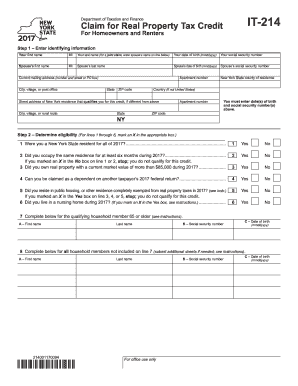
Get Ny Dtf It-214 2017
How it works
-

Open form follow the instructions
-

Easily sign the form with your finger
-

Send filled & signed form or save
How to fill out the NY DTF IT-214 online
The NY DTF IT-214 form allows homeowners and renters to claim a real property tax credit. This guide provides step-by-step instructions to help users navigate the online filling process with confidence and clarity.
Follow the steps to complete the NY DTF IT-214 form online:
- Press the ‘Get Form’ button to acquire the form and open it in the editing interface.
- Enter your identifying information. Begin by providing your first name and middle initial, followed by your last name. If filing jointly, include your spouse’s name on the designated line. Record your date of birth in the format mmddyyyy, followed by your social security number.
- Input your spouse's identifying information if applicable, including their first name, middle initial, last name, date of birth, and social security number.
- Fill in your current mailing address, including street address, city, state, ZIP code, and country if not the United States. Additionally, provide the street address of your New York residence if different.
- Determine your eligibility by marking an 'X' in the appropriate boxes for questions 1 through 6, ensuring to check your residency status, the duration of residence, property ownership details, dependency status, and public housing residency.
- Identify qualifying household members aged 65 or older, and provide relevant details such as their name, date of birth, and social security number.
- Calculate your household gross income by entering all applicable amounts from lines 9 to 15. Add these amounts together to complete line 16.
- For renters, enter the total rent paid in 2017 on line 19, and adjust this for any included charges as needed in line 20. Calculate the average monthly adjusted rent for line 21.
- Homeowners must enter real property taxes paid during 2017 on line 23 and any special assessments on line 24.
- Compute your credit amount by entering the appropriate figures on lines 28 through 33, following the specific instructions indicated in the form.
- If claiming a direct deposit refund, fill in the account type, routing number, account number, and any necessary direct deposit information.
- Lastly, ensure that both you and your spouse (if applicable) sign the form, adding the date and any required identifying information. Submitting the form follows with specific instructions based on whether you are filing with or without a New York State income tax return.
Complete your NY DTF IT-214 document online today for a seamless filing experience.
Get form
Experience a faster way to fill out and sign forms on the web. Access the most extensive library of templates available.
Box 14 on your W-2 provides essential details that could influence your tax obligations or benefits. It serves as a platform for reporting information that is not categorized elsewhere, which could include state-specific deductions. When preparing your NY DTF IT-214, make sure to review box 14 closely to accurately reflect any deductions or credits you may claim.
Get This Form Now!
Use professional pre-built templates to fill in and sign documents online faster. Get access to thousands of forms.