Loading
Form preview
  • US Legal Forms
  • Other Templates
  • Tax Forms
  • Pennsylvania Tax Forms
  • Pa Pa-8879 2017

Get Pa Pa-8879 2017

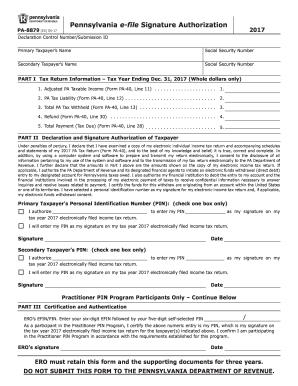
G Date Practitioner PiN Program Participants Only Continue below PARt iii Certification and Authentication / ERO s EFIN/PIN. Enter your six-digit EFIN followed by your five-digit self-selected PIN As a participant in the Practitioner PIN Program, I certify the above numeric entry is my PIN, which is my signature on the tax year 2017 electronically filed income tax return for the taxpayer(s) indicated above. I confirm I am participating in the Practitioner PIN Program in accordance wit.

How it works

  1. Open form

    Open form follow the instructions

  2. Easily sign form

    Easily sign the form with your finger

  3. Share form

    Send filled & signed form or save

How to fill out the PA PA-8879 online

The PA PA-8879 is an essential form for individuals e-filing their Pennsylvania income tax returns. This guide aims to provide clear, step-by-step instructions to help users complete the form accurately and efficiently online.

Follow the steps to successfully complete the PA PA-8879 online:

  1. Press the ‘Get Form’ button to access the form and open it in your preferred editor.
  2. Fill in the primary taxpayer’s name and Social Security number in the designated fields.
  3. If applicable, provide the secondary taxpayer’s name and Social Security number below the primary taxpayer’s information.
  4. In Part I, enter the tax return information for the tax year ending December 31, 2017. This includes adjusting the PA taxable income, PA tax liability, total PA tax withheld, refund amount, and total payment due, as indicated on the respective lines of Form PA-40.
  5. In Part II, review the declaration and signature authorization section carefully. Confirm that you understand and agree to the disclosures before providing your signature.
  6. Select a personal identification number (PIN) for the primary taxpayer as your signature and mark the appropriate box.
  7. Repeat the process for the secondary taxpayer if applicable, providing their signature and selecting a PIN as well.
  8. For practitioners, if engaged with the Practitioner PIN Program, fill out Part III with your EFIN and self-selected PIN.
  9. After completing the form, ensure all information is accurate, then save your changes, and you may choose to download, print, or share the form as needed.

Complete your tax document online and ensure your submissions are accurate and on time.

Get form

Experience a faster way to fill out and sign forms on the web. Access the most extensive library of templates available.

Related content

2024 Pennsylvania e-file Signature Authorization...
The PA-8879 form is a 2024 Pennsylvania e-file signature authorization, where the...
Learn more
IRS e-file Signature Authorization for an Exempt...
(Whole Dollars Only). Check the box for the return for which you are using this Form...
Learn more
M. P. Möller Opus 8879 (1955) - Holy Trinity...
Organ type: Traditional With Roll Top · Console position: Console in Fixed Position...
Learn more

Related links form

NY DTF IT-216 2020 KY DoR 62A500 (P) 2021 IL DoR IL-941 2021 NY DTF CT-241 2020

Questions & Answers

Get answers to your most pressing questions about US Legal Forms API.

Contact support

When you file your PA tax return, you should attach several documents, including W-2 and 1099 forms. If you are claiming deductions or credits, you may also need to include supporting materials, such as 1098 forms, and other relevant proof of payments. Ensuring you have all the essential paperwork ready helps facilitate a smoother filing experience with your PA PA-8879.

Generally, you do not need to attach receipts to your Pennsylvania tax return unless specifically required. However, it is essential to keep these receipts as records of your deductions. They serve as proof if the state later requests additional information or if you are audited. Utilizing tools like US Legal Forms can help you organize and track these documents efficiently.

The PA PA-8879 form acts as an electronic signature authorization for your Pennsylvania tax return. It allows taxpayers to confirm that their information is accurate and gives permission for e-filing. Without this form, your return cannot be electronically submitted. Completing the PA PA-8879 accurately is vital to ensure a smooth and efficient filing process.

The taxpayer or their authorized tax preparer fills out form PA PA-8879. This form serves to grant permission for e-filing and confirms that the tax return is accurate. If you work with a tax professional, they usually complete this form on your behalf, but ultimately you must review and sign it. A thorough understanding of the PA PA-8879 can help you maintain control over your tax filing process.

Yes, you must attach your W-2 forms when submitting your PA state tax return. The W-2 provides the state with a record of your income and taxes withheld, which is essential for accurate assessment. If you e-file your return, the W-2 information is typically sent electronically. However, if you're submitting a paper return, include a copy of your W-2 along with your PA PA-8879 to ensure compliance.

When filing your Pennsylvania tax return, you typically attach a few key documents. For example, you may need to include any W-2s, 1099s, and other relevant income statements. Additionally, if you claim deductions, you should attach supporting documentation, such as receipts. Ensuring all necessary attachments accompany your PA PA-8879 can streamline the review process.

The 3 day rule for PA PA-8879 states that taxpayers must electronically sign the form within three days of the e-filing of their Pennsylvania tax return. This rule ensures that you promptly authorize your return, avoiding delays in processing. If you fail to sign within this timeframe, the return may not be considered valid. Always remember to check your email or portal for reminders regarding your PA PA-8879.

Tax preparers must retain form 8879 for at least three years from the date of filing. This retention period ensures compliance with IRS regulations and allows for any future audits or reviews. It is advisable for both taxpayers and preparers to maintain proper records for their peace of mind.

The 8879 tax form is an IRS e-file signature authorization form that allows a tax preparer to electronically file your return on your behalf. It serves as your consent for the submission of your tax forms and validates your e-filing. Utilizing this form can enhance the efficiency of your tax filing process.

PA 8879 is a version of the form 8879 specifically for Pennsylvania residents. This form allows taxpayers to provide electronic signature authorization for their state tax returns. Using PA 8879 ensures accuracy and compliance while simplifying the filing process.

Get This Form Now!

Use professional pre-built templates to fill in and sign documents online faster. Get access to thousands of forms.
If you believe that this page should be taken down, please follow our DMCA take down processhere.
Get PA PA-8879
  • Adoption
  • Bankruptcy
  • Contractors
  • Divorce
  • Home Sales
  • Employment
  • Identity Theft
  • Incorporation
  • Landlord Tenant
  • Living Trust
  • Name Change
  • Personal Planning
  • Small Business
  • Wills & Estates
  • Packages A-Z
  • Affidavits
  • Bankruptcy
  • Bill of Sale
  • Corporate - LLC
  • Divorce
  • Employment
  • Identity Theft
  • Internet Technology
  • Landlord Tenant
  • Living Wills
  • Name Change
  • Power of Attorney
  • Real Estate
  • Small Estates
  • Wills
  • All Forms
  • Forms A-Z
  • Other Templates
  • Legal Hub
  • About Us
  • Help Portal
  • Legal Resources
  • Blog
  • Affiliates
  • Contact Us
  • Delete My Account
  • Site Map
  • Industries
  • Forms in Spanish
  • Localized Forms
  • State-specific Forms
  • Forms Kit
  • Real Estate Handbook
  • All Guides
  • Notarize
  • Incorporation services
  • For Consumers
  • For Small Business
  • For Attorneys
  • USLegal
  • FormsPass
  • pdfFiller
  • signNow
  • altaFlow
  • DocHub
  • Instapage
Form Packages
  • Adoption
  • Bankruptcy
  • Contractors
  • Divorce
  • Home Sales
  • Employment
  • Identity Theft
  • Incorporation
  • Landlord Tenant
  • Living Trust
  • Name Change
  • Personal Planning
  • Small Business
  • Wills & Estates
  • Packages A-Z
Form Categories
  • Affidavits
  • Bankruptcy
  • Bill of Sale
  • Corporate - LLC
  • Divorce
  • Employment
  • Identity Theft
  • Internet Technology
  • Landlord Tenant
  • Living Wills
  • Name Change
  • Power of Attorney
  • Real Estate
  • Small Estates
  • Wills
  • All Forms
  • Forms A-Z
  • Other Templates
Customer Service
  • Legal Hub
  • About Us
  • Help Portal
  • Legal Resources
  • Blog
  • Affiliates
  • Contact Us
  • Delete My Account
  • Site Map
  • Industries
  • Forms in Spanish
  • Localized Forms
  • State-specific Forms
  • Forms Kit
Legal Guides
  • Real Estate Handbook
  • All Guides
Prepared for you
  • Notarize
  • Incorporation services
Our Customers
  • For Consumers
  • For Small Business
  • For Attorneys
Our Sites
  • USLegal
  • FormsPass
  • pdfFiller
  • signNow
  • altaFlow
  • DocHub
  • Instapage
Social Media
Call us now toll free:
+1 833 426 79 33
As seen in:
© Copyright 1999-2026 airSlate Legal Forms, Inc. 17 Station Street, Ste. 203, Brookline, MA 02445
  • Your Privacy Choices
  • Terms of Service
  • Privacy Notice
  • Content Takedown Policy
  • Bug Bounty Program
PA PA-8879
This form is available in several versions.
Select the version you need from the drop-down list below.
2022 PA PA-8879
Select form
  • 2022 PA PA-8879
  • 2021 PA PA-8879
  • 2020 PA PA-8879
  • 2019 PA PA-8879
  • 2018 PA PA-8879
  • 2017 PA PA-8879
  • 2015 PA PA-8879
  • 2014 PA PA-8879
  • 2004 PA PA-8879
Select form