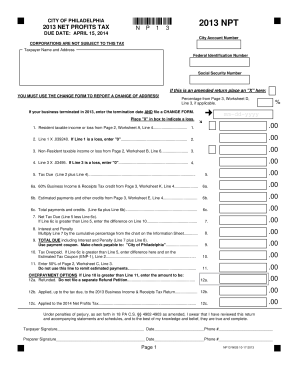
# Preparer Signature Date Phone # Page 1 NP13 WEB 10-17-2013.
Open form follow the instructions
Easily sign the form with your finger
Send filled & signed form or save
How to fill out the PA NPT online
Filling out the Pennsylvania Net Profits Tax (PA NPT) form online can streamline your tax reporting process. This guide provides clear, step-by-step instructions to help you complete the form accurately and efficiently.
Follow the steps to successfully complete your PA NPT online
- Click ‘Get Form’ button to obtain the PA NPT form and open it in the online editor.
- Enter your city account number in the designated field at the top of the form. This number is essential for processing your return.
- Fill in your taxpayer name and address accurately. Ensure that your name matches the information registered with tax authorities.
- Provide your federal identification number or social security number as applicable. This information is crucial for identifying your tax record.
- If you are submitting an amended return, mark the checkbox to indicate this and ensure you refer to the change form for any address updates.
- Complete the taxable income or loss information from Worksheet A and B as instructed. Enter the amounts in the respective fields, noting the calculation requirements.
- Calculate your net tax due by following the formulas provided on the form. Ensure you perform any necessary calculations for credits or penalties.
- Review the overpayment options and enter the amount to be refunded or applied to future tax liabilities if applicable.
- Sign and date the form at the designated areas to confirm the accuracy of your submission. If a preparer assisted you, ensure they also sign.
- After filling out the form, save your changes. You can then download, print, or share the completed PA NPT form as needed.
Complete your PA NPT filing online today for a streamlined tax process.
Experience a faster way to fill out and sign forms on the web. Access the most extensive library of templates available.
Related content
The Net Profits Tax (NPT) is imposed on the net profits from the operation of a trade...
Nov 5, 2024 — Nurse practitioners (NPs) and physician assistants (PAs) are advanced...
The flowmeter version can be identified by referring to the name plate that is attached to...
Get answers to your most pressing questions about US Legal Forms API.
What is NPT filing?
NPT filing involves submitting the Necessary Payment Tax form for transactions subject to the NPT in Pennsylvania. This process is crucial for individuals and businesses engaged in real estate transactions. Using platforms like uslegalforms can simplify the NPT filing process, ensuring compliance with state regulations.
What is pa state tax?
PA state tax refers to the tax imposed on income earned within the state, primarily collected through a flat rate of 3.07%. Alongside this, specific taxes, like the PA NPT, may apply based on your transactions or property ownership. Familiarizing yourself with these tax regulations is essential for financial planning.
How much is state tax pa?
The state income tax rate in Pennsylvania is a flat 3.07%. This means every taxpayer pays the same percentage, regardless of income level. Knowing how the state tax works can help you plan effectively for your yearly obligations, including your PA NPT filings.
Where is my state tax refund pa?
To track your PA state tax refund, you can use the Pennsylvania Department of Revenue's online portal. Enter your information related to your PA NPT filing and you can quickly check the status of your refund. It's a straightforward way to monitor your finances.
Is PA sales tax 7%?
Yes, the Pennsylvania sales tax rate is currently set at 6%, with an additional 1% in Philadelphia, bringing it to a total of 7%. Understanding this can help you properly estimate costs associated with purchases and comply with the PA NPT. This knowledge can aid you in budgeting for tax expenses.
What is the NPT tax rate in Philadelphia?
The NPT tax rate in Philadelphia is 1.5%. This tax applies to the sale of certain types of property and is specifically relevant for those filing under the PA NPT. Stay informed about the NPT rate, as it can affect your financial decisions in real estate.
How do I file a non resident tax return?
To file a non-resident tax return in Pennsylvania, start by gathering your income documents and completing the PA Non-Resident Income Tax Return form. You can file your return either by mail or electronically, depending on your preferences. Using the US Legal Forms platform can help streamline this process by providing forms and filing guidance tailored to your needs.
What is the tax form for a non resident citizen?
resident citizen must file the Pennsylvania NonResident Income Tax Return to report income earned within the state. This form ensures that you fulfill your tax responsibilities, even while residing outside Pennsylvania. Accessing and completing this form will be more manageable through US Legal Forms, guiding you through each step.
How to calculate Philadelphia net profit tax?
To calculate the Philadelphia Net Profits Tax, you must determine your net income from business activities conducted in the city. Generally, the NPT rate is 3.8712% for businesses. Make sure you account for any deductions or allowable expenses to arrive at your taxable income. For assistance with calculations, tools available on US Legal Forms can simplify this process.
Who must file Philadelphia NPT?
Any individual or entity earning income in Philadelphia must file the Philadelphia Net Profits Tax (NPT), including non-residents. This tax applies to anyone who generates business income, including freelancers and contractors. If you are unsure about your obligations, visit the US Legal Forms platform for resources and assistance in navigating these requirements.
Use professional pre-built templates to fill in and sign documents online faster. Get access to thousands of forms.
If you believe that this page should be taken down, please follow our DMCA take down process here.
This form is available in several versions. Select the version you need from the drop-down list below.