Cessing Natural Resources? q Yes q No 31. Will business be a Natural Gas Processor? q Yes q No 32. Will business be an Oil and Gas Taxes Filer? q Yes q No 33. Will business be a Master Operator (Equipment tax)? q Yes q No 34. Will business sell Liquor? q Yes q No If yes, is business: q Retailer q Direct Shipper q Wholesaler q Distributor q Manufacturer 35. Will business sell Prepaid Wireless Communication, Landline or Wireless Services? If yes, E-911 registration required. q Yes q No 37. Are yo.
Open form follow the instructions
Easily sign the form with your finger
Send filled & signed form or save
How to fill out the NM TRD ACD-31015 online
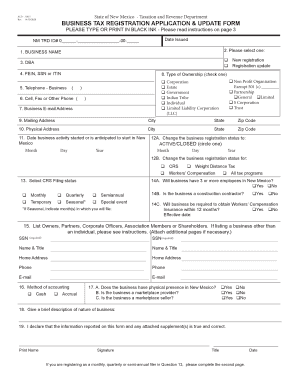
The NM TRD ACD-31015 form is essential for registering or updating a business with the New Mexico Taxation and Revenue Department. This guide provides clear, step-by-step instructions to help users accurately complete the form online.
Follow the steps to fill out the NM TRD ACD-31015 form online.
- Click ‘Get Form’ button to obtain the form and open it in the editor.
- Begin by entering the business name in the designated field. Ensure that the name is that of the entity and, if an individual’s name, include the first name, middle initial, and last name. This step is crucial for proper identification of your business.
- Select whether this submission is for a new registration or an update to an existing registration by marking the appropriate box.
- If the business operates under a different name, provide the Doing Business As (DBA) name in the specified field.
- Enter either the Federal Employer Identification Number (FEIN), Social Security Number (SSN), or Individual Taxpayer Identification Number (ITIN) as required.
- Fill in the business telephone number and a cell phone contact number to facilitate communication.
- Input the business email address where important notifications can be sent.
- Provide the mailing address at which the business will receive correspondence from the Taxation and Revenue Department.
- Specify the physical location of the business (not a PO Box) to indicate where the business operates.
- Indicate the date the business activity started or is expected to start in New Mexico using the format Month/Day/Year.
- If applicable, indicate any changes in business registration status (ACTIVE/CLOSED) and the corresponding date.
- Select the appropriate CRS filing status from the options provided and complete any required additional information based on the selection.
- Answer questions related to employment, such as whether the business will have three or more employees or if it requires Workers’ Compensation Insurance.
- List the owners, partners, corporate officers, or shareholders along with their required details (SSN, name, title, address, phone, email).
- Select the method of accounting utilized by the business, choosing between cash or accrual.
- Provide a brief description of the nature of your business to give context to your registration.
- Sign the application by someone authorized (owner, partner, etc.) and date the form.
- If applicable, complete any additional sections regarding specific licenses, tax types, or other necessary business details.
- Review all sections for completeness, ensuring that any non-applicable questions are marked accordingly. Only then can you proceed to finalize.
- Once completed, save the changes, download the form, and print or share it as needed.
Take the next step in managing your business by completing the NM TRD ACD-31015 online today.
Experience a faster way to fill out and sign forms on the web. Access the most extensive library of templates available.
Related content
and 4 of the ACD-31015, Business Tax Registration Appli- cation & Update form. Mail: NM...
ACD - 31015 ... If this is not a new business, enter the former owner's New Mexico...
Get answers to your most pressing questions about US Legal Forms API.
How to get a New Mexico business tax identification number?
To obtain a New Mexico business tax identification number, fill out the appropriate forms on the New Mexico Taxation and Revenue Department's website. This identification number is crucial for tax reporting and is connected to your NM TRD ACD-31015. Be sure to have all pertinent information ready to expedite the process and ensure compliance.
What does the CRS number stand for?
CRS stands for Combined Reporting System in New Mexico. This system consolidates different tax reporting requirements into one number, simplifying the process for businesses. By using your CRS number effectively, you can streamline your taxes and maintain compliance with your NM TRD ACD-31015.
What is a CRS number for New Mexico?
A CRS number is a unique identifier assigned to businesses by the New Mexico Taxation and Revenue Department. This number allows businesses to report various taxes, including gross receipts tax and compensating tax. If you are starting a business, obtaining a CRS number is an essential step associated with your NM TRD ACD-31015 to ensure compliance with state laws.
What is a caid number in New Mexico?
A CAID number, or Contractor Identification Number, is issued to contractors in New Mexico for tax reporting purposes. This number is essential for managing taxes on the services you provide as a contractor. If you're a contractor in New Mexico, obtaining your CAID number will complement your obligations associated with your NM TRD ACD-31015.
What is a CRS number in New Mexico?
The CRS number, or Combined Reporting System number, is a unique identifier issued by the New Mexico Taxation and Revenue Department. It is required for businesses to report gross receipts tax, compensating tax, and other taxes. If your business engages in taxable sales, obtaining a CRS number will help you comply with New Mexico tax laws related to your NM TRD ACD-31015.
How to register with New Mexico Taxation and Revenue Department?
To register with the New Mexico Taxation and Revenue Department, you need to complete the online registration process. This includes filling out the necessary forms and providing required information about your business. After submitting your registration, you will receive information about your NM TRD ACD-31015, which is essential for tax purposes. Make sure to have all your business details ready for a smooth registration process.
Where can I get NM tax forms?
NM tax forms are conveniently available on the New Mexico Taxation and Revenue Department's official website. You will find all necessary forms, including the NM TRD ACD-31015, in an organized section dedicated to taxpayers. Downloading and printing forms for your needs is quite direct. Additionally, consider uslegalforms as a valuable tool for ensuring you have the correct forms and instructions.
Is sales tax refund taxable?
Generally, a sales tax refund is not considered taxable income; however, it can impact other areas of your taxes. If you received a refund for sales tax previously deducted, you may need to report it. For further understanding and guidance on how this applies to your situation in New Mexico, you can refer to the NM TRD ACD-31015. Uslegalforms offers detailed explanations and resources to clarify tax refund implications.
How to get a NM tax ID number?
Obtaining a NM tax ID number is straightforward. You can apply online through the New Mexico Taxation and Revenue Department's website or by mail. Having this number is essential for businesses operating in New Mexico and is required for various tax-related processes. With uslegalforms, you can quickly access helpful resources to navigate this application smoothly.
How do I apply for a tax refund in New Mexico?
To apply for a tax refund in New Mexico, start by completing the relevant form found on the state’s Taxation and Revenue Department website. The NM TRD ACD-31015 is critical for correct submission. Be sure to gather all necessary documentation and submit by the stated deadlines. If you need further help, consider using uslegalforms for guided assistance.
Use professional pre-built templates to fill in and sign documents online faster. Get access to thousands of forms.
If you believe that this page should be taken down, please follow our DMCA take down process here.
This form is available in several versions. Select the version you need from the drop-down list below.