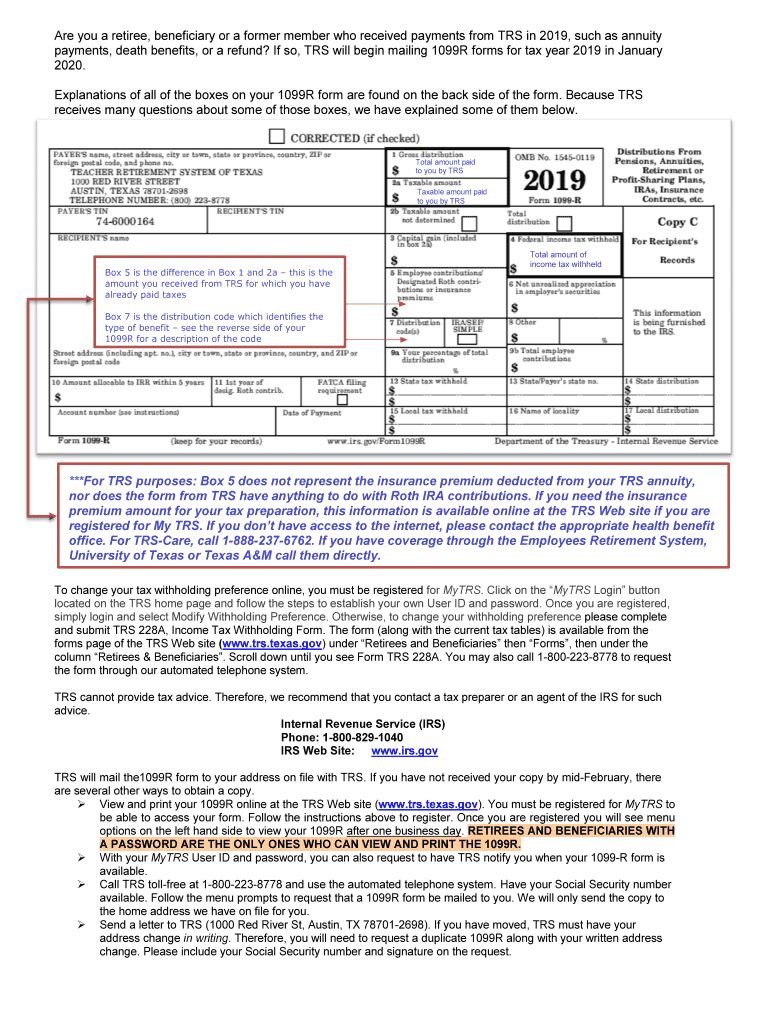
2019 in January 2020. Explanations of all of the boxes on your 1099R form are found on the back side of the form. Because TRS receives many questions about some of those boxes, we have explained some of them below. Total amount paid to you by TRS Taxable amount paid to you by TRS Box 5 is the difference in Box 1 and 2a this is the amount you received from TRS for which you have already paid taxes Total amount of income tax withheld Box 7 is the distribution code which identifies the typ.
Loading

Open form follow the instructions

Easily sign the form with your finger

Send filled & signed form or save
How to fill out the TX 1099-R TRS Information online
The TX 1099-R TRS Information form is essential for reporting retirement payments received from the Teacher Retirement System (TRS). This guide will help users navigate the online process of completing this form, ensuring all necessary information is accurately provided.
Follow the steps to fill out your TX 1099-R TRS Information online.
- Press the ‘Get Form’ button to retrieve the TX 1099-R TRS Information form and open it in your preferred document editor.
- Review the top section of the form to confirm your personal information is correctly entered, including your name, address, and Social Security number.
- Locate the 'Total amount paid to you by TRS' section. Fill in the total payments received from TRS for the tax year, as detailed in Box 1 of your printed 1099-R form.
- Next, move to the 'Taxable amount paid to you by TRS' section. This is found in Box 2a of your form, which represents the taxable income you must report.
- In the following section, enter the 'Total amount of income tax withheld' if any taxes were deducted from your payments; this figure can be found in Box 4 of your 1099-R form.
- Review Box 7 for the distribution code that describes the nature of your retirement payments. Ensure that this code accurately reflects the type of benefit received.
- Once all sections are completed, double-check the accuracy of your entries. Make any necessary adjustments before proceeding.
- Finally, save your changes. You have the option to download, print, or share the completed form based on your needs.
Begin the online process to complete your TX 1099-R TRS Information form today.
Experience a faster way to fill out and sign forms on the web. Access the most extensive library of templates available.
Related content
The 1099-R form reports retirement benefits from TRS to the IRS. Retiree, beneficiary, or...
Tax statements (Form 1099-R) are required to be mailed to your address of record with TRS...
Jun 9, 2009 — This application report provides information on the DM648/7 throughput...
Get answers to your most pressing questions about US Legal Forms API.
How to report TRS on taxes?
Reporting your Texas Retirement System benefits on your taxes involves including information from your 1099-R form, which details your taxable distributions. You must follow IRS guidelines for reporting retirement income and consult financial professionals if necessary. Gaining a clear understanding of how to report TRS accurately ensures compliance and helps you manage your financial future effectively with your TX 1099-R TRS Information.
How do I find my TRS information?
To find your Texas TRS information, you can log into your online TRS account, where comprehensive details about your benefits and service history are available. Alternatively, you can contact TRS customer service for assistance. Staying informed is essential, as it helps you manage your retirement planning effectively and ensures you have updated TX 1099-R TRS Information.
What happens to my Texas TRS if I quit?
If you decide to quit your teaching position in Texas, your TRS account remains intact with the benefits you have accrued. You can choose to leave your funds in the TRS system until you are eligible to retire, or you may opt for a refund, though this may impact your future benefits. To understand the implications fully, it’s beneficial to review your options and consider the relevant TX 1099-R TRS Information.
How do I find my retirement account number?
Finding your retirement account number is straightforward. You can check your account statements or log into your Texas TRS online account to locate this information. If you encounter difficulties, reaching out directly to the TRS support team can provide assistance and ensure you have the correct TX 1099-R TRS Information for your records.
Can I get a copy of my 1099-R online?
You can indeed obtain a copy of your 1099-R online through the Texas TRS website. Simply log into your account and navigate to the appropriate section to view your tax documents. This convenient access allows you to keep track of your financial records easily and stay updated with your TX 1099-R TRS Information.
Will I get a 1099 from my retirement account?
Yes, if you have distributions from your Texas Retirement System (TRS) account, you will receive a 1099-R form. This form reports your taxable income and is essential for filing your taxes. Make sure to keep an eye out for it each year, especially as it contains crucial TX 1099-R TRS Information that you will need during tax season.
How many years do you have to teach in Texas to get full retirement?
To qualify for full retirement benefits in Texas, teachers typically need to accumulate 30 years of service. This service time allows you to receive your full pension without reductions. However, if you have at least five years of service, you can still retire earlier, although the benefits may be reduced. Understanding your eligibility is essential for planning your retirement, and you can find more specific details under TX 1099-R TRS Information.
What happens if I don't claim my 1099-R?
If you do not claim your 1099-R, the IRS may assume you have underreported your income. This could lead to penalties, interest, and potential audits, which are best avoided. It's important to utilize your TX 1099-R TRS Information properly to ensure your income is reported accurately. Ignoring this could create financial stress down the road, so take the necessary steps to report it correctly.
How do I fill out a 1099-R?
To fill out a 1099-R, you need information about the distribution, including the total amount received and the reason for the distribution. Make sure to use your TX 1099-R TRS Information to fill in the details accurately. The form requires your personal information along with the payer's details, so double-check to ensure everything is correct before submission. This accuracy minimizes errors during the tax filing process.
What happens if I don't put my 1099-R on my taxes?
Failing to report your 1099-R can lead to penalties and interest charges from the IRS. Not including this information may trigger an audit or lead to discrepancies in your tax filing. It's essential to use your TX 1099-R TRS Information to ensure that you comply with tax regulations and avoid unnecessary complications. Keeping accurate records helps prevent these issues.
Use professional pre-built templates to fill in and sign documents online faster. Get access to thousands of forms.
If you believe that this page should be taken down, please follow our DMCA take down process here.
This form is available in several versions. Select the version you need from the drop-down list below.