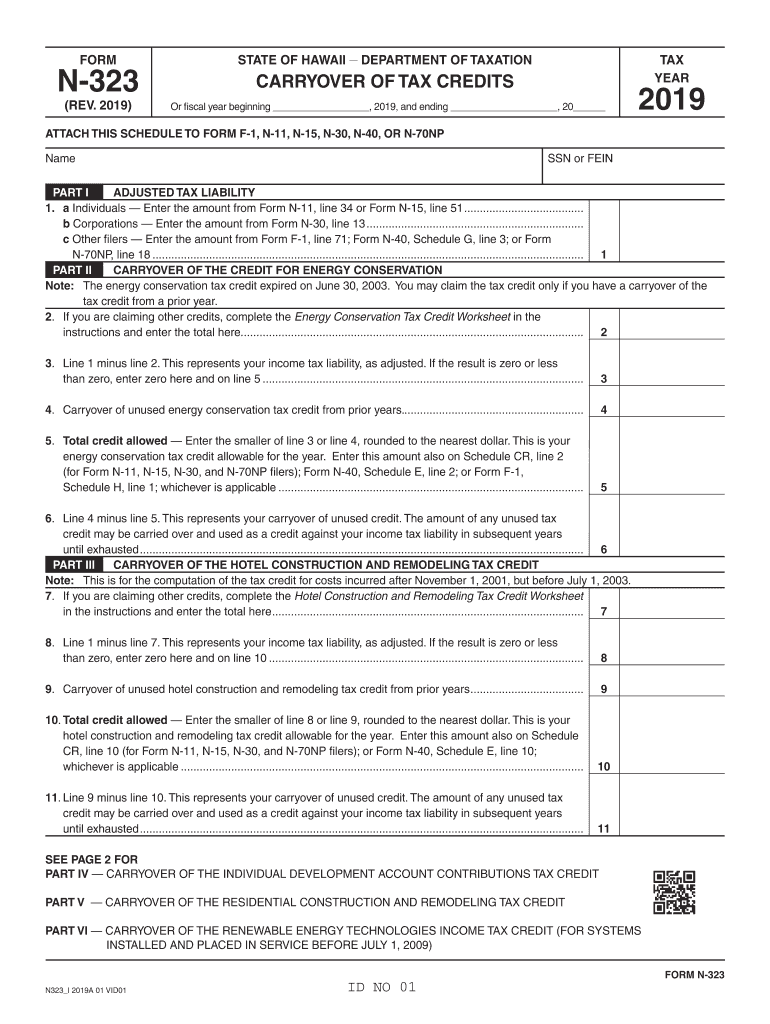
, 20 2019 ATTACH THIS SCHEDULE TO FORM F-1, N-11, N-15, N-30, N-40, OR N-70NP Name SSN or FEIN PART I ADJUSTED TAX LIABILITY 1. a Individuals Enter the amount from Form N-11, line 34 or Form N-15, line 51....................................... b Corporations Enter the amount from Form N-30, line 13...................................................................... c Other filers Enter the amount from Form F-1, line 71; Form N-40, Schedule G, line 3; or.
Loading

Open form follow the instructions

Easily sign the form with your finger

Send filled & signed form or save
How to fill out the HI DoT N-323 online
The HI DoT N-323 form is essential for reporting the carryover of tax credits for various types of taxpayers in Hawaii. This guide provides clear, step-by-step instructions for completing the form online, ensuring that users can efficiently manage their tax credit information.
Follow the steps to successfully complete the HI DoT N-323 form.
- Press ‘Get Form’ button to obtain the HI DoT N-323 and open it in the editor.
- Fill in the tax year and enter your name and Social Security Number (SSN) or Federal Employer Identification Number (FEIN). This information is crucial for identifying your tax records.
- For Part I, report your adjusted tax liability. Depending on your filing status, enter the corresponding amounts from Form N-11, N-15, N-30, N-40, or Form F-1 on the appropriate lines.
- In Part II, if you are claiming the Energy Conservation Tax Credit, complete the Energy Conservation Tax Credit Worksheet per the provided instructions. Enter the total on line 2.
- Calculate your adjusted income tax liability by subtracting line 2 from line 1 for Part II. If the result is zero or less, enter zero on line 3 and line 5.
- Complete the carryover section by entering any unused credits from prior years on line 4. Determine the total credit allowed based on the lesser of lines 3 or 4, rounded to the nearest dollar and enter that on line 5.
- Continue to Parts III through VIII reporting any additional carryover tax credits from other specific categories, following similar steps to complete each part.
- After filling out all relevant sections of the form, review your entries for accuracy.
- Once completed, you can save changes, download, print, or share the HI DoT N-323 form as needed.
Start completing your HI DoT N-323 form online today!
Experience a faster way to fill out and sign forms on the web. Access the most extensive library of templates available.
Related content
Jan 7, 2025 — State of Hawaii, Department of Taxation, Ka 'Oihana 'Auhau. HAWAII...
323 ... In concrete structures exposed to sea water, construction joints will not be...
Very High Pressure XL™-50VHP and XL™-55VHP. Liquid or Gaseous Nitrogen, Oxygen, Argon...
Get answers to your most pressing questions about US Legal Forms API.
What do non-residents need to file in Hawaii?
Non-residents must file a tax return if they earn income from sources within Hawaii. This typically involves completing Form N-15 to report their income and calculate any taxes owed. Resources, such as HI DoT N-323, can help clarify any uncertainties regarding the filing process for non-residents.
Does Hawaii have a state tax form?
Yes, Hawaii offers various state tax forms for individuals and businesses to report their income and financial activity. Forms like the HI DoT N-323 are essential for understanding what’s required and ensuring you meet your tax obligations. It is crucial to use the right form for your situation to stay compliant.
What address do I send my Hawaii state tax return?
You should send your Hawaii state tax return to the Department of Taxation at the address indicated on the form instructions. Different forms may have different submission addresses, so make sure to double-check before sending. Using services like those offered by uslegalforms can also help ensure you are sending your forms to the correct address, especially when utilizing HI DoT N-323.
What is the difference between G45 and G49 in Hawaii?
G45 is the general excise tax return filed by businesses about their gross receipts in Hawaii, while G49 is a reconciliation form specifically for general excise taxes. Understanding the usage of these forms is essential for accurate tax reporting. If you navigate the process with the HI DoT N-323, you will find it easier to understand which forms apply to your business.
Does Hawaii have a corporate income tax?
Yes, Hawaii imposes a corporate income tax on businesses operating within the state. The tax rates can vary based on income levels, which makes it essential for businesses to understand how to calculate their tax obligations thoroughly. Filing the appropriate forms, such as the HI DoT N-323, can ensure compliance with state tax laws.
What is the corporate tax form for Hawaii?
The primary corporate tax form for Hawaii is Form N-30, which applies to corporations doing business in the state. Corporations engaged in income-generating activities must submit this form annually. You may want to check if the HI DoT N-323 helps simplify your understanding of the filing requirements.
Who needs to file a Hawaii state tax return?
Individuals who earn income in Hawaii or are residents of the state must file a Hawaii state tax return. This includes residents with wages, rental income, or self-employment income. If you meet specific income thresholds, you are required to file. Utilizing forms like the HI DoT N-323 can guide you through the process.
Can a Hawaii tax return be filed electronically?
Yes, a Hawaii tax return can be filed electronically, making the process faster and more convenient. Electronic filing options are available through various tax preparation software and services. The HI DoT N-323 includes information about the benefits of electronic filing that you might find very useful.
Where to mail an IRS tax return from Hawaii?
When mailing an IRS tax return from Hawaii, you should send it to the address designated for your specific circumstances. Generally, the mailing address is Internal Revenue Service, P.O. Box 932100, Louisville, KY 40293-2100 for individuals without payments. Make sure to check the HI DoT N-323 for up-to-date mailing instructions.
What is the address to mail a tax return?
For mailing a tax return in Hawaii, you typically use the Hawaii Department of Taxation's main address, P.O. Box 1500, Honolulu, HI 96806-1500. Always confirm that you’re using the right address for your specific tax scenario and form type. The HI DoT N-323 provides detailed information that can guide you through the mailing process.
Use professional pre-built templates to fill in and sign documents online faster. Get access to thousands of forms.
If you believe that this page should be taken down, please follow our DMCA take down process here.
This form is available in several versions. Select the version you need from the drop-down list below.