Loading
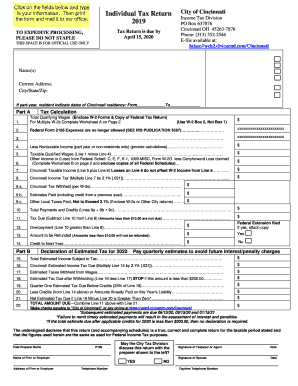
Get Oh Individual Tax Return - Cincinnati 2019
How it works
-

Open form follow the instructions
-

Easily sign the form with your finger
-

Send filled & signed form or save
How to fill out the OH Individual Tax Return - Cincinnati online
Filing your OH Individual Tax Return for Cincinnati can be straightforward when you follow the right guidance. This guide offers step-by-step instructions on how to efficiently complete your tax return online, ensuring that you accurately report your income and any applicable deductions.
Follow the steps to smoothly complete your tax return online:
- Click ‘Get Form’ button to initiate the process of obtaining the OH Individual Tax Return form and open it in your preferred online document editor.
- Begin by entering your personal details, including your Social Security Number and your spouse's Social Security Number if applicable. Make sure all information is accurate and corresponds to your federal tax records.
- Provide your account number and full name(s) in the designated fields. If this is your first time filing, check the indicated box.
- Indicate whether you used Federal Schedule C, E, F, or K-1, or if you are an athlete or entertainer. Additionally, check any other relevant options like 'Amended Return' or request for refund.
- Fill out your current address, including city, state, and zip code. This information is critical for processing your return.
- In Part A, report your total qualifying wages from Box 5 of your W-2 forms. Attach copies of your W-2s and any other necessary federal tax forms.
- Calculate your taxable income by entering any business income or losses from federal schedules and deducting any nontaxable income if applicable.
- After calculating your Cincinnati taxable income, determine your Cincinnati income tax by multiplying the taxable income by the tax rate of 2.1%.
- Provide information on tax withheld (from W-2 forms), estimated taxes paid, and any other local taxes paid, then calculate the total payments and credits.
- Determine if you owe any additional tax or if you have an overpayment. If there is an overpayment, indicate the amount you wish to be refunded.
- Complete the declaration of estimated tax for the following year, including total estimated income, and ensure to pay quarterly estimates to avoid penalties.
- In the final step, review your entire form for accuracy, save any changes made, and you can proceed to download, print, or share the completed tax return for mailing.
Complete your OH Individual Tax Return online today to ensure timely processing and compliance.
Get form
Experience a faster way to fill out and sign forms on the web. Access the most extensive library of templates available.
If you earn income within a city that enforces a local tax, it is likely that you must file a city tax return. This applies even if you only work in the city but reside elsewhere. Always review both your state and local tax requirements to ensure you fulfill your obligations, especially when preparing your OH Individual Tax Return - Cincinnati.
Get This Form Now!
Use professional pre-built templates to fill in and sign documents online faster. Get access to thousands of forms.