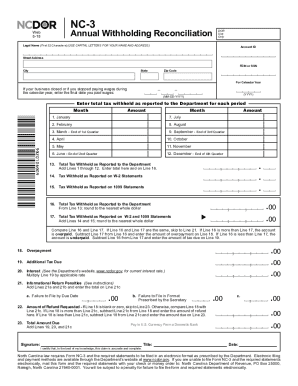
Sending Guidelines Do not use red ink. Use blue or black ink. Printing ,, (8) Do not use dollar signs, commas, or other punctuation marks. , 1 t I ocopies of returns. Submit originals only. Set page scaling to "none." The Auto-Rotate and Center checkbox should be unchecked. 1 Do not select "print on both sides of paper." c; ; 1 Do not mix form types. NC-3 Annual Withholding Reconciliation Web 8-18 DOR Use Only Legal Name (First 32 Characters) (USE CAPITAL LETTERS F.
Open form follow the instructions
Easily sign the form with your finger
Send filled & signed form or save
How to fill out the NC NC-3 online
Filling out the NC NC-3 form online is a crucial step for businesses in North Carolina to report annual withholding reconciliation accurately. This guide provides clear and concise instructions to help users complete the form effectively and ensure compliance with state regulations.
Follow the steps to fill out the NC NC-3 online seamlessly.
- Press the ‘Get Form’ button to access the NC NC-3 document and open it in your editing environment.
- Enter your legal name accurately using capital letters, ensuring it is within the first 32 character limit.
- Input your Account ID, FEIN (Federal Employer Identification Number) or SSN (Social Security Number), street address, city, state, and zip code as requested in the designated fields.
- Specify the calendar year for which you are reporting the withholding reconciliation.
- If applicable, enter the final date wages were paid during the calendar year, using the format MM-DD-YYYY.
- In the sections labeled for each month from January to December, enter the total tax withheld that corresponds to each month.
- Calculate the total tax withheld as reported to the Department by adding the amounts entered from Lines 1 to 12, and enter this value on Line 13.
- Fill in the tax withheld as reported on W-2 statements on Line 14 and on 1099 statements on Line 15.
- Total the tax withheld reported on W-2 and 1099 statements on Line 17 by adding Lines 14 and 15.
- Compare Line 16 (total tax withheld as reported) and Line 17; if they are the same, proceed to Line 21. If Line 16 is greater, complete Line 18 for overpayment; if less, complete Line 19 for additional tax due.
- Calculate any interest due on Line 20 related to additional tax due.
- Enter any penalties owed for late filing on Line 21, summarizing Sections 21a and 21b.
- If Line 18 indicates an overpayment, compare it with Line 21c to determine the amount of refund on Line 22, otherwise calculate the total amount due on Line 23.
- Finally, ensure your form is signed and dated, affirming that the information provided is accurate.
- Once all sections are correctly filled, users can save their changes, download, print, or share the form as needed.
Begin your online form completion today to ensure timely and accurate submission of the NC NC-3!
Experience a faster way to fill out and sign forms on the web. Access the most extensive library of templates available.
Related content
eNC3 is the online filing option for businesses to electronically file Form NC-3 and...
This program offers up to 90% tax savings for private eligible landowners in NC.3 At its...
Get answers to your most pressing questions about US Legal Forms API.
What percentage should I withhold for NC state taxes?
For NC state taxes, the withholding rate changes based on income brackets, so knowing your specific situation is essential. Generally, you might need to refer to the NC-3 form and understand the current rates. Consulting tools available on uslegalforms that cater to NC NC-3 can help you accurately calculate the appropriate withholding percentage.
Do both parties have to be present to get a title notarized in North Carolina?
In North Carolina, both parties typically must be present for notarization of a title. This ensures that both the buyer and seller agree to the transaction and validate their identity before the notary. If you need details on notary requirements, uslegalforms offers resources related to NC NC-3 that can help clarify the process.
How to fill out a North Carolina title?
To fill out a North Carolina title, you should enter the required information accurately and legibly. This includes details about the vehicle and the seller and buyer’s information. Utilizing uslegalforms can simplify this process, providing templates specifically tailored for NC NC-3 paperwork, ensuring you don’t miss any crucial steps.
Does the NC-3 have to be filed electronically?
Filing the NC-3 electronically is not mandatory, but it is highly recommended. Electronic filings are often processed faster, which can lead to quicker refunds if you’re expecting one. Using compliant software, like what uslegalforms provides, allows you to seamlessly file your NC NC-3 while ensuring adherence to state guidelines.
How do you fill out a title certificate?
Filling out a title certificate involves entering essential information, such as the owner's name, address, and the vehicle's details. Ensure that you double-check all entries for accuracy, as mistakes can lead to delays or complications. Resources like uslegalforms offer simple forms and clear instructions designed around NC NC-3, making this task easier.
Should I claim the NC standard deduction?
Deciding whether to claim the NC standard deduction depends on your financial situation. If you have minimal itemized deductions, claiming the standard deduction for NC NC-3 may benefit you. Typically, many taxpayers find it simpler and advantageous to take this deduction, allowing for a more straightforward tax filing process.
Do you have to file local taxes in North Carolina?
Yes, if you live or work in certain localities in North Carolina, you may be required to file local taxes. Local taxes are different from state taxes and often depend on your specific location. It is essential to check with your local tax authority for specific requirements. Understanding local obligations ensures compliance and helps you avoid penalties.
What tax forms cannot be electronically filed?
Certain tax forms, such as some older or more complex ones, cannot be filed electronically. You should check the specific guidelines from the North Carolina Department of Revenue to confirm which forms are eligible for e-filing. Generally, the NC-3 can be filed electronically if you meet the criteria. Understanding form eligibility can help streamline your filing process.
Can I file my return electronically?
You can file your return electronically, and this is a preferred method for many taxpayers in North Carolina. Electronic filing saves time and minimizes errors compared to paper forms. Platforms like uslegalforms provide user-friendly options to help you complete your filings, including your NC-3. Make your filing experience smooth by choosing electronic submission.
Can an NC tax return be filed electronically?
Taxpayers can file their NC tax returns electronically, making it easier to report their earnings and deductions. This method is efficient and often leads to faster refunds. Using online services or platforms like uslegalforms can simplify the e-filing process. Remember to include your NC-3 information if necessary.
Use professional pre-built templates to fill in and sign documents online faster. Get access to thousands of forms.
If you believe that this page should be taken down, please follow our DMCA take down process here.