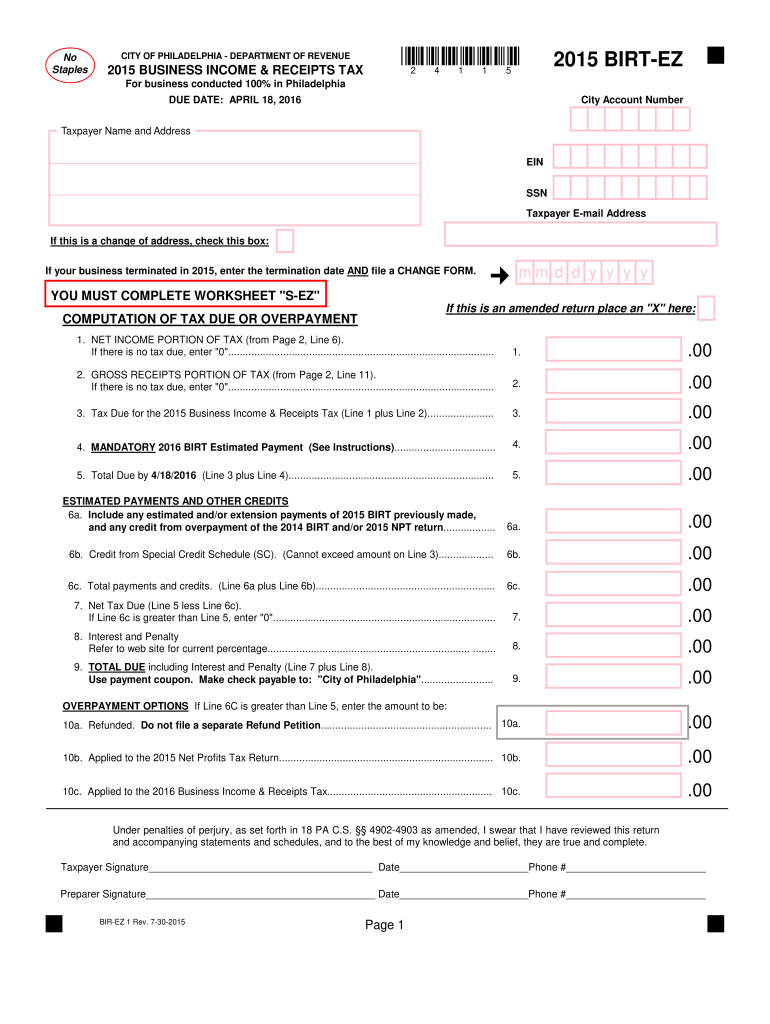
Y Account Number Taxpayer Name and Address EIN SSN Taxpayer E-mail Address If this is a change of address, check this box: If your business terminated in 2015, enter the termination date AND file a CHANGE FORM. mm d d y y y y YOU MUST COMPLETE WORKSHEET "S-EZ" If this is an amended return place an "X" here: COMPUTATION OF TAX DUE OR OVERPAYMENT 1. NET INCOME PORTION OF TAX (from Page 2, Line 6). If there is no tax due, enter "0".
Loading

Open form follow the instructions

Easily sign the form with your finger

Send filled & signed form or save
How to fill out the PA BIRT-EZ online
The PA BIRT-EZ is a streamlined form for reporting business income and receipts taxes for businesses operating entirely within Philadelphia. This guide provides clear instructions on how to complete the form online, ensuring that all necessary information is accurately recorded.
Follow the steps to fill out the PA BIRT-EZ online seamlessly.
- Press the ‘Get Form’ button to access the PA BIRT-EZ form and open it in your browser.
- Enter your City Account Number as registered with the City of Philadelphia. This information is crucial for identifying your business in the city tax system.
- Fill in the Taxpayer Name and Address fields with the legal name of your business and its primary physical address.
- Input your Employer Identification Number (EIN) or Social Security Number (SSN) as applicable.
- Provide your taxpayer email address for any necessary correspondence regarding this form.
- If there has been a change in your business address, check the appropriate box.
- If your business terminated in 2015, indicate the termination date and remember to file a CHANGE FORM.
- Complete the WORKSHEET ‘S-EZ’ to determine the net income portion of tax.
- Indicate if this return is amended by placing an ‘X’ in the designated box.
- Proceed to calculate your tax due or overpayment by filling in Line 1 and Line 2, referencing the amounts from the computation sections.
- For Line 3, sum Line 1 and Line 2 to find your total tax due.
- Calculate the mandatory estimated payment for 2016 by entering the required amount on Line 4.
- Sum Lines 3 and 4 to find the total due by the filing deadline on Line 5.
- Complete the estimated payments and other credits as indicated in Lines 6a, 6b, and 6c.
- If your total payments and credits exceed the tax due, enter ‘0’ on Line 7.
- Enter any applicable interest and penalties on Line 8.
- Calculate the total due, including any interest and penalties, and summarize that on Line 9.
- Decide on the options for overpayments as detailed in Lines 10a, 10b, and 10c.
- Sign and date the form in the designated areas for both taxpayer and preparer if applicable.
- Once all fields are completed, save your changes, download, or print the form as needed.
Complete your PA BIRT-EZ form online today to ensure compliance and timely submission.
Experience a faster way to fill out and sign forms on the web. Access the most extensive library of templates available.
Related content
As of Tax Year 2022, trade show vendors must use the BIRT-EZ annual form to file their...
The Philadelphia Business Income & Receipts Tax (BIRT) is based on both gross receipts and...
The manual is divided into sections denling rvith llle nra.jor assenblies and these are...
Get answers to your most pressing questions about US Legal Forms API.
How do I get my PA income tax form?
You can obtain your PA income tax form through the Pennsylvania Department of Revenue's website or reliable tax platforms. For convenience, you can also access necessary forms through resources like US Legal Forms, which provides clear guidance. Ensuring you have the correct PA BIRT-EZ form is crucial for a smooth filing experience.
What is the birt EZ form?
The BIRT EZ form is a simplified version specifically designed for certain businesses in Philadelphia to ease the filing process. It allows taxpayers to report their business income with fewer complexities. By using the PA BIRT-EZ, you can simplify your filing experience and expedite your tax process.
Can I file my PA local tax online?
Yes, you can file your Pennsylvania local tax online. E-filing through platforms like US Legal Forms allows you to complete your tax responsibilities quickly and conveniently. The PA BIRT-EZ form is available for this purpose, helping you to ensure accuracy and compliance.
Who must file Philadelphia Birt?
Filers of the Philadelphia BIRT typically include businesses operating within the city that generate revenue. If your business is registered with the state and details revenue, you need to file. Utilizing the PA BIRT-EZ can make this process easier, ensuring you meet all necessary obligations.
How to file Philadelphia Birt online?
Filing the Philadelphia BIRT online is simple and efficient. You can access the PA BIRT-EZ form through various platforms, including US Legal Forms, which guides you through each step. By using this online method, you ensure faster processing and eliminate paperwork hassles.
Do I need to file a Philadelphia school tax return?
Yes, if you reside in Philadelphia and meet certain criteria, you are required to file a school tax return. This includes individuals who earn income within the city's jurisdiction. It’s essential to utilize the PA BIRT-EZ to streamline this process and ensure compliance with local tax laws.
Who are required to file BIR Form 1701?
Individuals required to file BIR Form 1701 typically include self-employed professionals, freelancers, and those with mixed income. If you derive income from both compensation and business or practice, you'll need to file this form. Utilizing the PA BIRT-EZ tool can simplify this process for you significantly.
How to file an annual income tax return in the Philippines?
Filing your annual income tax return in the Philippines involves gathering all your income statements, completing the appropriate tax return form, and submitting it to the Bureau of Internal Revenue. It is important to file on or before the deadline to avoid penalties. Consider using the PA BIRT-EZ for a streamlined filing experience and accuracy.
How is the Philadelphia birt calculated?
The Philadelphia Business Income and Receipts Tax (BIRT) is calculated based on your business's gross receipts and net income. The rates and specific calculations vary, so understanding the rules that apply to your business situation is crucial. Using the PA BIRT-EZ will allow you to compute your taxes accurately and ensure compliance.
How do I fill out an income tax return form?
To fill out an income tax return form, begin by collecting all relevant financial documents, including income statements and possible deductions. Carefully input your details while following the instructions provided for your specific form type. For assistance, consider the PA BIRT-EZ to help simplify the filing process.
Use professional pre-built templates to fill in and sign documents online faster. Get access to thousands of forms.
If you believe that this page should be taken down, please follow our DMCA take down process here.
This form is available in several versions. Select the version you need from the drop-down list below.