Loading
Form preview
  • US Legal Forms
  • Other Templates
  • Tax Forms
  • Executive Department Treasury IRS Forms
  • Irs 1099-patr 2019

Get Irs 1099-patr 2019

But the online version of it, printed from this website, is not. Do not print and file copy A downloaded from this website; a penalty may be imposed for filing with the IRS information return forms that can t be scanned. See part O in the current General Instructions for Certain Information Returns, available at www.irs.gov/form1099, for more information about penalties. Please note that Copy B and other copies of this form, which appear in black, may be downloaded and printed and used to sat.

This website is not affiliated with IRS

How it works

  1. Open form

    Open form follow the instructions

  2. Easily sign form

    Easily sign the form with your finger

  3. Share form

    Send filled & signed form or save

How to fill out the IRS 1099-PATR online

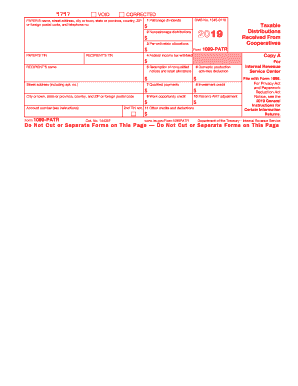
Filling out the IRS 1099-PATR form online is an essential task for reporting taxable distributions received from cooperatives. This guide provides a clear and supportive step-by-step approach to ensuring accuracy and compliance with IRS requirements.

Follow the steps to successfully complete the IRS 1099-PATR form online.

  1. Click ‘Get Form’ button to access the IRS 1099-PATR form. This will allow you to download and open the form in your preferred editor.
  2. Begin by entering the payer's details including their name, street address, city or town, state or province, country, ZIP code, and telephone number in the designated fields.
  3. Next, fill in your taxpayer identification number (TIN) in the specified box to ensure proper identification.
  4. Proceed to Box 1 and enter the amount for patronage dividends received. This includes cash, property, or qualified written notices of allocation.
  5. In Box 2, record any nonpatronage distributions received during the year.
  6. Fill in Box 3 with the amount for per-unit retain allocations received.
  7. If applicable, include any federal income tax withheld in Box 4. This is essential for reporting accurate tax information.
  8. For Box 5, enter any amounts received upon the redemption of nonqualified notices and retain allocations.
  9. Continue to Box 6 to report your share of the domestic production activities deduction.
  10. Fill in Box 7 and Box 8 for qualified payments and investment credits, respectively, as applicable.
  11. In Box 9, report any unused work opportunity credits that may apply.
  12. Next, complete Box 10 with the patron’s alternative minimum tax adjustment amount, if applicable.
  13. Finally, enter any other credits and deductions in Box 11 that may apply.
  14. Once all fields are accurately filled, you can save your changes, download, print, or share the completed form as required.

Complete your IRS 1099-PATR forms online today to meet your tax obligations promptly.

Get form

Experience a faster way to fill out and sign forms on the web. Access the most extensive library of templates available.

Related content

About Form 1099-PATR, Taxable Distributions...
Feb 19, 2025 — Cooperatives file Form 1099-PATR for each person: To whom the they paid...
Learn more
Form 1099 Information Returns∗
Note that Patronage Dividends are reported on Form 1099-. PATR (see below). Form 1099-G...
Learn more
2017 Publication 505
Mar 1, 2017 — Form 1099-MISC, Miscellaneous Income;. Form 1099-OID, Original Issue...
Learn more

Related links form

FORM 4559 - City Of Chula Vista - Ci Chula-vista Ca 5514 Temporary Encroachment Permit.doc - Ci Chula-vista Ca Form 4545 - Ci Chula-vista Ca REQUEST FOR FIELD MONUMENT CHECK - City Of Chula Vista - Ci Chula-vista Ca

Questions & Answers

Get answers to your most pressing questions about US Legal Forms API.

Contact support

The IRS Form 1099-PATR is a tax document that reports patronage dividends received from cooperatives. It provides detailed information about dividend amounts, including various boxes that reflect different types of distributions. Understanding this form is essential for accurate tax reporting and compliance with IRS guidelines.

For farmers filing taxes, income reported on IRS 1099-PATR should be included on Schedule F. Specifically, you will list this as part of your farm income. Properly integrating this form into your Schedule F helps maintain an accurate financial picture, simplifying your overall tax filing experience.

To report IRS 1099-PATR in Lacerte, navigate to the income section of the software. Select the appropriate form for 1099 income and enter the specific values from Box 1 and any additional relevant boxes. Using Lacerte simplifies reporting, ensuring you account for all income correctly and efficiently.

Box 6 of the IRS 1099-PATR highlights the amount of nonqualified written notices. You generally report this amount as ordinary income on your tax return. It’s important to accurately include this to ensure your reported income reflects all necessary transactions. If you're unsure, tax software can help guide you through the process.

If you received an IRS 1099-PATR, it means you earned patronage dividends from a cooperative during the tax year. Cooperatives distribute these dividends based on your purchasing contributions to the cooperative. Receiving this form indicates you participated in cooperative activities, which is essential for accurate tax reporting.

While both IRS 1099-PATR and 1099-DIV report income from investments, they serve different purposes. The 1099-PATR specifically focuses on patronage dividends from cooperatives, whereas the 1099-DIV reports dividends from stocks and mutual funds. Understanding this difference can make managing your tax reporting easier.

Income reported on IRS 1099-PATR generally falls under the category of taxable income. You'll typically report it on Form 1040, specifically on the income section. If you receive dividends, ensure you accurately reflect these amounts in the correct place to avoid issues during tax filing. Consulting with tax software, such as Lacerte, can help streamline this process.

To report IRS 1099-PATR on Schedule F, you need to include the amounts that reflect your share of the cooperative’s income. Enter these amounts on the lines designated for cooperative distributions in your Schedule F filing. The IRS 1099-PATR indicates specific guidelines for these entries, ensuring that you comply with reporting requirements. U.S. Legal Forms can also assist you with nuanced questions in this area.

In the Drake software, you can enter IRS 1099-PATR information in the 'Farm' section of the program. Look for the input area for Schedule F, where you can enter the details regarding the cooperative distributions. Be meticulous in entering all relevant figures, as inaccuracies can affect your overall tax calculations. For detailed instructions, consulting U.S. Legal Forms may provide additional support.

Reporting IRS 1099-R on your taxes involves including the amounts from the form in your gross income. You typically report this information on Form 1040, where you will transfer the totals from the 1099-R to the appropriate lines for income. Ensure that you double-check the figures and classifications to avoid errors. If you are unsure about the reporting process, U.S. Legal Forms can guide you through everything you need to know.

Get This Form Now!

Use professional pre-built templates to fill in and sign documents online faster. Get access to thousands of forms.
If you believe that this page should be taken down, please follow our DMCA take down processhere.
Get IRS 1099-PATR
  • Adoption
  • Bankruptcy
  • Contractors
  • Divorce
  • Home Sales
  • Employment
  • Identity Theft
  • Incorporation
  • Landlord Tenant
  • Living Trust
  • Name Change
  • Personal Planning
  • Small Business
  • Wills & Estates
  • Packages A-Z
  • Affidavits
  • Bankruptcy
  • Bill of Sale
  • Corporate - LLC
  • Divorce
  • Employment
  • Identity Theft
  • Internet Technology
  • Landlord Tenant
  • Living Wills
  • Name Change
  • Power of Attorney
  • Real Estate
  • Small Estates
  • Wills
  • All Forms
  • Forms A-Z
  • Other Templates
  • Legal Hub
  • About Us
  • Help Portal
  • Legal Resources
  • Blog
  • Affiliates
  • Contact Us
  • Delete My Account
  • Site Map
  • Industries
  • Forms in Spanish
  • Localized Forms
  • State-specific Forms
  • Forms Kit
  • Real Estate Handbook
  • All Guides
  • Notarize
  • Incorporation services
  • For Consumers
  • For Small Business
  • For Attorneys
  • USLegal
  • FormsPass
  • pdfFiller
  • signNow
  • altaFlow
  • DocHub
  • Instapage
Form Packages
  • Adoption
  • Bankruptcy
  • Contractors
  • Divorce
  • Home Sales
  • Employment
  • Identity Theft
  • Incorporation
  • Landlord Tenant
  • Living Trust
  • Name Change
  • Personal Planning
  • Small Business
  • Wills & Estates
  • Packages A-Z
Form Categories
  • Affidavits
  • Bankruptcy
  • Bill of Sale
  • Corporate - LLC
  • Divorce
  • Employment
  • Identity Theft
  • Internet Technology
  • Landlord Tenant
  • Living Wills
  • Name Change
  • Power of Attorney
  • Real Estate
  • Small Estates
  • Wills
  • All Forms
  • Forms A-Z
  • Other Templates
Customer Service
  • Legal Hub
  • About Us
  • Help Portal
  • Legal Resources
  • Blog
  • Affiliates
  • Contact Us
  • Delete My Account
  • Site Map
  • Industries
  • Forms in Spanish
  • Localized Forms
  • State-specific Forms
  • Forms Kit
Legal Guides
  • Real Estate Handbook
  • All Guides
Prepared for you
  • Notarize
  • Incorporation services
Our Customers
  • For Consumers
  • For Small Business
  • For Attorneys
Our Sites
  • USLegal
  • FormsPass
  • pdfFiller
  • signNow
  • altaFlow
  • DocHub
  • Instapage
Social Media
Call us now toll free:
+1 833 426 79 33
As seen in:
© Copyright 1999-2026 airSlate Legal Forms, Inc. 17 Station Street, Ste. 203, Brookline, MA 02445
  • Your Privacy Choices
  • Terms of Service
  • Privacy Notice
  • Content Takedown Policy
  • Bug Bounty Program
IRS 1099-PATR
This form is available in several versions.
Select the version you need from the drop-down list below.
2022 IRS 1099-PATR
Select form
  • 2022 IRS 1099-PATR
  • 2021 IRS 1099-PATR
  • 2020 IRS 1099-PATR
  • 2019 IRS 1099-PATR
  • 2018 IRS 1099-PATR
  • 2017 IRS 1099-PATR
  • 2016 IRS 1099-PATR
  • 2015 IRS 1099-PATR
  • 2014 IRS 1099-PATR
  • 2013 IRS 1099-PATR
  • 2012 IRS 1099-PATR
  • 2011 IRS 1099-PATR
  • 2010 IRS 1099-PATR
Select form