Loading
Form preview
  • US Legal Forms
  • Other Templates
  • Tax Forms
  • New York Tax Forms
  • Ny Dtf Mt-50 2019

Get Ny Dtf Mt-50 2019-2026

How it works

  1. Open form

    Open form follow the instructions

  2. Easily sign form

    Easily sign the form with your finger

  3. Share form

    Send filled & signed form or save

How to fill out the NY DTF MT-50 online

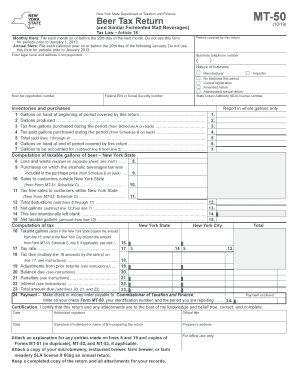
The NY DTF MT-50 is a crucial document for businesses involved in the production or importation of beer and similar fermented beverages in New York State. This guide will help users navigate the online process of filling out this tax return to ensure compliance with state regulations.

Follow the steps to complete the NY DTF MT-50 effortlessly.

  1. Press the ‘Get Form’ button to access the MT-50 form, making it available for editing.
  2. Enter your legal name and address in the designated fields, especially if they are not preprinted on the form.
  3. Specify the period covered by this return by filling in the relevant dates.
  4. Provide your business telephone number for contact purposes.
  5. Indicate the nature of your business by selecting one of the options: Manufacturer, Importer, No business this period, Cancel registration, Amended return, or Abbreviated annual return.
  6. Fill in your State Liquor Authority (SLA) license number alongside your beer tax registration number, as well as your Federal EIN or Social Security number.
  7. In the section for inventories and purchases, report all figures in whole gallons, covering gallons on hand at the beginning of the period, gallons produced, tax-free gallons, and tax-paid gallons purchased.
  8. Calculate the total gallons by adding the amounts from lines 1 through 4, and fill in the gallons on hand at the end of the period.
  9. Determine the gallons to be accounted for by subtracting the end inventory (line 6) from the total (line 5).
  10. Complete the computation of taxable gallons section by reporting any losses, purchases on which the alcoholic beverages tax was included, and any sales made outside New York State.
  11. Calculate deductions by adding together losses and other deductions, and then subtract this total from the gallons to be accounted for to find the net gallons.
  12. Input the net taxable gallons into the designated area before computing the tax by applying the respective tax rates.
  13. Finally, ensure that all necessary signatures are completed and any required audits or explanations for certain entries are attached. Users can then save changes, download, print, or share the form as needed.

Start filling out your NY DTF MT-50 form online today to stay compliant with state tax regulations.

Get form

Experience a faster way to fill out and sign forms on the web. Access the most extensive library of templates available.
Get form

Related content

Instructions for Form MT-50
The bulletins provide information to help distributors comply with their New. York State...
Learn more
NYS Driver's Manual NYS DMV
For clearance of your NYS driver license or permit you must submit proof to the NYS...
Learn more
GALaxy IV Traction Elevator Controller Manual
Foreword. G.A.L. has developed this manual with usability and safety in mind. General and...
Learn more

Related links form

MN HOU202 2021 LA Request For Warrant Of Possession 2016 ID CAO UD 2-1 2016 ME CV-007 2014

Questions & Answers

Get answers to your most pressing questions about US Legal Forms API.

Contact support

To cancel your NYS estimated tax payment, you need to follow the procedures outlined by the New York State Department of Taxation and Finance. Typically, this involves notifying them of your intention to withdraw your payment. It is essential to take these steps promptly to avoid unnecessary penalties. The NY DTF MT-50 form can offer guidance on managing your tax responsibilities efficiently.

A notice of intent to refer your debt in NY is a communication indicating that your tax debt may be forwarded for collection. This notice arises when you have outstanding payments and is a crucial warning to take corrective action. Ignoring this notice can lead to additional penalties or legal action. Addressing your tax situation promptly with the NY DTF MT-50 can help you manage your debts effectively.

DTF on a bank statement typically stands for 'Department of Taxation and Finance.' This notation indicates transactions related to tax payments made to the New York State government. Knowing this can help you track your financial obligations and avoid confusion. If you need assistance with tax-related documents, the NY DTF MT-50 might be a useful resource.

NYS DTF tax payment represents the payment you submit to the New York State Department of Taxation and Finance. This payment can include several types of taxes, such as income tax or property tax. Staying informed about your tax obligations is vital to avoid penalties. The NY DTF MT-50 can serve as an effective tool to manage your tax payments efficiently.

DTF payment NY refers to the payment method used for the New York State Department of Taxation and Finance. These payments cover various taxes, including sales tax, personal income tax, and others. Accurately processing these payments is crucial to remain compliant with state tax regulations. Utilizing the NY DTF MT-50 form can help you ensure timely and proper tax payments.

Filling out the ST 120 form in PDF format is similar to completing a paper form but offers the convenience of digital submission. Begin by downloading the form from the New York State Department of Taxation and Finance website. Use a PDF editor to fill in your business information, the exemption reason, and any other required details. Ensure that you review your entries before submitting, as accuracy is important when managing your NY DTF MT-50.

Filling out a sales tax exemption certificate in New York requires clarity. Start by entering your name, address, and the reason for your exemption in the appropriate sections of the NY ST 120 form. Don’t forget to provide your Certificate of Authority number. If you need assistance, uslegalforms can guide you through proper completion to ensure your exemption claims related to the NY DTF MT-50 are approved.

To change your address on your New York State income tax, you will need to complete the Form IT-201-V or the Form IT-201. Make sure your new address is stated clearly, and it’s important to notify the New York State Department of Taxation and Finance promptly to ensure you receive all correspondence correctly. Remember, keeping your records updated also helps facilitate your transactions involving the NY DTF MT-50.

Applying for sales tax exemption in New York involves completing the NY ST 120 form, which you will submit to the New York State Department of Taxation and Finance. Start by gathering necessary documentation that supports your exemption claim, such as proof of your organization’s exempt status. You can simplify this process by using platforms like uslegalforms, which provide guided assistance for accurate completion of the forms required with your NY DTF MT-50.

To fill out the NY ST 120 form, begin by entering your business name and address at the top of the form. Then, provide your Certificate of Authority number and clearly state the type of property you are claiming the exemption for. Ensure that you include a detailed description of the property and the reason for your exemption, as this will help you leverage the NY DTF MT-50 effectively.

Get This Form Now!

Use professional pre-built templates to fill in and sign documents online faster. Get access to thousands of forms.
Get form
If you believe that this page should be taken down, please follow our DMCA take down processhere.
Get NY DTF MT-50
Get form
  • Adoption
  • Bankruptcy
  • Contractors
  • Divorce
  • Home Sales
  • Employment
  • Identity Theft
  • Incorporation
  • Landlord Tenant
  • Living Trust
  • Name Change
  • Personal Planning
  • Small Business
  • Wills & Estates
  • Packages A-Z
  • Affidavits
  • Bankruptcy
  • Bill of Sale
  • Corporate - LLC
  • Divorce
  • Employment
  • Identity Theft
  • Internet Technology
  • Landlord Tenant
  • Living Wills
  • Name Change
  • Power of Attorney
  • Real Estate
  • Small Estates
  • Wills
  • All Forms
  • Forms A-Z
  • Other Templates
  • Legal Hub
  • About Us
  • Help Portal
  • Legal Resources
  • Blog
  • Affiliates
  • Contact Us
  • Delete My Account
  • Site Map
  • Industries
  • Forms in Spanish
  • Localized Forms
  • State-specific Forms
  • Forms Kit
  • Real Estate Handbook
  • All Guides
  • Notarize
  • Incorporation services
  • For Consumers
  • For Small Business
  • For Attorneys
  • USLegal
  • FormsPass
  • pdfFiller
  • signNow
  • altaFlow
  • DocHub
  • Instapage
Form Packages
  • Adoption
  • Bankruptcy
  • Contractors
  • Divorce
  • Home Sales
  • Employment
  • Identity Theft
  • Incorporation
  • Landlord Tenant
  • Living Trust
  • Name Change
  • Personal Planning
  • Small Business
  • Wills & Estates
  • Packages A-Z
Form Categories
  • Affidavits
  • Bankruptcy
  • Bill of Sale
  • Corporate - LLC
  • Divorce
  • Employment
  • Identity Theft
  • Internet Technology
  • Landlord Tenant
  • Living Wills
  • Name Change
  • Power of Attorney
  • Real Estate
  • Small Estates
  • Wills
  • All Forms
  • Forms A-Z
  • Other Templates
Customer Service
  • Legal Hub
  • About Us
  • Help Portal
  • Legal Resources
  • Blog
  • Affiliates
  • Contact Us
  • Delete My Account
  • Site Map
  • Industries
  • Forms in Spanish
  • Localized Forms
  • State-specific Forms
  • Forms Kit
Legal Guides
  • Real Estate Handbook
  • All Guides
Prepared for you
  • Notarize
  • Incorporation services
Our Customers
  • For Consumers
  • For Small Business
  • For Attorneys
Our Sites
  • USLegal
  • FormsPass
  • pdfFiller
  • signNow
  • altaFlow
  • DocHub
  • Instapage
Social Media
Call us now toll free:
+1 833 426 79 33
As seen in:
© Copyright 1999-2026 airSlate Legal Forms, Inc. 17 Station Street, Suite 303, Brookline, MA 02445
  • Your Privacy Choices
  • Terms of Service
  • Privacy Notice
  • Content Takedown Policy
  • Bug Bounty Program