Loading
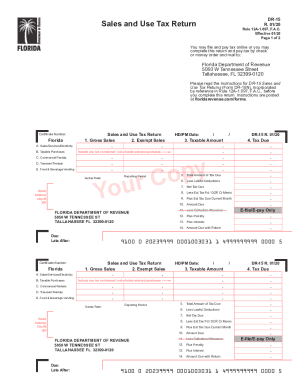
Get Fl Dor Dr-15 2020-2026
How it works
-

Open form follow the instructions
-

Easily sign the form with your finger
-

Send filled & signed form or save
How to fill out the FL DoR DR-15 online
Filling out the FL DoR DR-15 online is a straightforward process designed for individuals and entities reporting sales and use tax. This comprehensive guide will walk you through each step to ensure accurate completion of the form.
Follow the steps to effectively complete the FL DoR DR-15 online.
- Click ‘Get Form’ button to access the FL DoR DR-15 and open it for online completion.
- Enter your certificate number in the designated field. This number identifies your business for tax purposes.
- Fill out your name, address, city, state, and ZIP code in the required sections.
- Report your gross sales in the section marked 'Gross Sales.' This should include all sales made during the reporting period.
- Detail any exempt sales in the 'Exempt Sales' field. This will help determine your taxable amounts.
- Calculate and record the taxable amount in the 'Taxable Amount' section.
- Complete the fields for any lawful deductions, estimated tax paid, and any current month estimated tax due.
- Summarize the total amount of tax due, including any penalties or interest, in the corresponding sections.
- Review your input for accuracy and completeness to ensure all relevant fields have been filled out correctly.
- Once all sections are complete, you can choose to save your changes, download the form, print it, or share it as needed.
Prepare and file your FL DoR DR-15 online today for a streamlined process.
To calculate the collection allowance in Florida, first determine your total taxable sales. The allowance typically equates to 2.5% of the sales tax collected. This calculation rewards timely and accurate tax submission. For thorough guidance, reviewing the FL DoR DR-15 will support you in this endeavor.