Sit) and virtual currency (such as Bitcoin, Ripple, Ethereum, etc.), life insurance policies that have a cash value, and safe deposit boxes. Asset value is subject to adjustment by IRS based on individual circumstances. Enter the total amount available for each of the following (if additional space is needed include attachments). Round to the nearest dollar. Do not enter a negative number. If any line item is a negative number, enter "0". Cash and Investments (domestic and foreign) Cash Checki.
Loading

Open form follow the instructions

Easily sign the form with your finger

Send filled & signed form or save
How to fill out the IRS 433-A (OIC) online
Filling out the IRS 433-A (OIC) is an essential step for individuals seeking to submit an offer in compromise regarding their tax debts. This guide provides a clear, comprehensive method for completing the form online, ensuring that users can navigate through each section with confidence.
Follow the steps to complete your IRS 433-A (OIC) online.
- Press the ‘Get Form’ button to access the IRS 433-A (OIC) form and open it in your preferred editing platform.
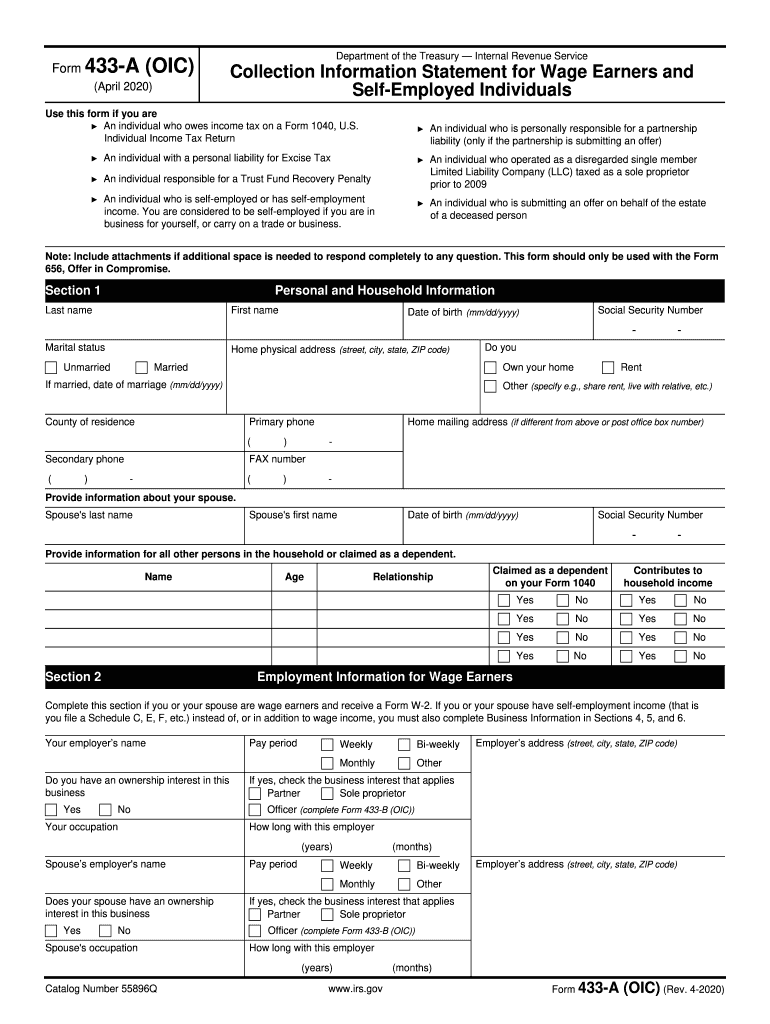
- Begin with Section 1, Personal and Household Information. Fill in your last name, first name, Social Security number, date of birth, marital status, home physical address, and phone numbers. If applicable, also include information about your spouse and any other household members.
- Move to Section 2, Employment Information for Wage Earners. Complete this if you or your spouse receive wages. Provide employer information and details regarding ownership interest.
- Proceed to Section 3, Personal Asset Information. Report current cash and investments, real property, vehicles, and other valuable items. Use the most current statements and ensure to round values to the nearest dollar.
- In Section 4, Self-Employed Information, fill in details if you or your spouse are self-employed. Include business name, address, and any other business interests.
- Continue with Section 5, Business Asset Information. Report all business assets and their values as you did in Section 3 for personal assets.
- Fill out Section 6, Business Income and Expense Information. Provide gross monthly income and business expenses, rounding to the nearest dollar.
- Complete Section 7, Monthly Household Income and Expense Information. Add all sources of household income and average monthly expenses to get totals.
- In Section 8, Calculate Your Minimum Offer Amount. Follow the instructions to determine the offer amount based on your remaining monthly income and available assets.
- Finally, review the information in Section 9, Other Information, and Section 10 for Signatures. Ensure all sections are accurately filled and sign the form before submission.
- Once you have completed the form, save your changes, download it, print it for your records, or share it as necessary.
Start filling out your IRS 433-A (OIC) form online to take control of your tax situation today.
Experience a faster way to fill out and sign forms on the web. Access the most extensive library of templates available.
Related content
Examples of other income include but are not limited to: agricultural subsidies, gambling...
After we review the completed Form 433-A, you may be asked to provide verification for the...
Oct 19, 2017 — Use this publication as a guide to figure your taxes and complete your...
Get answers to your most pressing questions about US Legal Forms API.
How to fill out IRS abatement form?
Filling out the IRS abatement form involves gathering the necessary information about the taxes you wish to abate and the reasons for your request. Clearly explain your situation and provide supporting documentation. Ensure that your abatement request aligns with any claims made in your IRS 433-A (OIC) submission. US Legal Forms can provide useful templates and examples to help you complete the abatement form correctly.
How to file 433-A?
To file IRS 433-A, you need to complete the form with accurate and detailed information about your financial situation. This includes data on income, expenses, assets, and liabilities. After filling out the form, you can submit it to the IRS, usually along with other relevant documentation for your OIC. Seeking guidance from US Legal Forms can simplify this process and ensure you meet all requirements.
Who might request a collection form 433-A?
Typically, taxpayers who owe back taxes or are undergoing an IRS collection action might request collection Form 433-A. This form allows the IRS to evaluate your financial situation, which aids in determining suitable tax resolution options, including an OIC utilizing IRS 433-A (OIC). If you find yourself in this situation, consider consulting tax professionals or using services from US Legal Forms for assistance.
What is the difference between form 433-A and 433-A OIC?
Form 433-A is generally used to report personal financial information to the IRS, while IRS 433-A (OIC) is specifically designed for individuals seeking an Offer in Compromise. The latter requires more detailed financial disclosures tailored for OIC assessments. Understanding this difference is crucial, as providing the correct form will ensure your OIC request is accurately evaluated. For precise completion, check out resources from US Legal Forms.
Where do I send my installment agreement form?
Send your installment agreement form to the address specified in the IRS instructions for Form 9465. If you are also filing your OIC using IRS 433-A (OIC), you may need to send everything to the IRS office handling OIC requests. Double-check that you're using the correct mailing address for your specific situation. For further clarity, you can refer to resources provided by US Legal Forms.
How do I apply for OIC?
To apply for an Offer in Compromise (OIC) using IRS 433-A (OIC), you must complete Form 656 and submit it along with your financial documentation. Ensure you provide accurate details about your income, expenses, and assets. Submitting the correct forms, including Form 433-A (OIC), significantly increases the likelihood of approval. Consider using US Legal Forms for clear instructions and templates.
How to file OIC with IRS?
Filing your Offer in Compromise with the IRS involves a few key steps. First, fill out IRS 433-A (OIC) to provide a complete overview of your financial situation. After filling out this form, submit it alongside your Offer in Compromise application. Using platforms like US Legal Forms can streamline this process and provide essential guidance on the IRS requirements.
How do I submit power of attorney to IRS?
To submit power of attorney to the IRS, complete Form 2848, Power of Attorney and Declaration of Representative. Make sure to include all necessary details, including your appointed representative's information. Once completed, send the form directly to the IRS, ensuring it aligns with any ongoing IRS 433-A (OIC) processes regarding your tax situation.
Can I file an offer in compromise myself?
Yes, you can file an Offer in Compromise on your own without professional help. However, it is crucial to understand the IRS requirements and prepare your IRS 433-A (OIC) accurately. Many individuals find the process complex, so consider using US Legal Forms, where you can access an easy-to-follow template to simplify your submission.
How do I contact the IRS about OIC?
To contact the IRS about your Offer in Compromise, you can call the IRS Customer Service at 1-800-829-1040. Ensure you have all relevant information, including your tax identification number and any paperwork regarding your IRS 433-A (OIC). You may also visit the IRS website for additional resources or assistance about your status.
Use professional pre-built templates to fill in and sign documents online faster. Get access to thousands of forms.
If you believe that this page should be taken down, please follow our DMCA take down process here.
This form is available in several versions. Select the version you need from the drop-down list below.