Loading
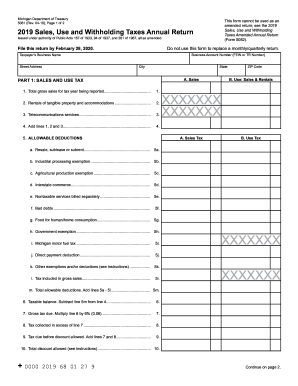
Get Mi 5081 2019
How it works
-

Open form follow the instructions
-

Easily sign the form with your finger
-

Send filled & signed form or save
How to fill out the MI 5081 online
Completing the MI 5081 form online can seem daunting, but with the right guidance, you can navigate it smoothly. This guide will help you understand each section and field of the form to ensure accurate submission.
Follow the steps to fill out the MI 5081 online effectively.
- Click the ‘Get Form’ button to obtain the MI 5081 form and open it for editing.
- Fill out the taxpayer’s business name and street address. Make sure to include the business account number (FEIN or TR Number), city, state, and zip code.
- In Part 1, Sales and Use Tax, start with line 1. Enter the total gross sales for the tax year you are reporting, including all forms of transactions as detailed in the instructions.
- Continue filling in lines 2 and 3 for rental income and telecommunications services, respectively. On line 4, sum up lines 1, 2, and 3 for total sales.
- Move to line 5 where you will enter allowable deductions. Each deduction has specific criteria, so refer to the instructions for lines 5a through 5l.
- Calculate the taxable balance on line 6 by subtracting the total allowable deductions (line 5m) from the total sales (line 4).
- On line 7, compute the gross tax due by multiplying the taxable balance (line 6) by the applicable tax rate of 6%.
- Fill in lines for any tax collected in excess (line 8) and the total tax due before discounts (line 9) which adds line 7 and line 8.
- Determine the total discount allowed on line 10 as outlined in the instructions.
- For line 11, subtract the total discount allowed (line 10) from the total tax due (line 9) to find the total tax due.
- In subsequent sections, complete information for use tax, withholding tax, and the summary totals, ensuring accuracy at each step.
- Before finalizing your form, check all entries for accuracy. Once satisfied, you can save your changes, download, print, or share the completed MI 5081 form.
Complete your documents online today for a hassle-free experience!
Get form
Experience a faster way to fill out and sign forms on the web. Access the most extensive library of templates available.
Related links form
Michigan sales tax increased from 4% to 6% in 2007 as part of a broader tax reform initiative. This change affected not only goods but also a range of services, prompting adjustments in sales tax collection practices. For businesses and individuals alike, staying informed about tax changes like this is critical for compliance with state tax laws, including the implications of Michigan form MI 5081.
Get This Form Now!
Use professional pre-built templates to fill in and sign documents online faster. Get access to thousands of forms.