Loading
Form preview
  • US Legal Forms
  • Other Templates
  • Tax Forms
  • Executive Department Treasury IRS Forms
  • Irs 1099-r 2020

Get Irs 1099-r 2020

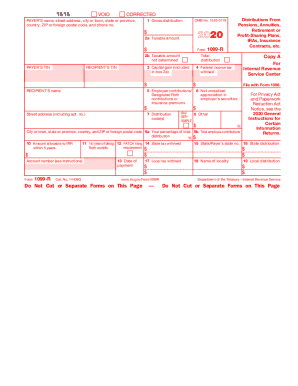
4 Federal income tax withheld $ 5 Employee contributions/ Designated Roth contributions or insurance premiums RECIPIENT’S name $ Copy 1 For State, City, or Local Tax Department 6 Net unrealized appreciation in employer’s securities $ 7 Distribution code(s) Street address (including apt. no.) 1099-R Distributions From Pensions, Annuities, Retirement or Profit-Sharing Plans, IRAs, Insurance Contracts, etc. IRA/ 8 Other SEP/ SIMPLE $ % City or town, state or province, country, and .

This website is not affiliated with IRS

How it works

  1. Open form

    Open form follow the instructions

  2. Easily sign form

    Easily sign the form with your finger

  3. Share form

    Send filled & signed form or save

How to fill out the IRS 1099-R online

Filling out the IRS 1099-R form online can be a straightforward process if you have the right guidance. This guide provides clear, step-by-step instructions to help you efficiently complete the form and ensure compliance with IRS requirements.

Follow the steps to complete the IRS 1099-R form online.

  1. Click ‘Get Form’ button to obtain the form and open it in the editor.
  2. Enter the payer’s name, address, and phone number in the designated fields. This information is crucial as it identifies the source of the distribution.
  3. Fill in the recipient’s name, address, and taxpayer identification number (TIN). Ensure all details are accurate to avoid processing issues.
  4. In box 1, report the gross distribution amount received. This should reflect the total amount before any deductions.
  5. Complete box 2a by indicating the taxable amount of the distribution you received. If the taxable amount is not known, check box 2b.
  6. Provide details for any federal income tax withheld in box 4, if applicable. This amount should be included on your tax return.
  7. Enter any employee contributions or designated Roth contributions in box 5. This includes any amounts you have paid into retirement accounts.
  8. If applicable, fill in box 6 for net unrealized appreciation in employer securities. This pertains to any employer stock you may have in your retirement account.
  9. Continue by completing boxes 7 through 19 as needed, including details on distribution codes, state taxes withheld, and other relevant financial information.
  10. After reviewing all entries for accuracy, users can save changes, download the completed form, print it for their records, or share it through specified channels.

Complete your IRS 1099-R form online today to ensure timely compliance and accurate reporting.

Get form

Experience a faster way to fill out and sign forms on the web. Access the most extensive library of templates available.

Related content

About Form 1099-R, Distributions From Pensions ...
Form 1099-R is filed for distributions of $10 or more from retirement plans, IRAs...
Learn more
About IRS Form 1099-R - Employee Workday Help
The Form 1099-R reports supplemental pensions paid from the January 10 payday through the...
Learn more
2016 Publication 575
Jan 4, 2017 — A “corrected” Form 1099R replaces the corre sponding original Form...
Learn more

Related links form

Petition For Review Of Real Property Valuation - Mohave County - Resource Co Mohave Az Mohave County Attorney Bad Check Program Form OREGON ASSOCIATION Of COUNTY TAX COLLECTORS Nomination Form Adobe Acrobat PDF - Ocean County Department ...

Questions & Answers

Get answers to your most pressing questions about US Legal Forms API.

Contact support

You should enter the IRS 1099-S on your tax return in the section dedicated to reporting income from the sale of property. This typically falls under capital gains on Form 1040. Accurate reporting is vital to ensure correct tax calculations and potential refunds.

Yes, you should include IRS 1099-SA on your tax return if you made withdrawals from a health savings account. Report this income on the appropriate lines in your tax return, as it counts toward your taxable income. Using tools like USLegalForms can help clarify how to enter this information.

Yes, you can use the IRS direct file method even if you have an IRS 1099-R. This method supports electronic filing, which is fast and efficient. Just ensure that you correctly input the details from your 1099-R as you go through the filing process, making it easier to submit.

For IRS 1099-S, report it on your tax return where you document income from the sale of real estate. This will usually be included in your capital gains section on Form 1040. Being thorough in your reporting can help you avoid issues with the IRS later.

Yes, you must report any IRS 1099-R you receive on your tax return. The IRS uses this information to track your income, so failure to report it can result in penalties. Always ensure that you include it among your other income sources to maintain compliance with tax laws.

You should enter your IRS 1099-R information on your tax return in the 'Pensions and Annuities' section. For Form 1040, look for lines dedicated to pensions, and include the amounts from the 1099-R. It’s essential to ensure the accuracy of these figures to prevent discrepancies with the IRS.

To report an IRS 1099-R on your tax return, you will need to include the information detailed in the form. Begin by entering the gross distribution amount on the appropriate line of your tax return, typically on Form 1040. Make sure to also report any amount that represents taxable income. Using resources like USLegalForms can simplify this process by providing guided instructions.

If you forgot to include your IRS 1099-R on your taxes, you need to file an amended return as soon as possible. Failing to report this income can result in penalties and interest from the IRS. Consider using the US Legal Forms platform to help you prepare the necessary documentation and ensure full compliance.

Yes, you can obtain a copy of your IRS 1099-R online through the IRS's Get Transcript service. This feature allows you to view and download your tax returns and other related documents. It's a convenient option, especially if you're in need of quick access to your IRS 1099-R.

To obtain your IRS 1099-R directly from the IRS, you can use the Get Transcript service on the IRS website. This option allows you to access your tax information, including any forms related to retirement distributions. If you need a physical copy, you may have to request a tax return transcript by mail, which can take time.

Get This Form Now!

Use professional pre-built templates to fill in and sign documents online faster. Get access to thousands of forms.
If you believe that this page should be taken down, please follow our DMCA take down processhere.
Get IRS 1099-R
  • Adoption
  • Bankruptcy
  • Contractors
  • Divorce
  • Home Sales
  • Employment
  • Identity Theft
  • Incorporation
  • Landlord Tenant
  • Living Trust
  • Name Change
  • Personal Planning
  • Small Business
  • Wills & Estates
  • Packages A-Z
  • Affidavits
  • Bankruptcy
  • Bill of Sale
  • Corporate - LLC
  • Divorce
  • Employment
  • Identity Theft
  • Internet Technology
  • Landlord Tenant
  • Living Wills
  • Name Change
  • Power of Attorney
  • Real Estate
  • Small Estates
  • Wills
  • All Forms
  • Forms A-Z
  • Other Templates
  • Legal Hub
  • About Us
  • Help Portal
  • Legal Resources
  • Blog
  • Affiliates
  • Contact Us
  • Delete My Account
  • Site Map
  • Industries
  • Forms in Spanish
  • Localized Forms
  • State-specific Forms
  • Forms Kit
  • Real Estate Handbook
  • All Guides
  • Notarize
  • Incorporation services
  • For Consumers
  • For Small Business
  • For Attorneys
  • USLegal
  • FormsPass
  • pdfFiller
  • signNow
  • altaFlow
  • DocHub
  • Instapage
Form Packages
  • Adoption
  • Bankruptcy
  • Contractors
  • Divorce
  • Home Sales
  • Employment
  • Identity Theft
  • Incorporation
  • Landlord Tenant
  • Living Trust
  • Name Change
  • Personal Planning
  • Small Business
  • Wills & Estates
  • Packages A-Z
Form Categories
  • Affidavits
  • Bankruptcy
  • Bill of Sale
  • Corporate - LLC
  • Divorce
  • Employment
  • Identity Theft
  • Internet Technology
  • Landlord Tenant
  • Living Wills
  • Name Change
  • Power of Attorney
  • Real Estate
  • Small Estates
  • Wills
  • All Forms
  • Forms A-Z
  • Other Templates
Customer Service
  • Legal Hub
  • About Us
  • Help Portal
  • Legal Resources
  • Blog
  • Affiliates
  • Contact Us
  • Delete My Account
  • Site Map
  • Industries
  • Forms in Spanish
  • Localized Forms
  • State-specific Forms
  • Forms Kit
Legal Guides
  • Real Estate Handbook
  • All Guides
Prepared for you
  • Notarize
  • Incorporation services
Our Customers
  • For Consumers
  • For Small Business
  • For Attorneys
Our Sites
  • USLegal
  • FormsPass
  • pdfFiller
  • signNow
  • altaFlow
  • DocHub
  • Instapage
Social Media
Call us now toll free:
+1 833 426 79 33
As seen in:
© Copyright 1999-2026 airSlate Legal Forms, Inc. 17 Station Street, Ste. 203, Brookline, MA 02445
  • Your Privacy Choices
  • Terms of Service
  • Privacy Notice
  • Content Takedown Policy
  • Bug Bounty Program
IRS 1099-R
This form is available in several versions.
Select the version you need from the drop-down list below.
2021 IRS 1099-R
Select form
  • 2021 IRS 1099-R
  • 2020 IRS 1099-R
  • 2019 IRS 1099-R
  • 2018 IRS 1099-R
  • 2017 IRS 1099-R
  • 2016 IRS 1099-R
  • 2015 IRS 1099-R
  • 2014 IRS 1099-R
  • 2013 IRS 1099-R
  • 2012 IRS 1099-R
  • 2011 IRS 1099-R
  • 2010 IRS 1099-R
  • 2009 IRS 1099-R
Select form