Loading
Form preview
  • US Legal Forms
  • Other Templates
  • Tax Forms
  • Ohio Tax Forms
  • Oh Rita 37 2019

Get Oh Rita 37 2019

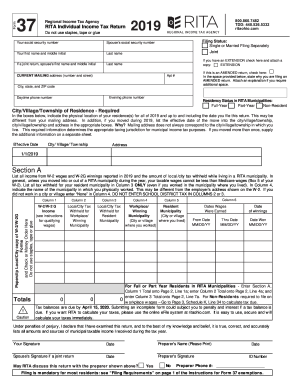
Ty number Spouse’s social security number Your first name and middle initial Last name If a joint return, spouse's first name and middle initial Last name Filing Status: Single or Married Filing Separately Joint If you have an EXTENSION check here and attach a copy: EXTENSION CURRENT MAILING address (number and street) If this is an AMENDED return, check here: In the space provided below, state why you are filing an AMENDED return. Attach an explanation if you require additional space.

How it works

  1. Open form

    Open form follow the instructions

  2. Easily sign form

    Easily sign the form with your finger

  3. Share form

    Send filled & signed form or save

How to fill out the OH RITA 37 online

The OH RITA 37 form is essential for individuals filing their income tax returns in the RITA municipalities. This guide provides clear instructions to help users complete the form accurately and efficiently online.

Follow the steps to successfully fill out the OH RITA 37 online.

  1. Click the ‘Get Form’ button to acquire the OH RITA 37 form and open it in the online editor.
  2. Enter your social security number in the designated field. If applicable, include your spouse's social security number if filing jointly.
  3. Fill in your first name, middle initial, and last name. For joint filings, provide the same information for your spouse.
  4. Select your filing status: Single, Married Filing Separately, or Joint. If you have an extension, check the appropriate box and attach the copy as instructed.
  5. Complete your current mailing address, ensuring to include the apartment number, city, state, and ZIP code.
  6. Indicate your residency status in RITA municipalities by selecting Full-Year, Part-Year, or Non-Resident.
  7. Detail your city, village, or township of residence. If you moved during the applicable year, list the effective date of the move.
  8. Provide all relevant income information from W-2 and W-2G forms, including the amounts of local/city tax withheld. Ensure to enter the correct municipalities where you worked.
  9. Calculate totals for Sections A and complete all required fields. If any income is classified as non-W-2, proceed to fill out Section B as per the instructions provided.
  10. Review all entered information thoroughly for accuracy. Once completed, you can choose to save changes, download, print, or share the form as necessary.

Start completing your OH RITA 37 form online today to ensure timely filing and avoid penalties.

Get form

Experience a faster way to fill out and sign forms on the web. Access the most extensive library of templates available.

Related content

RITA's instructions for filing are designed to...
An Exemption form may be filed electronically or downloaded at ritaohio.com. A...
Learn more
Section A RITA's eFile
Yes. Filing is mandatory for most residents: see “Filing Requirements” on page 1 of...
Learn more
BUDGET ESTIMATES
*Reimbursed to NHTSA in by RITA to support Intelligent Transportation Systems work....
Learn more

Related links form

NY IT-601 2020 NY IT-360.1 2020 NY IT-203-GR-ATT-B 2020 NY IT-638 2020

Questions & Answers

Get answers to your most pressing questions about US Legal Forms API.

Contact support

Filing form 37 can be accomplished either online or via paper submission, depending on your preference. You will need to gather all necessary financial documents, such as W-2s and 1099s, before starting the filing process. Using platforms like uslegalforms can simplify this process, offering you templates and guidance to ensure you complete your OH RITA 37 accurately.

Individuals who reside or work in an area that participates in the Regional Income Tax Agency (RITA) are typically required to file the OH RITA 37. This includes employees, self-employed individuals, and those receiving rental income. Be sure to check the specific local requirements of your municipality to confirm your eligibility.

If you don’t file your RITA form 37, you may face penalties and interest on any unpaid taxes. Local tax authorities typically issue notices for non-compliance, which can escalate quickly if not addressed. It is crucial to file on time to avoid these issues and maintain a good standing with Ohio tax regulations.

Filing the RITA form 37 is a straightforward process. You can either complete it online through the RITA website or fill out a physical form obtained from your local tax authority. Make sure to provide all requested information, including your income, deductions, and relevant tax credits, to ensure a proper filing. Alternatively, you may utilize platforms like uslegalforms for a more guided approach.

Form 37, also known as the OH RITA 37, is specifically designed for residents of Ohio who are required to file local income tax. It documents your income, deductions, and any credits you may have. Completing this form accurately is essential for compliance with local tax regulations and can help you avoid potential issues in the future.

To file RITA through Turbo Tax, first, ensure that you have downloaded the current version of the software. During the tax preparation process, the program will prompt you to enter your local tax information. Look for the section dedicated to local taxes where you can easily input your OH RITA 37 details. Turbo Tax will guide you through this process efficiently.

A form 37 on an Ohio tax return refers specifically to the document that facilitates reporting your taxable income to local authorities. This form is essential for residents and workers in RITA communities, helping to calculate local income tax owed. Understanding its purpose can help streamline your tax filing experience.

If you reside or earn income in a municipality that utilizes RITA, you generally must file an Ohio RITA return. It’s crucial for compliance and avoiding penalties. Utilize services like uslegalforms to simplify the filing process and ensure you submit the correct documentation.

In Mexico, form 37 does not relate to local income tax but serves a different purpose in their tax framework. Typically, it may refer to a specific document related to administrative processes or obligations within the country's tax system. It’s important to use the correct jurisdiction-specific forms to avoid confusion.

You may owe RITA if your reported income exceeds certain thresholds or if you worked in a municipality that requires local income tax. Various reasons, such as under-withholding at your job, can lead to an outstanding balance. Understanding your filing obligations can help you manage or prevent these debts.

Get This Form Now!

Use professional pre-built templates to fill in and sign documents online faster. Get access to thousands of forms.
If you believe that this page should be taken down, please follow our DMCA take down processhere.
Get OH RITA 37
  • Adoption
  • Bankruptcy
  • Contractors
  • Divorce
  • Home Sales
  • Employment
  • Identity Theft
  • Incorporation
  • Landlord Tenant
  • Living Trust
  • Name Change
  • Personal Planning
  • Small Business
  • Wills & Estates
  • Packages A-Z
  • Affidavits
  • Bankruptcy
  • Bill of Sale
  • Corporate - LLC
  • Divorce
  • Employment
  • Identity Theft
  • Internet Technology
  • Landlord Tenant
  • Living Wills
  • Name Change
  • Power of Attorney
  • Real Estate
  • Small Estates
  • Wills
  • All Forms
  • Forms A-Z
  • Other Templates
  • Legal Hub
  • About Us
  • Help Portal
  • Legal Resources
  • Blog
  • Affiliates
  • Contact Us
  • Delete My Account
  • Site Map
  • Industries
  • Forms in Spanish
  • Localized Forms
  • State-specific Forms
  • Forms Kit
  • Real Estate Handbook
  • All Guides
  • Notarize
  • Incorporation services
  • For Consumers
  • For Small Business
  • For Attorneys
  • USLegal
  • FormsPass
  • pdfFiller
  • signNow
  • altaFlow
  • DocHub
  • Instapage
Form Packages
  • Adoption
  • Bankruptcy
  • Contractors
  • Divorce
  • Home Sales
  • Employment
  • Identity Theft
  • Incorporation
  • Landlord Tenant
  • Living Trust
  • Name Change
  • Personal Planning
  • Small Business
  • Wills & Estates
  • Packages A-Z
Form Categories
  • Affidavits
  • Bankruptcy
  • Bill of Sale
  • Corporate - LLC
  • Divorce
  • Employment
  • Identity Theft
  • Internet Technology
  • Landlord Tenant
  • Living Wills
  • Name Change
  • Power of Attorney
  • Real Estate
  • Small Estates
  • Wills
  • All Forms
  • Forms A-Z
  • Other Templates
Customer Service
  • Legal Hub
  • About Us
  • Help Portal
  • Legal Resources
  • Blog
  • Affiliates
  • Contact Us
  • Delete My Account
  • Site Map
  • Industries
  • Forms in Spanish
  • Localized Forms
  • State-specific Forms
  • Forms Kit
Legal Guides
  • Real Estate Handbook
  • All Guides
Prepared for you
  • Notarize
  • Incorporation services
Our Customers
  • For Consumers
  • For Small Business
  • For Attorneys
Our Sites
  • USLegal
  • FormsPass
  • pdfFiller
  • signNow
  • altaFlow
  • DocHub
  • Instapage
Social Media
Call us now toll free:
+1 833 426 79 33
As seen in:
© Copyright 1999-2026 airSlate Legal Forms, Inc. 17 Station Street, Suite 303, Brookline, MA 02445
  • Your Privacy Choices
  • Terms of Service
  • Privacy Notice
  • Content Takedown Policy
  • Bug Bounty Program
OH RITA 37
This form is available in several versions.
Select the version you need from the drop-down list below.
2022 OH RITA 37
Select form
  • 2022 OH RITA 37
  • 2020 OH RITA 37
  • 2019 OH RITA 37
  • 2018 OH RITA 37
  • 2017 OH RITA 37
  • 2016 OH RITA 37
  • 2015 OH RITA 37
  • 2014 OH RITA 37
  • 2013 OH RITA 37
  • 2012 OH RITA 37
  • 2011 OH RITA 37
  • 2010 OH RITA 37
  • 2007 OH RITA 37B
Select form