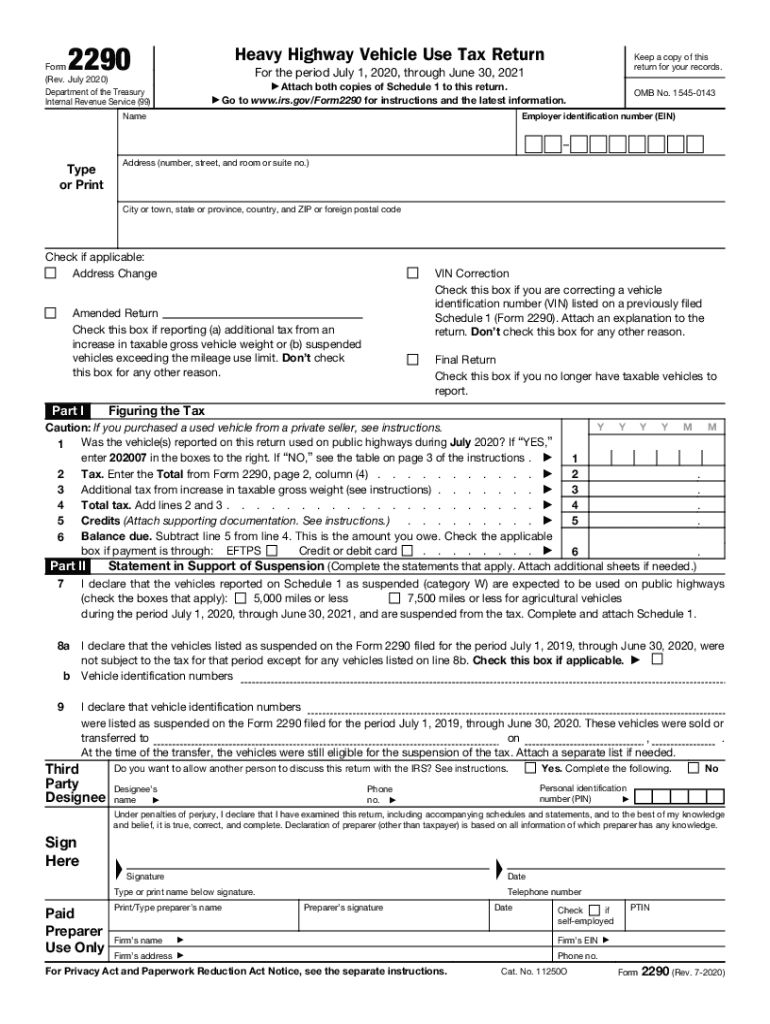
the tax due on Form 2290 returns using a credit card or debit card. Form 2290 will not be revised to remove the Credit or Debit Card check box on line 6. The ability to make credit card and debit card payments for tax due on Form 2290 returns is expected to resume on January 1, 2021. See the section titled How To Pay the Tax in the Instructions for Form 2290 for information on alternative methods to pay the tax. This July 2020 revision is for the tax period beginning on July 1, 2020, and ending.
Loading

Open form follow the instructions

Easily sign the form with your finger

Send filled & signed form or save
How to fill out the IRS 2290 online
Filing the IRS 2290, the heavy highway vehicle use tax return, online can streamline your tax obligations significantly. This guide provides clear, step-by-step instructions to assist users in accurately completing the form.
Follow the steps to fill out the IRS 2290 online effectively.
- Click 'Get Form' button to obtain the form and open it in your preferred editor.
- Enter your employer identification number (EIN) in the designated field. This is crucial for tax identification purposes.
- In Part I, report if the vehicles were used on public highways during the specified tax period. Enter 'YES' or 'NO' and include the appropriate code as instructed.
- In Part II, fill out the statements in support of suspension for vehicles expected to be used under the mileage limit. Check the appropriate boxes as applicable.
- Review the entire form for accuracy. After completing the form, you can save your changes, download, or print the completed IRS 2290 return.
Start your online filing now for a smooth tax process.
Experience a faster way to fill out and sign forms on the web. Access the most extensive library of templates available.
Related content
This July 2025 revision is for the tax period beginning on July 1, 2025, and ending on...
Aug 6, 2012 — You must file Form 2290 and Schedule 1 for the tax period beginning on...
Dec 21, 2011 — Report the tax on Form ing items. 2290, Heavy Highway Vehicle Use Tax...
Get answers to your most pressing questions about US Legal Forms API.
When can I file my 2290 for 2023?
You can file your IRS 2290 for the 2023 tax year starting on July 1, 2023. The deadline for submitting this form is usually August 31 of that year. By using a service like USLegalForms, you can seamlessly prepare and file your 2290 timely and efficiently.
How do I know when my 2290 is due?
Your IRS 2290 is due by the end of the month following the month in which you first used your heavy vehicle. Tracking your filing date is essential to avoid penalties. Services like USLegalForms can also send you reminders about due dates, ensuring you never miss a filing obligation.
How long does it take for Form 2290 to be approved?
Once submitted, your IRS 2290 approval can take anywhere from a few hours to several weeks. The approval time depends on whether you filed electronically or by mail. Filing through USLegalForms often expedites this process, providing you with timely confirmations.
What happens if you don't file your 2290?
Failing to file your IRS 2290 can lead to penalties and interest on unpaid taxes. Additionally, you may face difficulties operating heavy vehicles legally, as the IRS requires timely filing for compliance. To avoid these issues, consider using USLegalForms to simplify your filing process and ensure adherence to deadlines.
Why does my 2290 keep getting rejected?
Your IRS 2290 may be rejected due to incorrect information, such as an invalid Employer Identification Number (EIN) or mismatched details. Double-check your entries for accuracy and ensure that all required fields are filled out correctly. Using services like USLegalForms can help minimize errors and guide you through the submission process effectively.
How long does it take to process a 2290?
The processing time for your IRS 2290 typically varies but can take anywhere from a few minutes to a couple of weeks. If you file electronically, your submission may receive a quicker response. Remember, using a reliable service like USLegalForms can streamline this process and provide faster results.
How can I check the status of my 2290?
To check the status of your IRS 2290, you can visit the IRS website and use their online services. Alternatively, if you filed through a platform like USLegalForms, you can log into your account to access your filing status quickly. This ensures you are always updated on whether your return has been processed.
How can I get a copy of my stamped 2290?
You can obtain a copy of your stamped Form 2290 from the IRS by using their online request system or contacting their office directly. If you filed electronically, a copy may be available through the e-filing service you used. It is essential to keep this document for your records, as it reflects your compliance with the heavy vehicle use tax requirements. Platforms like US Legal Forms can assist with follow-up processes to retrieve this documentation.
How do I get proof of 2290?
To obtain proof of your IRS Form 2290 submission, you can request a stamped copy once the IRS processes your application. This stamped form serves as your official proof of payment and filing. Keep this document on hand for future reference and any needed compliance checks. Using US Legal Forms can help ensure you receive accurate and timely documentation.
How do I check my 2290 status?
You can check your 2290 status by going to the IRS website and using their online tools for tracking your submission. Make sure you have your EIN handy, as it will be required for verification. Additionally, the tracking system will inform you if your application has been processed or if there are outstanding issues. Services like US Legal Forms provide user-friendly guides to assist you in this process.
Use professional pre-built templates to fill in and sign documents online faster. Get access to thousands of forms.
If you believe that this page should be taken down, please follow our DMCA take down process here.