Loading
Form preview
  • US Legal Forms
  • Other Templates
  • Tax Forms
  • Oklahoma Tax Forms
  • Ok Osec Oes-1 2017

Get Ok Osec Oes-1 2017

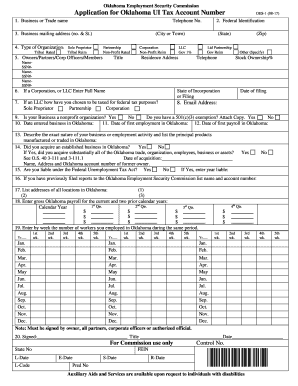
Federal Identification Account Number. 3. Enter address to which forms for reports, notices and correspondence should be mailed by Commission. 4. Enter a check mark after the word that properly describes type of ownership of your business. 5. Enter full name, residence address, telephone number and Social Security Number of all owners, partners, corporate officers or members. Attach additional sheet if sufficient space is not provided. All corporate officers, including officers of Sub-Chapter S.

How it works

  1. Open form

    Open form follow the instructions

  2. Easily sign form

    Easily sign the form with your finger

  3. Share form

    Send filled & signed form or save

How to fill out the OK OSEC OES-1 online

The OK OSEC OES-1 form is essential for businesses seeking to establish an Oklahoma Unemployment Insurance Tax Account. This guide will provide you with detailed instructions on how to complete the form online, ensuring a seamless and efficient filing process.

Follow the steps to complete your application efficiently.

  1. Press the ‘Get Form’ button to obtain the OK OSEC OES-1 form and open it in your preferred editor.
  2. Enter the business or trade name in the designated field, followed by your business telephone number.
  3. Provide your Federal Identification Number in the appropriate section.
  4. Fill in your business mailing address, including street number and name, city or town, state, and zip code.
  5. Identify the type of organization by marking the appropriate box, such as Sole Proprietor, Partnership, Corporation, or LLC.
  6. List the full names, residence addresses, telephone numbers, and Social Security Numbers of all owners, partners, corporate officers, or members. Attach an additional sheet if necessary.
  7. If registering as a Corporation or LLC, enter the full name and state of incorporation along with the date of filing.
  8. Indicate your federal tax classification for the LLC by checking the relevant option.
  9. Enter your email address for official communications.
  10. Provide the date your business started operations in Oklahoma.
  11. Enter the date of your first employment activities in Oklahoma.
  12. Input the date of your first payroll in Oklahoma.
  13. Describe your business operations and list the main products you manufacture or trade within Oklahoma.
  14. If applicable, indicate if you acquired an established business and provide necessary details and the date of acquisition.
  15. Answer whether you are liable under the Federal Unemployment Tax Act and provide the year you became liable.
  16. If you have filed reports with the Oklahoma Employment Security Commission before, list the name and account number.
  17. List the addresses of all locations in Oklahoma where your business operates.
  18. Enter the gross payroll for your business over the current and two previous years, broken down by quarter.
  19. Provide the number of workers employed in Oklahoma by week for the current year and the two previous years.
  20. Ensure the form is signed by the owner, all partners, or authorized officials before submission.
  21. Once you have completed all sections, save your changes, download a copy, print it, or share it as needed.

Complete your application online today to ensure compliance with Oklahoma employment regulations.

Get form

Experience a faster way to fill out and sign forms on the web. Access the most extensive library of templates available.

Related content

Instructions for preparation of form OES-1 ......
... OES-1, Application for Oklahoma UI Tax Account Number. Oklahoma Employment Security...
Learn more
Apprenticeship Electrical Independent AAS — 63...
UPDATED: 07/15/2024. The SLCC Apprenticeship Electrical Independent AAS program is...
Learn more

Related links form

UK NSF-CMi Certification 2017 UK SFE PFF2 2020 UK NHS SD502 2019 UK HS302 2020

Questions & Answers

Get answers to your most pressing questions about US Legal Forms API.

Contact support

Typically, it takes about two to three weeks to receive your first unemployment check in Oklahoma after filing your claim. However, processing times may vary based on the accuracy of your submission and any potential complications. To facilitate faster payment, ensure all information is complete and correct in your application. Keep in mind that OK OSEC OES-1 can provide assistance during this period.

Registering with the Oklahoma Employment Security Commission is a vital step to access unemployment benefits. You can register online through the OESC website by creating an account and providing your personal details. This process is straightforward and will prepare you to file for unemployment benefits like those available through OK OSEC OES-1.

Filing an initial unemployment claim in Oklahoma involves visiting the OESC website to complete an online application. The website provides step-by-step instructions that make the process simple and straightforward. Be sure to fill out all required fields with accurate information to avoid delays. Utilizing the OK OSEC OES-1 resources can simplify your filing experience.

To obtain your unemployment tax form in Oklahoma, you should log into your account on the Oklahoma Employment Security Commission website. The necessary forms are typically available for download directly from your online account. If you need assistance, you can contact OESC customer service for guidance. Using the OK OSEC OES-1 resources can simplify the tax form retrieval process.

In Oklahoma, you have up to one year to file for unemployment after losing your job. However, it is best to file as soon as possible to avoid missing out on potential benefits. Timely filing helps ensure your benefits begin promptly, which can be crucial during your job search. Always refer to the OK OSEC OES-1 guidelines for optimal filing insights.

To file for unemployment in Oklahoma for the first time, you can visit the Oklahoma Employment Security Commission (OESC) website. There, you'll find a user-friendly online application system that walks you through the process. Be sure to have your personal information and work history ready as you complete your application. By submitting your claim through OK OSEC OES-1, you can access essential unemployment benefits.

In Oklahoma, several factors may disqualify you from receiving unemployment benefits. Common reasons include quitting your job without good cause, being fired for misconduct, or failing to actively seek work. Additionally, any fraudulent activity related to your claim can result in disqualification. It is essential to understand these rules to ensure your eligibility for OK OSEC OES-1 benefits.

To get your Oklahoma tax account number, visit the tax section of the OESC website. You can apply online or by submitting a paper application if preferred. This number is essential for your business dealings as outlined in the OK OSEC OES-1.

The OESC new employer rate is a specific percentage that applies to new businesses for unemployment taxes. This rate may vary based on your industry and other factors. Understanding this rate is crucial for managing your financial obligations under the OK OSEC OES-1.

To get your employer ID number, start by visiting the OESC site. Follow the prompts to register your business and submit the necessary information. This step will ensure you receive the correct ID aligned with the OK OSEC OES-1 regulations.

Get This Form Now!

Use professional pre-built templates to fill in and sign documents online faster. Get access to thousands of forms.
If you believe that this page should be taken down, please follow our DMCA take down processhere.
Get OK OSEC OES-1
  • Adoption
  • Bankruptcy
  • Contractors
  • Divorce
  • Home Sales
  • Employment
  • Identity Theft
  • Incorporation
  • Landlord Tenant
  • Living Trust
  • Name Change
  • Personal Planning
  • Small Business
  • Wills & Estates
  • Packages A-Z
  • Affidavits
  • Bankruptcy
  • Bill of Sale
  • Corporate - LLC
  • Divorce
  • Employment
  • Identity Theft
  • Internet Technology
  • Landlord Tenant
  • Living Wills
  • Name Change
  • Power of Attorney
  • Real Estate
  • Small Estates
  • Wills
  • All Forms
  • Forms A-Z
  • Other Templates
  • Legal Hub
  • About Us
  • Help Portal
  • Legal Resources
  • Blog
  • Affiliates
  • Contact Us
  • Delete My Account
  • Site Map
  • Industries
  • Forms in Spanish
  • Localized Forms
  • State-specific Forms
  • Forms Kit
  • Real Estate Handbook
  • All Guides
  • Notarize
  • Incorporation services
  • For Consumers
  • For Small Business
  • For Attorneys
  • USLegal
  • FormsPass
  • pdfFiller
  • signNow
  • altaFlow
  • DocHub
  • Instapage
Form Packages
  • Adoption
  • Bankruptcy
  • Contractors
  • Divorce
  • Home Sales
  • Employment
  • Identity Theft
  • Incorporation
  • Landlord Tenant
  • Living Trust
  • Name Change
  • Personal Planning
  • Small Business
  • Wills & Estates
  • Packages A-Z
Form Categories
  • Affidavits
  • Bankruptcy
  • Bill of Sale
  • Corporate - LLC
  • Divorce
  • Employment
  • Identity Theft
  • Internet Technology
  • Landlord Tenant
  • Living Wills
  • Name Change
  • Power of Attorney
  • Real Estate
  • Small Estates
  • Wills
  • All Forms
  • Forms A-Z
  • Other Templates
Customer Service
  • Legal Hub
  • About Us
  • Help Portal
  • Legal Resources
  • Blog
  • Affiliates
  • Contact Us
  • Delete My Account
  • Site Map
  • Industries
  • Forms in Spanish
  • Localized Forms
  • State-specific Forms
  • Forms Kit
Legal Guides
  • Real Estate Handbook
  • All Guides
Prepared for you
  • Notarize
  • Incorporation services
Our Customers
  • For Consumers
  • For Small Business
  • For Attorneys
Our Sites
  • USLegal
  • FormsPass
  • pdfFiller
  • signNow
  • altaFlow
  • DocHub
  • Instapage
Social Media
Call us now toll free:
+1 833 426 79 33
As seen in:
© Copyright 1999-2026 airSlate Legal Forms, Inc. 17 Station Street, Suite 303, Brookline, MA 02445
  • Your Privacy Choices
  • Terms of Service
  • Privacy Notice
  • Content Takedown Policy
  • Bug Bounty Program
OK OSEC OES-1
This form is available in several versions.
Select the version you need from the drop-down list below.
2021 OK OSEC OES-1
Select form
  • 2021 OK OSEC OES-1
  • 2017 OK OSEC OES-1
  • 2014 OK OSEC OES-1
  • 2013 OK OSEC OES-1
  • 2012 OK OSEC OES-1
Select form