D (Ashtabula, Geauga) ... Logan Elm LSD (Hocking, Pickaway)..... Miami East LSD (Champaign, Miami) .... Milton-Union EVSD (Miami) ................... Monroeville LSD (Erie, Huron) ............... Montpelier EVSD (Williams) ................... North Baltimore LSD (Hancock, Wood) ..................................................... North Fork LSD (Knox, Licking).............. Northwest LSD (Stark, Summit, Wayne) ................................................... Northwestern LSD (Clark, Champaig.
Open form follow the instructions
Easily sign the form with your finger
Send filled & signed form or save
How to fill out the OH SD 101 Short online
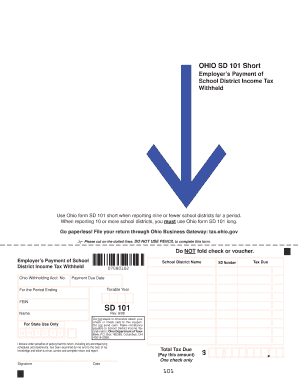
Filling out the OH SD 101 Short form is essential for employers reporting school district income tax withheld. This guide provides a comprehensive walkthrough to help you complete the form online with clarity and confidence.
Follow the steps to complete your OH SD 101 Short online.
- Click ‘Get Form’ button to access the HO SD 101 Short and open it in your online editor.
- Enter your Ohio withholding account number in the designated field at the top of the form.
- Fill in the school district numbers using the provided list; you can report nine or fewer districts on this form.
- List the names of the relevant school districts alongside their corresponding numbers in the specified fields.
- Indicate the total tax due, ensuring this reflects the sum of the amounts for all reported school districts.
- Provide the payment due date, the taxable year, and the period ending date in the indicated fields.
- Enter your federal employer identification number (FEIN) in the appropriate section.
- Review all filled-out sections for accuracy to ensure compliance with reporting requirements.
- Finally, users can save changes, download, print, or share the completed form.
Complete your OH SD 101 Short form online today for a streamlined submission process.
Experience a faster way to fill out and sign forms on the web. Access the most extensive library of templates available.
Related content
Use Ohio form SD 101 short when reporting nine or fewer school districts for a period...
Jan 14, 2022 — This installment of the series provides an overview of Ohio employment...
OH. Thermal protector input. Temperature sensor terminal input for motor overheat...
Get answers to your most pressing questions about US Legal Forms API.
How do I set up withholding?
Setting up withholding starts by gathering employee information and determining the appropriate withholding allowances. Use the IT-4 form for Ohio or similar documentation to collect this data. You can streamline this process through payroll software or resources from US Legal Forms, which guide you in ensuring compliance with state laws.
How do I know if I'm exempt from Ohio or school district income tax?
To determine your exemption from Ohio or school district income tax, review the specific circumstances of your income and residency. Generally, individuals whose income falls below a certain threshold may qualify for exemptions. Consult the Ohio Department of Taxation's guidelines or use services like US Legal Forms to clarify your status further.
How do I set up a withholding account in Ohio?
Establishing a withholding account in Ohio requires you to register with the Ohio Department of Taxation. You can do this online by providing necessary business information. Once registered, you will receive an account number, which you will use to report and remit withholding taxes, including when using forms like the OH SD 101 Short.
How do I set up a Withholding Tax account in Quickbooks?
To set up a Withholding Tax account in Quickbooks, first, access your company settings and locate the payroll section. Here, you can add tax rates and specify your location for accurate deductions. If you find the process challenging, resources like US Legal Forms can help simplify the steps for you.
Does Ohio have a withholding form?
Yes, Ohio has several withholding forms, including the IT-4 for employee withholding information. Employers must provide these forms to their employees, allowing for the correct amount of state income tax to be withheld. Ensure you are using the latest versions and consider using US Legal Forms for guidance.
How to file a sales tax return in Ohio?
Filing a sales tax return in Ohio involves collecting sales data and determining tax owed. You will need to complete the appropriate documentation, such as the OH SD 101 Short, which is user-friendly for many businesses. After completing the form, submit it electronically or by mail to meet the filing deadline.
What is Ohio form sd100?
The Ohio form SD100 is a document used to report and remit school district income tax. It is essential for individuals who reside or work in a school district that imposes this tax. You can easily complete the form online or through services like US Legal Forms to ensure accuracy and compliance.
How do I file an Ohio sales tax return?
To file an Ohio sales tax return, gather your sales data for the reporting period. Log into your account on the Ohio Department of Taxation website, and complete the necessary forms. You can also file using the OH SD 101 Short form if you meet certain criteria, which simplifies the process significantly.
Do I have to withhold school district taxes in Ohio?
Yes, if you are an employer in Ohio with employees who work in a school district that imposes a tax, you are required to withhold school district taxes. This applies even if your business operates outside the taxing district. Understanding your responsibilities regarding withholding, especially concerning the OH SD 101 Short, is key for compliance.
Where to send Ohio SD 100?
You should mail your completed Ohio SD 100 to the address specified in the instructions on the form. Generally, submissions go to the Ohio Department of Taxation. For those handling forms like the OH SD 101 Short, ensure your documents are sent to the correct location to avoid delays.
Use professional pre-built templates to fill in and sign documents online faster. Get access to thousands of forms.
If you believe that this page should be taken down, please follow our DMCA take down process here.
This form is available in several versions. Select the version you need from the drop-down list below.