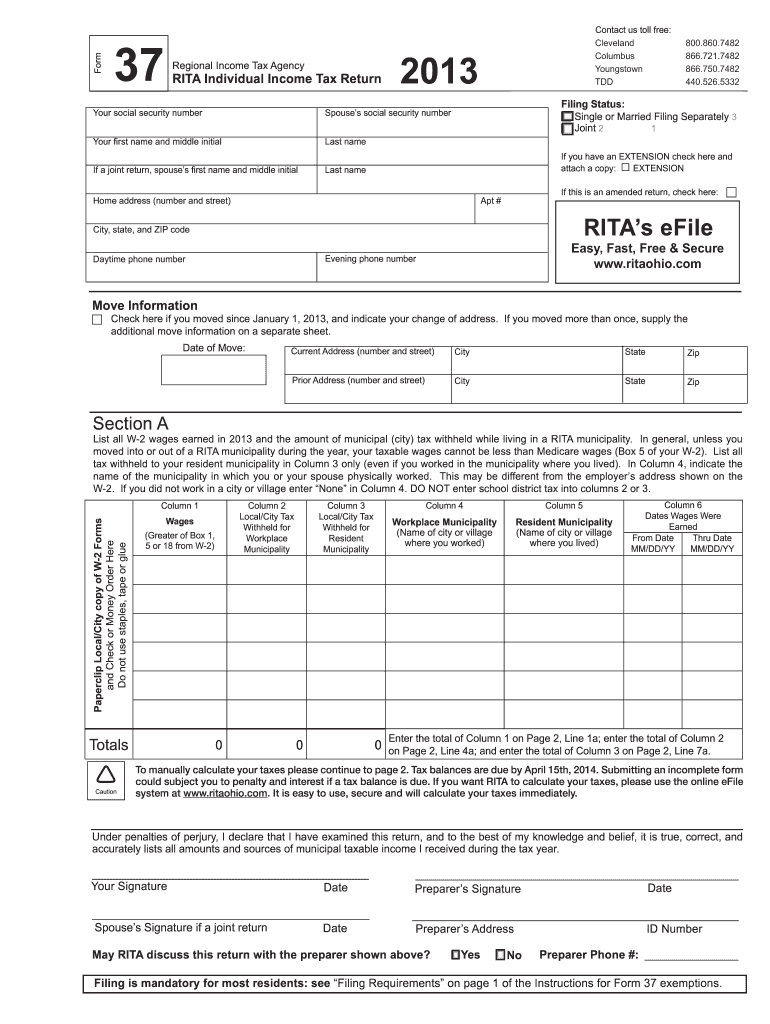
Ture if a joint return Date Preparer s Signature Date Date Preparer s Address ID Number May RITA discuss this return with the preparer shown above? Yes No Preparer Phone #: Filing is mandatory for most residents: see Filing Requirements on page 1 of the Instructions for Form 37 exemptions. Page 2 Form 37 (2013) Section B Withheld taxes shown on your W-2 forms are reported on either line 4a or 7a. 1 a Total W-2 wages from Page 1, Section A, Column 1 1a b Total self-emp.
Loading

Open form follow the instructions

Easily sign the form with your finger

Send filled & signed form or save
How to fill out the OH RITA 37 online
This guide provides a comprehensive overview of how to fill out the OH RITA 37 form online. It is designed to support users of all experience levels, ensuring that completing your individual income tax return is straightforward and efficient.
Follow the steps to complete your OH RITA 37 form successfully.
- Click the ‘Get Form’ button to access the OH RITA 37 form and open it in your preferred online document editor.
- Enter your personal details in the designated fields, including your social security number, first name, middle initial, last name, and spouse’s information if applicable. Ensure accuracy to avoid processing delays.
- Select your filing status from the options provided: 'Single or Married Filing Separately' or 'Joint'. Make sure to provide your spouse’s social security number and name if filing jointly.
- Fill out your home address completely, including the number and street, apartment number, city, state, and ZIP code.
- Indicate if you had an extension by checking the appropriate box and attaching any related documents.
- Complete the move information section if you changed your address since January 1, 2013. Provide the current address and any prior addresses, with dates of the move, if applicable.
- In Section A, list all W-2 wages earned in 2013 and the related local/city tax withheld while residing in a RITA municipality. Make sure to follow the instructions on how to categorize your workplace and resident municipality taxes.
- Continue to Section B to report your total taxable income, including any self-employment or other taxable income. Remember to accurately calculate your taxes and any withheld amounts.
- At the end of the form, complete the signature section. Both you and your spouse must sign if filing jointly, along with any preparer's information if applicable.
- Finally, review all entered information for accuracy, then save your changes, and follow the on-screen prompts to download, print, or share your completed OH RITA 37 form.
Start filling out your OH RITA 37 form online today!
Experience a faster way to fill out and sign forms on the web. Access the most extensive library of templates available.
Related content
Jan 1, 2022 — If you want RITA to calculate your taxes, please use the online eFile...
Yes. Filing is mandatory for most residents: see “Filing Requirements” on page 1 of...
Edge, SiteLink, SonoCalc, SonoHD2, SonoMB, SonoMBe, SonoSite e o logotipo SonoSite são...
Get answers to your most pressing questions about US Legal Forms API.
How to file RITA Form 37?
Filing RITA Form 37 requires obtaining the correct form through RITA’s official site or services like uslegalforms. Complete the form with accurate details and submit it according to the provided instructions. Following these steps ensures your OH RITA 37 filing is done correctly and efficiently.
What is Form 37 in Mexico?
Form 37 in Mexico is not directly related to RITA, as it pertains to different tax regulations in that country. Understanding the distinctions between forms and their purposes can help clarify your responsibilities. For your OH RITA 37 needs, focus on the forms and guidelines specific to the U.S. tax system.
How to file Form 37?
To file Form 37, start by downloading the appropriate form from the RITA website or using uslegalforms for convenience. Fill out all required sections accurately and submit it by mail or electronic means, depending on your preference. Make sure you keep a copy of your submission for your records regarding your OH RITA 37.
What happens if you don't file RITA?
If you do not file your RITA taxes, you may face penalties and interest on any unpaid taxes. Additionally, failure to file can result in restrictions on your ability to claim refunds in the future. It's essential to address your OH RITA 37 filings to avoid these consequences and stay compliant.
How do I file a RITA claim?
Filing a RITA claim involves completing the necessary forms and submitting them to the RITA office. Ensure you include any supporting documentation to validate your claim. Using platforms like uslegalforms can simplify this process by providing you with the correct forms and instructions required for your OH RITA 37 claim.
How do I send my tax forms by mail?
To send your tax forms by mail properly, gather your completed forms and attach any required payment. Make sure the envelope is addressed to the appropriate RITA address and consider using certified mail for tracking. This way, you can confirm that your OH RITA 37 forms arrive safely and on time.
How do I file RITA taxes on TurboTax?
To file RITA taxes on TurboTax, select the correct forms for your location, and be sure to enter your RITA income details. TurboTax will guide you through the process, making it straightforward to report OH RITA 37 effectively. After entering the required data, review your information for accuracy before submitting your return.
What is the point of RITA?
The point of RITA is to facilitate the collection of income taxes in participating communities across Ohio. It allows local governments to fund essential services such as infrastructure, schools, and public safety. By filing your taxes through RITA, you contribute to the well-being of your community while staying compliant with local laws.
Do you have to file RITA taxes in Ohio?
Yes, you must file RITA taxes in Ohio if you reside in a RITA member municipality or if you earn income in one of these areas. Filing your RITA taxes ensures that you comply with local tax regulations. It's necessary to accurately report your earnings, so utilizing resources like US Legal Forms can help simplify the process.
What is form 37 on an Ohio tax return?
Form 37 on an Ohio tax return is used to report income earned in specific cities that have municipal income taxes. Taxpayers need to complete this form to declare their earnings to the Regional Income Tax Agency. Properly filing this form is essential to avoid potential penalties associated with the OH RITA 37.
Use professional pre-built templates to fill in and sign documents online faster. Get access to thousands of forms.
If you believe that this page should be taken down, please follow our DMCA take down process here.
This form is available in several versions. Select the version you need from the drop-down list below.