Get Oh Odt Sd 101 Long 2014
How it works
-

Open form follow the instructions
-

Easily sign the form with your finger
-

Send filled & signed form or save
How to fill out the OH ODT SD 101 Long online
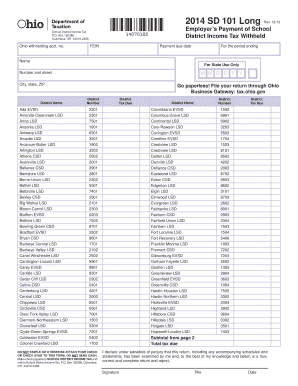
The OH ODT SD 101 Long form is essential for employers to report the school district income tax withheld from employees. This guide outlines the necessary steps to efficiently complete the form online, ensuring users have a clear understanding of each component.
Follow the steps to successfully complete the OH ODT SD 101 Long form online.
- Click the ‘Get Form’ button to obtain the OH ODT SD 101 Long and open it in your preferred online editor.
- Fill in your Ohio withholding account number and Federal Employer Identification Number (FEIN) in the designated fields.
- Specify the payment due date for the period ending. Ensure you use the correct format for the date, MM/DD/YYYY.
- Enter your name and address information accurately, including street number, city, state, and ZIP code.
- Select the school district name from the provided list using the corresponding district number.
- Calculate the total district tax due based on withholdings and report it in the tax due section.
- Read the declaration statement carefully before signing to confirm the information provided is true and complete.
- Include your title, add the date of signing, and ensure the form is free of staples or attachments.
- Save your changes, and proceed to download, print, or share the completed form as necessary.
Complete your OH ODT SD 101 Long form online today for a streamlined filing process.
Get form
Filing Ohio SD 100 involves gathering your financial information and completing the necessary sections of the form. You can file it online or send a paper version to your school district’s tax office. For a smooth filing process, consider utilizing resources from the US Legal Forms platform, which offers comprehensive instructions to assist you in meeting the requirements of the OH ODT SD 101 Long efficiently.